Eine Temp-Mail für Instagram ist eine Wegwerf-E-Mail-Adresse, mit der Sie sich registrieren, Bestätigungscodes empfangen und Ihr Konto verwalten können, ohne Ihre persönliche Inbox preiszugeben. Sie wird häufig verwendet, um die Privatsphäre zu schützen, Spam zu vermeiden und sicher mehrere Instagram-Konten zu erstellen.
Im Jahr 2026 ist die Verwendung einer Temp-Mail für Instagram jedoch nicht mehr so einfach wie früher. Viele Nutzer stoßen auf Probleme, wie z. B. nicht ankommende Bestätigungscodes, abgelehnte E-Mails oder die erzwungene Telefonverifizierung. Dies liegt daran, dass Instagram seine Erkennungssysteme erheblich aufgerüstet hat, wodurch minderwertige Wegwerf-E-Mail-Dienste ineffektiv geworden sind.
Hinter diesen Problemen verbirgt sich ein grundlegender Wandel in der Funktionsweise von Plattformen wie Instagram.
Suchen Sie nach einem umfassenderen Überblick?
Lesen Sie unseren vollständigen Leitfaden zu Temp-Mail für soziale Medien, um zu vergleichen, wie verschiedene Plattformen mit Wegwerf-E-Mails umgehen.
Die neue Realität: KI-gestützte Identitätsverfolgung
Laut einem TechCrunch-Bericht von 2026 hat sich Instagram zu einem KI-First-Ökosystem entwickelt. Moderne Tracking-Systeme behandeln Ihre E-Mail nicht mehr nur als einfache Anmeldedaten – sie nutzen sie als zentrales Identitätsmerkmal.
Wenn Sie sich mit einer persönlichen E-Mail-Adresse registrieren, kann Instagram Ihr Konto mit anderen Datenpunkten wie Surfverhalten, Einkaufsaktivitäten und plattformübergreifenden Profilen korrelieren. Dieser Prozess, der oft als Identitätsabgleich bezeichnet wird, macht echte Anonymität zunehmend schwierig.
Berichte von Organisationen wie Cybersecurity Ventures 2026 und der TechCrunch Q1 2026 Report haben hervorgehoben, wie integrierte Systeme über Apps hinweg das Risiko der Offenlegung und Übernahme von Konten erhöhen können, wenn primäre E-Mail-Adressen wiederverwendet werden.
Warum Temp-Mail weiterhin wichtig ist
Hier wird die Verwendung einer Temp-Mail für Instagram mehr als nur eine bequeme Lösung – sie wird zu einer praktischen Strategie für den Datenschutz.
Eine hochwertige Wegwerf-E-Mail fungiert als Puffer zwischen Ihrer echten Identität und Ihren sozialen Aktivitäten. Anstatt Ihre persönliche Inbox mit jeder Aktion zu verknüpfen, schafft sie eine kontrollierte Ebene, die das Tracking reduziert, Datenkorrelationen einschränkt und Risiken minimiert.
Den richtigen Temp-Mail-Dienst wählen
Nicht alle Wegwerf-E-Mail-Dienste funktionieren 2026 mit Instagram.
Aufgrund strengerer Filter (wie Domain-Reputationsprüfungen und E-Mail-Server-Validierung) stellen viele kostenlose Temp-Mail-Anbieter keine Bestätigungs-E-Mails mehr zu. Um erfolgreich eine Temp-Mail für Instagram zu nutzen, benötigen Sie einen Dienst, der Folgendes bietet:
- Saubere Domains mit hoher Reputation
- Zuverlässige E-Mail-Zustellung
- Infrastruktur, die echte E-Mail-Anbieter imitiert
Plattformen wie tempemail.cc sind darauf ausgelegt, diese Anforderungen zu erfüllen, damit Ihr Bestätigungscode schnell ankommt und Ihre Kontoeinrichtung reibungslos verläuft.

Was ist eine Temp-Mail für Instagram?
Eine Temp-Mail für Instagram ist eine Wegwerf-E-Mail-Adresse, die verwendet wird, um sich anzumelden, Bestätigungscodes zu empfangen und ein Konto zu erstellen, ohne Ihre persönliche E-Mail-Adresse zu verwenden.
Im Jahr 2026 wird sie üblicherweise verwendet, um:
- Die Privatsphäre zu schützen
- Spam zu vermeiden
- Sicher mehrere Instagram-Konten zu erstellen
Allerdings funktionieren nicht alle Temp-Mail-Dienste aufgrund der strengeren Erkennungssysteme von Instagram.
Warum die Verwendung Ihrer primären E-Mail für Instagram riskant ist
Im Jahr 2026 ist Ihre primäre E-Mail mehr als nur ein Weg, Nachrichten zu empfangen – sie ist das zentrale Bindeglied zu Ihrer gesamten Online-Identität. Die Verwendung für die Anmeldung bei Instagram mag bequem erscheinen, schafft aber auch einen Single Point of Failure.
Wenn diese E-Mail jemals kompromittiert wird, können mehrere Bereiche Ihres digitalen Lebens gleichzeitig betroffen sein.
1. Ihre E-Mail kann plattformübergreifend abgeglichen werden
Eines der größten Risiken heutzutage ist die Datenkorrelation.
Wenn Sie Ihre Haupt-E-Mail für Instagram verwenden, kann sie mit anderen Diensten verknüpft werden, die Sie zuvor genutzt haben – wie Shopping-Seiten, Foren oder Apps. Wenn Ihre E-Mail in einer Datenpanne auftaucht, können Angreifer diese Informationen mit Ihrem Instagram-Konto in Verbindung bringen.
Das bedeutet, dass selbst ein kleiner Datenleck von einer anderen Website Folgendes offenlegen könnte:
- Ihr Instagram-Profil
- Persönliche Details, die mit Ihrer E-Mail verknüpft sind
- Andere Konten, die dieselbe Adresse verwenden
Die Verwendung einer Temp-Mail für Instagram hilft, dies zu verhindern, indem sie Ihr soziales Konto von Ihrer echten Identität trennt.
2. Sie werden zum Ziel für Phishing-E-Mails
Eine weitere wachsende Bedrohung ist gezieltes Phishing.
Im Jahr 2026 versenden Betrüger keinen zufälligen Spam mehr. Sie analysieren das Nutzerverhalten und versenden E-Mails, die wie echte Instagram-Benachrichtigungen aussehen – wie zum Beispiel:
- „Ihr Konto hat ein Sicherheitsproblem“
- „Ihr Inhalt hat gegen Richtlinien verstoßen“
- „Bestätigen Sie Ihr Konto, um eine Sperrung zu vermeiden“
Diese Nachrichten sind darauf ausgelegt, Sie dazu zu verleiten, Ihre Anmeldedaten einzugeben.
Wenn Ihr Instagram-Konto mit Ihrer primären E-Mail verknüpft ist, landen diese Phishing-E-Mails direkt in Ihrer Haupt-Inbox – wo Sie ihnen eher vertrauen.
Durch die Verwendung einer Temp-Mail für Instagram verringern Sie die Wahrscheinlichkeit, dass diese Nachrichten überhaupt in Ihrer persönlichen Inbox landen.
3. Mehrere Konten können sich gegenseitig beeinflussen
Wenn Sie mehr als ein Instagram-Konto verwalten, kann die Verwendung derselben E-Mail zusätzliche Risiken bergen.
Das System von Instagram kann Konten verknüpfen, die dieselbe E-Mail oder Wiederherstellungsdaten teilen. Wenn ein Konto markiert, eingeschränkt oder gesperrt wird, kann dies andere damit verbundene Konten beeinträchtigen.
Zum Beispiel:
- Ein Konto wird eingeschränkt
- Andere Konten, die dieselbe E-Mail verwenden, könnten an Sichtbarkeit verlieren
- Vertrauenssignale über Konten hinweg könnten sinken
Die Verwendung separater Adressen – wie einer Temp-Mail für Instagram – hilft dabei, jedes Konto unabhängig zu halten und dieses Risiko zu reduzieren.
Ihre primäre E-Mail verbindet alles in Ihrem digitalen Leben. Die Verwendung für jede Plattform, einschließlich Instagram, erhöht Ihre Anfälligkeit für Sicherheitsrisiken.
Eine Temp-Mail für Instagram fungiert als einfache Schutzschicht – sie hält Ihre sozialen Aktivitäten getrennt, reduziert das Tracking und begrenzt die Auswirkungen potenzieller Datenlecks.
Warum manche Temp-Mails für Instagram nicht funktionieren (2026)
Wenn Ihre Temp-Mail für Instagram nicht funktioniert, sehen Sie möglicherweise Fehlermeldungen wie:
- „Bitte geben Sie eine gültige E-Mail-Adresse ein“
- Bestätigungscode nicht erhalten
- E-Mail während der Anmeldung abgelehnt
Sie sind nicht allein.
Im Jahr 2026 hat Instagram sein Filtersystem aufgerüstet, und viele minderwertige temporäre E-Mail-Dienste funktionieren nicht mehr. Hier ist der Grund:
1. Die Domain-Reputation ist entscheidend
Instagram prüft die Reputation der E-Mail-Domain, die Sie verwenden.
Viele kostenlose Temp-Mail-Dienste verwenden dieselben Domains für Tausende von Nutzern wieder. Sobald diese Domains als Spam oder Bot-Aktivität markiert werden, funktionieren sie überhaupt nicht mehr.
Deshalb:
- Funktionieren manche Temp-Mails an einem Tag und am nächsten nicht mehr
- Werden neue oder minderwertige Domains oft sofort blockiert
Um erfolgreich eine Temp-Mail für Instagram zu nutzen, benötigen Sie eine Domain mit einer sauberen Reputation und einer stabilen Historie.
2. Das Verhalten des E-Mail-Servers wird überwacht
Instagram prüft nicht nur die E-Mail-Adresse – es prüft auch, wie sich der E-Mail-Server verhält, wenn Bestätigungscodes gesendet werden.
Wenn das System ungewöhnliche Muster erkennt, kann es die E-Mail blockieren oder den Code gar nicht erst zustellen.
Häufige Probleme sind:
- E-Mails kommen zu langsam oder gar nicht an
- Serverantworten, die nicht mit echten Anbietern übereinstimmen
- Mangelhafte Unterstützung von Verschlüsselung
Dies ist einer der Hauptgründe, warum Instagram-Bestätigungs-E-Mails manchmal bei der Verwendung von Temp-Mails nicht ankommen.
3. „Catch-All“-E-Mails sind leichter zu erkennen
Einige temporäre E-Mail-Dienste akzeptieren alle eingehenden Nachrichten, selbst für Adressen, die gar nicht existieren.
Instagram kann dies testen, indem Anfragen an zufällige E-Mail-Adressen auf derselben Domain gesendet werden. Wenn alles akzeptiert wird, kann das System dies als Wegwerf-E-Mail-Dienst markieren.
Infolgedessen werden viele generische Temp-Mail-Anbieter automatisch blockiert.
Warum einige Temp-Mail-Dienste weiterhin funktionieren
Nicht alle Temp-Mail-Dienste sind betroffen.
Hochwertige Anbieter nutzen:
- Saubere, vertrauenswürdige Domains
- Stabile E-Mail-Server-Infrastruktur
- Zustellungsverhalten, das echten E-Mail-Diensten ähnelt
Deshalb sind Plattformen wie tempemail.cc weiterhin in der Lage, Instagram-Bestätigungscodes zuverlässig zuzustellen, während viele kostenlose Alternativen scheitern.
Wenn Ihre Temp-Mail für Instagram nicht funktioniert, liegt das Problem meist nicht am Konzept – sondern an der Qualität des E-Mail-Dienstes.
Die Wahl eines zuverlässigen Anbieters macht den Unterschied zwischen sofortiger Bestätigung und ständigen Anmeldefehlern.
So verwenden Sie eine Temp-Mail für Instagram (Schritt-für-Schritt-Anleitung)
Die Verwendung einer Temp-Mail für Instagram im Jahr 2026 erfordert ein sauberes Setup. Befolgen Sie diese Schritte, um sich erfolgreich anzumelden und häufige Fehler wie Bestätigungsfehler oder Telefonabfragen zu vermeiden.
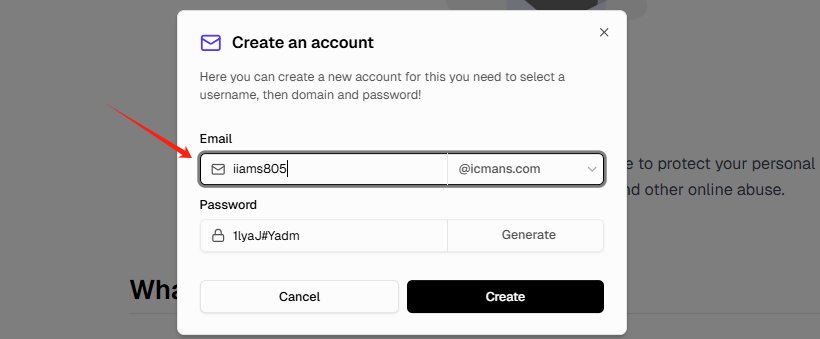
Schritt 1: Generieren Sie eine hochwertige Temp-Mail
Gehen Sie zu tempemail.cc und generieren Sie eine neue E-Mail-Adresse.
Um die Erfolgsquote zu erhöhen:
- Wählen Sie Domains mit .com, .net oder .org
- Vermeiden Sie zufällig aussehende Benutzernamen (z. B.
[email protected]) - Verwenden Sie ein natürliches Format wie
[email protected]
Eine hochwertige Temp-Mail für Instagram erhöht Ihre Chancen, den Bestätigungscode sofort zu erhalten.
Schritt 2: Verwenden Sie eine saubere Browser-Umgebung
Bevor Sie Instagram öffnen, stellen Sie sicher, dass Ihre Umgebung sauber ist:
- Öffnen Sie ein Inkognito-/privates Fenster
- Oder verwenden Sie ein neues Browser-Profil
- Vermeiden Sie die Verwendung alter Sitzungen mit gespeicherten Cookies
Dies verhindert, dass Instagram Ihre neue Anmeldung mit früheren Aktivitäten verknüpft.
Profi-Tipp: Die Verwendung mobiler Daten (4G/5G) anstelle von WLAN kann die Erfolgsquote verbessern, da mobile IPs im Allgemeinen als vertrauenswürdiger gelten.
Schritt 3: Melden Sie sich bei Instagram mit der Temp-Mail an
Gehen Sie zu Instagram und starten Sie den Anmeldevorgang.
- Geben Sie Ihre Temp-Mail für Instagram ein
- Erstellen Sie einen Benutzernamen und ein Passwort
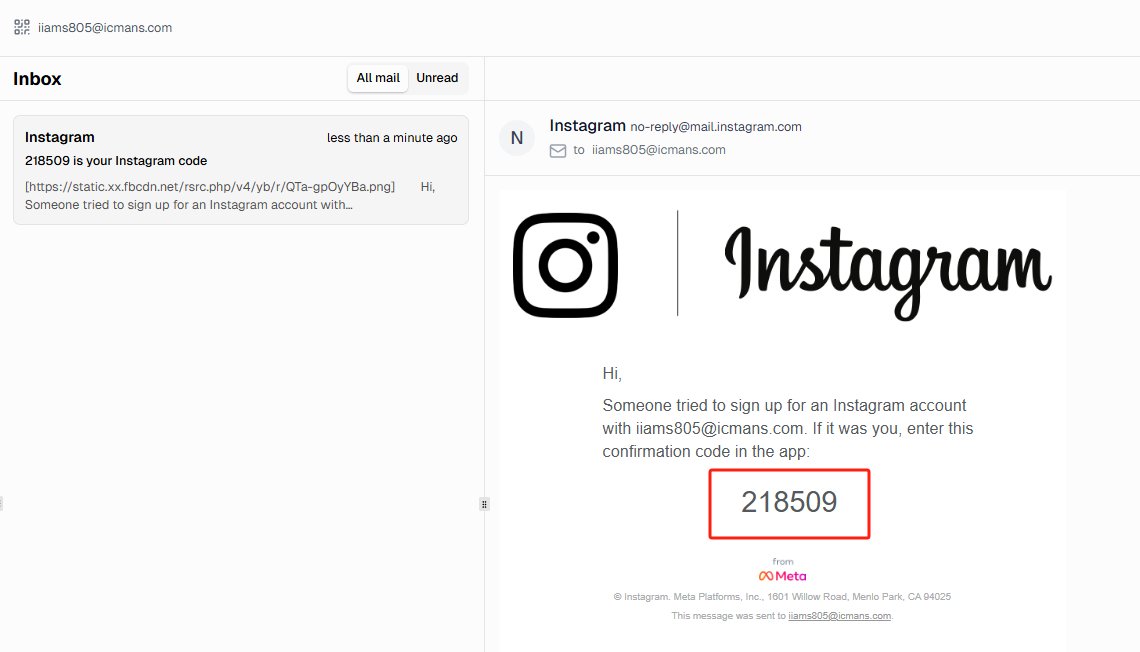
- Warten Sie auf den BestätigungscodeDie meisten Bestätigungs-E-Mails kommen innerhalb von 5–15 Sekunden an.
Wenn Sie den Code nicht erhalten:
- Warten Sie mindestens 60 Sekunden
- Vermeiden Sie es, wiederholt auf „Erneut senden“ zu klicken
- Versuchen Sie bei Bedarf eine andere Domain
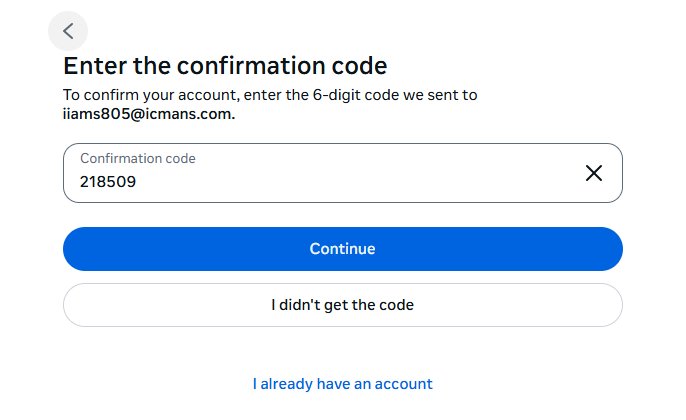
Schritt 4: Bestätigung abschließen und Konto sichern
Geben Sie den Bestätigungscode ein und schließen Sie Ihre Instagram-Registrierung ab.
Danach:
- Speichern Sie Ihre Anmeldedaten sofort
- Fügen Sie bei Bedarf eine Wiederherstellungsmethode hinzu (Telefonnummer oder eine zweite E-Mail-Adresse)
Dies stellt sicher, dass Sie den Zugriff nicht verlieren, falls die Wegwerf-E-Mail abläuft.
Schritt 5: Verdächtige Aktivitäten nach der Registrierung vermeiden
Neue Konten werden 2026 genau überwacht.
Um zu vermeiden, dass Ihr Konto markiert wird:
- Folgen Sie nicht sofort zu vielen Konten
- Laden Sie zuerst ein Profilfoto hoch und schreiben Sie eine Bio
- Verbringen Sie ein paar Minuten damit, normal zu surfen
Dies hilft dabei, dass Ihr Konto wie das eines echten Nutzers wirkt.
Die Verwendung einer Wegwerf-E-Mail für Instagram funktioniert am besten in Kombination mit einer sauberen Umgebung und realistischem Verhalten. Die meisten Probleme entstehen nicht durch die E-Mail selbst, sondern durch die Art und Weise, wie das Konto erstellt wird.
So verwalten Sie mehrere Instagram-Konten, ohne gesperrt zu werden
Wenn Sie eine Wegwerf-E-Mail für Instagram verwenden, um mehrere Konten zu erstellen, ist die eigentliche Herausforderung nicht die Registrierung, sondern die Sicherheit dieser Konten.
Das System von Instagram kann Konten miteinander verknüpfen, wenn sie ähnliche Signale teilen. Um dies zu vermeiden, müssen Sie jedes Konto so unabhängig wie möglich halten.
1. Verwenden Sie eine saubere und konsistente IP-Adresse
Ein häufiger Fehler ist die Verwendung einer Wegwerf-E-Mail für Instagram, während man sich von einer riskanten oder inkonsistenten IP-Adresse aus anmeldet.
Instagram bewertet die Qualität und den Standort der IP. Wenn Ihr Konto von einem Standort aus erstellt, aber von einem anderen, verdächtigen Netzwerk aus aufgerufen wird, kann es markiert werden.
Um dieses Risiko zu verringern:
- Vermeiden Sie kostenlose oder öffentliche VPNs
- Nutzen Sie stabile Netzwerke (WLAN zu Hause oder mobile Daten)
- Halten Sie die Anmeldestandorte konsistent
Eine saubere IP ist genauso wichtig wie eine zuverlässige Wegwerf-E-Mail.
2. Vermeiden Sie die Verknüpfung von Konten über dasselbe Gerät
Instagram kann Muster über Geräte und Browser hinweg erkennen.
Wenn Sie mehrere Konten im selben Browser ohne Trennung erstellen, können diese miteinander verknüpft werden.
Um sicher zu bleiben:
- Verwenden Sie verschiedene Browserprofile oder Inkognito-Sitzungen
- Vermeiden Sie es, sich gleichzeitig bei mehreren Konten anzumelden
- Löschen Sie zwischen den Sitzungen Cookies und Cache
Das Ziel ist es, jedes Instagram-Konto so aussehen zu lassen, als gehöre es einem anderen Nutzer.
3. Wärmen Sie neue Konten langsam auf
Neue Instagram-Konten werden genau überwacht, insbesondere solche, die mit einer Wegwerf-E-Mail erstellt wurden.
Wenn Sie zu schnell agieren, könnte das System Ihr Konto als verdächtig einstufen.
Bewährte Vorgehensweise:
- Fügen Sie zuerst ein Profilfoto und eine Bio hinzu
- Durchsuchen Sie den Feed einige Minuten lang wie gewohnt
- Folgen Sie pro Tag nur wenigen Konten
Schrittweise Aktivität hilft dabei, Vertrauen aufzubauen und das Risiko von Einschränkungen zu verringern.
Die Verwendung einer Wegwerf-E-Mail für Instagram ist nur ein Teil der Strategie.
Um mehrere Konten erfolgreich zu verwalten, müssen Sie auch Ihre IP, Ihre Browserumgebung und Ihr Verhalten kontrollieren. Alles getrennt und natürlich zu halten, ist der sicherste Weg, um Sperren zu vermeiden.
Wegwerf-E-Mail für Instagram funktioniert nicht? Häufige Probleme & Lösungen
Selbst bei der Verwendung einer hochwertigen Wegwerf-E-Mail für Instagram können bei der Registrierung Probleme auftreten. Hier sind die häufigsten Probleme im Jahr 2026 – und wie Sie diese beheben.
1. Instagram fragt nach einer Telefonnummer
Dies geschieht normalerweise, wenn Instagram eine riskante Registrierungsumgebung erkennt.
Häufige Ursachen:
- Verwendung eines kostenlosen VPN
- Verdächtige oder gemeinsam genutzte IP-Adresse
- Zu schnelle Registrierung
Lösung:
- Wechseln Sie zu mobilen Daten (4G/5G) oder einem sauberen Heimnetzwerk
- Vermeiden Sie kostenlose VPN-Dienste
- Versuchen Sie die Registrierung erneut mit einer neuen Wegwerf-E-Mail für Instagram
In den meisten Fällen löst ein Wechsel der IP und ein erneuter Versuch das Problem.
2. Instagram-Bestätigungscode nicht erhalten
Dies ist eines der häufigsten Probleme bei der Verwendung von Wegwerf-E-Mails.
Mögliche Gründe:
- Die E-Mail-Domain ist blockiert
- Der E-Mail-Server ist unzuverlässig
- Zu viele Versuche, den Code erneut zu senden
Lösung:
- Warten Sie mindestens 60–120 Sekunden, bevor Sie es erneut versuchen
- Klicken Sie nicht wiederholt auf „Erneut senden“
- Versuchen Sie eine andere Domain (.net oder .org funktionieren oft besser)
- Verwenden Sie einen zuverlässigen Anbieter für Wegwerf-E-Mails
Eine funktionierende Wegwerf-E-Mail für Instagram sollte Bestätigungscodes innerhalb von Sekunden zustellen, genau wie eine normale temporäre E-Mail für Instagram.
3. Fehler „Ungültige E-Mail-Adresse“
Wenn Instagram sagt, dass Ihre E-Mail ungültig ist, bedeutet dies normalerweise, dass die Domain markiert wurde.
Lösung:
- Generieren Sie eine neue Wegwerf-E-Mail-Adresse
- Vermeiden Sie ungewöhnliche Domain-Endungen wie .xyz oder .top
- Verwenden Sie ein realistischeres Benutzernamen-Format
Hochwertige Domains sind für eine erfolgreiche Instagram-Registrierung unerlässlich.
4. Instagram „Checkpoint“-Schleife
Manchmal fordert Instagram Sie nach der Registrierung wiederholt auf, Ihr Konto zu bestätigen.
Dies wird oft verursacht durch:
- Nicht übereinstimmende Browser-Fingerabdrücke
- Sitzungskonflikte
- Signale für verdächtige Aktivitäten
Lösung:
- Verwenden Sie einen anderen Browser oder den Inkognito-Modus
- Löschen Sie Cookies und Cache
- Beginnen Sie von vorne mit einer frischen Wegwerf-E-Mail für Instagram
5. Sorge, den Zugriff nach Ablauf der E-Mail zu verlieren?
Temporäre E-Mail-Adressen können ablaufen, aber Ihr Instagram-Konto wird dadurch nicht gelöscht.
Was Sie tun sollten:
- Speichern Sie Ihre Anmeldedaten sofort
- Fügen Sie später eine Backup-E-Mail oder Telefonnummer hinzu
- Aktivieren Sie die Zwei-Faktor-Authentifizierung
Dies stellt den langfristigen Zugriff sicher, auch wenn Ihre Wegwerf-E-Mail nicht mehr verfügbar ist.
Wenn Ihre Wegwerf-E-Mail für Instagram nicht funktioniert, liegt das Problem normalerweise an der E-Mail-Qualität, der IP-Umgebung oder dem Registrierungsverhalten – nicht am Konzept selbst.
Die Optimierung dieser Faktoren kann Ihre Erfolgsquote drastisch verbessern.
Ist es sicher, eine Wegwerf-E-Mail für Instagram zu verwenden?
Viele Nutzer fragen sich, ob die Verwendung einer Wegwerf-E-Mail für Instagram erlaubt ist – und ob dies zu Problemen mit dem Konto führen kann.
Ist es sicher, eine Wegwerf-E-Mail zu verwenden für Instagram? Die kurze Antwort: Ja, Sie können sie verwenden – aber es gibt einige Einschränkungen.
Verstößt die Verwendung einer Wegwerf-E-Mail gegen die Regeln von Instagram?
Die Nutzungsbedingungen von Instagram verlangen von Nutzern, bei der Erstellung eines Kontos korrekte Informationen anzugeben. Theoretisch erfüllt die Verwendung einer Wegwerf-E-Mail diese Anforderung möglicherweise nicht vollständig.
In der Praxis gilt jedoch:
- Instagram sperrt Konten nicht allein wegen der Verwendung einer Wegwerf-E-Mail
- Millionen von Nutzern registrieren sich mit alternativen oder sekundären E-Mail-Adressen
- Die Durchsetzung konzentriert sich stärker auf das Verhalten (Spam, Automatisierung, Missbrauch)
Das bedeutet, dass die Verwendung einer Wegwerf-E-Mail für Instagram im Allgemeinen sicher ist, solange Sie die normalen Nutzungsregeln befolgen.
Ist eine Wegwerf-E-Mail legal?
Ja. Die Verwendung einer temporären E-Mail ist in den meisten Ländern legal.
Es handelt sich lediglich um ein Datenschutz-Tool – ähnlich wie:
- Die Verwendung eines VPN
- Das Erstellen eines sekundären E-Mail-Kontos
- Die Begrenzung der Offenlegung persönlicher Daten im Internet
Es gibt keine Gesetze, die die Verwendung einer Wegwerf-E-Mail für die Instagram-Registrierung verbieten.
Wann Sie KEINE Wegwerf-E-Mail verwenden sollten
Obwohl eine Wegwerf-E-Mail nützlich ist, ist sie nicht für jede Situation geeignet.
Vermeiden Sie die Verwendung einer Wegwerf-E-Mail für Instagram, wenn:
- Sie ein Geschäftskonto betreiben
- Ihr Konto mit Zahlungen oder Anzeigen verknüpft ist
- Sie langfristigen Zugriff auf wichtige Inhalte benötigen
In diesen Fällen könnte der Verlust des Zugriffs auf die E-Mail schwerwiegende Probleme verursachen.
Bewährte Vorgehensweise: Wegwerf-E-Mail verwenden, dann Backup hinzufügen
Ein kluger Ansatz ist:
- Verwenden Sie bei der Registrierung eine Wegwerf-E-Mail für Instagram
- Schließen Sie die Bestätigung und die Ersteinrichtung ab
- Fügen Sie später eine dauerhafte E-Mail-Adresse oder Telefonnummer hinzu
Dies bietet Ihnen sowohl Privatsphäre als auch langfristige Kontosicherheit.
Die Verwendung einer Wegwerf-E-Mail für Instagram ist im Allgemeinen sicher und legal. Das eigentliche Risiko geht von der Art der Kontonutzung aus – nicht von der E-Mail selbst.
Solange Sie sich normal verhalten und Wiederherstellungsoptionen einrichten, können Sie eine Wegwerf-E-Mail ohne größere Probleme verwenden.
Wegwerf-E-Mail vs. persönliche E-Mail für Instagram
| Funktion | Wegwerf-E-Mail für Instagram | Persönliche E-Mail |
|---|---|---|
| Datenschutz | Hoch | Niedrig |
| Spam-Risiko | Niedrig | Hoch |
| Kontoverknüpfung | Minimal | Hoch |
| Wiederherstellung | Begrenzt | Vollständig |
Die Verwendung einer Wegwerf-E-Mail für Instagram hilft, Ihre Identität zu schützen, während persönliche E-Mails bessere langfristige Wiederherstellungsoptionen bieten.
Fazit: Sollten Sie eine Wegwerf-E-Mail für Instagram verwenden?
Die Verwendung einer Wegwerf-E-Mail für Instagram im Jahr 2026 ist eine der einfachsten Möglichkeiten, Ihre Privatsphäre zu schützen, Spam zu vermeiden und das Risiko von Kontoproblemen zu verringern.
Da die Erkennungssysteme von Instagram immer fortschrittlicher werden, hängt der Erfolg nicht nur von der Verwendung einer temporären E-Mail ab, sondern auch von der Wahl eines zuverlässigen Dienstes und der Einhaltung des richtigen Einrichtungsprozesses.
Wenn Sie sich schnell registrieren und häufige Probleme wie Bestätigungsfehler oder Telefonabfragen vermeiden möchten, kann die Verwendung einer hochwertigen Wegwerf-E-Mail für Instagram den Prozess erheblich erleichtern.
Sie können sofort eine funktionierende Wegwerf-E-Mail für Instagram generieren und Ihre Registrierung in Sekunden abschließen.
Starten Sie jetzt und generieren Sie eine Wegwerf-E-Mail für Instagram, um Ihr Konto sicher und privat zu erstellen.
Häufig gestellte Fragen zu Wegwerf-E-Mails für Instagram
1. Wie registriere ich mich bei Instagram mit einer Wegwerf-E-Mail?
Sie können eine Wegwerf-E-Mail für Instagram verwenden, um sich zu registrieren, ohne Ihre persönliche E-Mail-Adresse preiszugeben. Generieren Sie einfach eine temporäre Adresse auf Plattformen wie tempemail.cc, geben Sie diese im Registrierungsformular ein und bestätigen Sie den Bestätigungscode. Dieser Prozess hält Ihren Hauptposteingang privat und hilft Ihnen, mehrere Konten sicher zu erstellen. Wählen Sie immer eine seriöse Domain (.com/.net), um die KI-Erkennungsfilter von Instagram zu umgehen und eine reibungslose Registrierung im Jahr 2026 zu gewährleisten.
2. Funktioniert mein Instagram-Konto, wenn die Wegwerf-E-Mail abläuft?
Ja, Ihr Konto bleibt aktiv. Sobald die temporäre E-Mail jedoch abläuft, erhalten Sie an diese Adresse keine Passwort-Resets oder Sicherheitsbenachrichtigungen mehr. Um zu verhindern, dass Sie den Zugriff verlieren, fügen Sie sofort nach der Registrierung eine Telefonnummer oder eine zweite, dauerhafte E-Mail-Adresse hinzu. Dies hält Ihr Konto wiederherstellbar.während Sie weiterhin von der anfänglichen Privatsphäre einer Wegwerf-E-Mail für Instagram profitieren.
3. Kann Instagram Wegwerf-E-Mails erkennen oder blockieren?
Die KI von Instagram im Jahr 2026 kann minderwertige Wegwerf-E-Mail-Adressen markieren, aber Wegwerf-E-Mail-Dienste mit hohem Ansehen wie tempemail.cc umgehen diese Filter. Die Plattform sperrt Konten nicht allein wegen der Verwendung einer Wegwerf-E-Mail. Probleme entstehen nur, wenn Sie gegen andere Regeln verstoßen, wie z. B. durch Spamming, aggressive Automatisierung oder Richtlinienverstöße. Die Verwendung einer vertrauenswürdigen Wegwerf-E-Mail reduziert das Risiko und sorgt für eine reibungslose Registrierung.
4. Welche Wegwerf-E-Mail-Dienste sind für Instagram am sichersten?
Achten Sie auf Dienste mit verifizierten MX-Einträgen, rotierenden Domains mit hoher Vertrauenswürdigkeit und einer Serverinfrastruktur auf Unternehmensniveau. Tempemail.cc ist für Instagram 2026 optimiert und bietet eine schnelle Verifizierung, minimale Verzögerungen und eine hohe Zustellrate. Vermeiden Sie kostenlose oder unbekannte Anbieter mit gemeinsam genutzten IPs, da die KI von Instagram diese möglicherweise markiert. Die Wahl eines seriösen Dienstes erhöht die Erfolgsquote bei der Kontoerstellung und Verifizierung.
5. Kann ich mein Instagram-Konto später verifizieren, wenn ich eine Wegwerf-E-Mail verwendet habe?
Ja, aber nur, wenn Sie Wiederherstellungsoptionen wie eine Telefonnummer oder eine sekundäre E-Mail-Adresse eingerichtet haben. Ohne diese riskieren Sie den Verlust des Zugriffs, falls der temporäre Posteingang abläuft. Fügen Sie nach der Registrierung sofort Wiederherstellungsdaten hinzu. Dies stellt sicher, dass Ihr Instagram-Konto mit Wegwerf-E-Mail sicher bleibt und Sie die volle Kontrolle für zukünftige Verifizierungen oder Passwort-Resets behalten.
6. Ist es möglich, eine Wegwerf-E-Mail durch eine echte E-Mail bei Instagram zu ersetzen?
Absolut. Gehen Sie nach der Registrierung mit einer Wegwerf-E-Mail zu Ihren Profileinstellungen und aktualisieren Sie das E-Mail-Feld. Instagram sendet einen Bestätigungscode an die neue Adresse. Sobald dieser verifiziert ist, ist Ihr Konto dauerhaft mit der echten E-Mail-Adresse verknüpft, während Ihre Wegwerf-E-Mail Ihnen geholfen hat, während der anfänglichen Registrierungsphase anonym zu bleiben.