Disposable email services have become a practical tool for handling online registrations that require email verification but do not necessarily deserve a permanent inbox. In many cases, users only need a one-time code, a download link, or a quick account activation, which makes temporary email services an efficient workaround.
Among these tools, YOPmail is one of the longest-running disposable email providers still in active use. It is frequently searched by users trying to avoid spam, protect their primary inbox, or quickly access gated content.
This guide explains what YOPmail is, how it works, where it fits in real-world usage, and whether it is still a reliable option in 2026 compared to newer alternatives.
What Is YOPmail.com?
When people search for "What is YOPmail", they are usually looking for a simple answer: YOPmail is a free disposable email service that allows users to create temporary email addresses instantly without registration.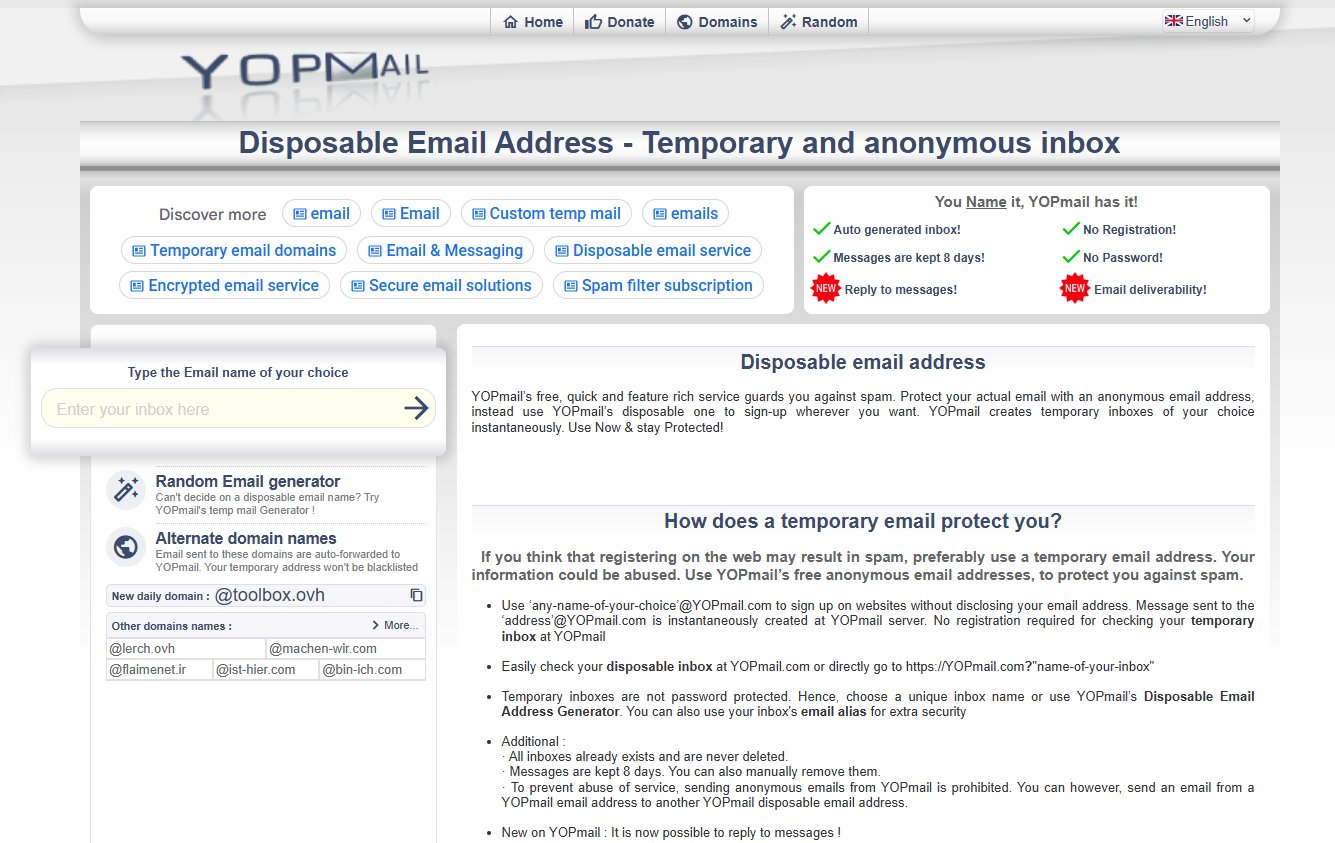 Unlike traditional email providers such as Gmail or Outlook, YOPmail does not require users to create an account, verify their identity, or provide personal information. Instead, users simply choose a mailbox name and immediately access the corresponding inbox. This approach eliminates the friction commonly associated with email registration and makes temporary communication much faster.
The platform was designed primarily to help users avoid spam and protect their primary email addresses. Rather than exposing a personal inbox when signing up for a website, users can provide a temporary YOPmail address and receive incoming messages there. This reduces the risk of marketing emails, data collection, and unwanted newsletters cluttering a permanent inbox.
Another reason YOPmail remains popular is its simplicity. There are no complex settings, lengthy onboarding processes, or subscription requirements. Users can visit the website, enter a mailbox name, and begin receiving emails within seconds. This ease of use has helped YOPmail maintain relevance even as the temporary email market has become increasingly competitive.
How YOPmail Works
Unlike traditional email services that create individual accounts tied to user credentials, YOPmail generates inboxes dynamically. Any mailbox name entered into the system instantly becomes accessible. There is no signup process, password creation, or account activation required.
This design dramatically simplifies access but also creates important privacy considerations that users should understand before relying on the service.
Creating a Temporary Inbox
Using YOPmail begins with selecting a mailbox name. For example, a user might enter a name such as "sampletest123" and immediately gain access to the inbox associated with that address.
The corresponding email address would typically follow a format similar to: [email protected]. Once the address is created, emails sent to it appear in the inbox automatically. There is no need to register, confirm ownership, or configure settings.
The entire process usually takes less than a minute, making YOPmail one of the fastest ways to receive temporary emails online.
Receiving Verification Emails
A common use case involves account verification. Many websites send confirmation links or security codes after registration. Instead of using a personal email account, users can provide a temporary YOPmail address.
After submitting the address during registration, users simply open the corresponding YOPmail inbox and retrieve the verification email. This approach helps keep personal inboxes free from promotional campaigns and follow-up marketing messages.
Automatic Message Retention
Unlike permanent email providers, YOPmail does not store messages indefinitely. Emails are retained for a limited period before being automatically removed from the system.
This temporary retention model helps reduce storage requirements while aligning with the disposable nature of the service. Users who need to preserve important information should save it elsewhere rather than relying on YOPmail for long-term storage.
Public Accessibility Considerations
An important aspect of understanding what YOPmail is involves recognizing that many inboxes are publicly accessible. Since no registration is required, anyone who knows a mailbox name may potentially access that inbox.
For this reason, YOPmail should not be used for sensitive communications, confidential information, financial accounts, or private business correspondence. It is best suited for low-risk situations where convenience outweighs security concerns.
Key Features of YOPmail
While YOPmail intentionally remains simple, several functionalities have contributed to its popularity among users seeking temporary email solutions.
Instant Email Generation
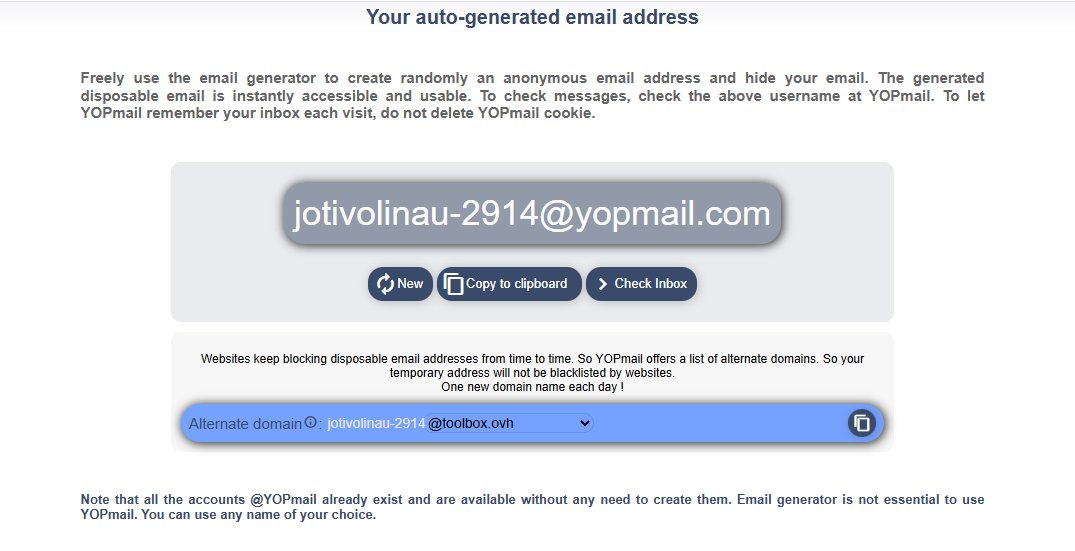 One of YOPmail’s core strengths is instant inbox creation. Users can generate a working email address in seconds without completing registration forms or verification steps.
This makes it significantly faster than traditional email providers when the goal is temporary access rather than long-term communication.
Multiple Domain Variations
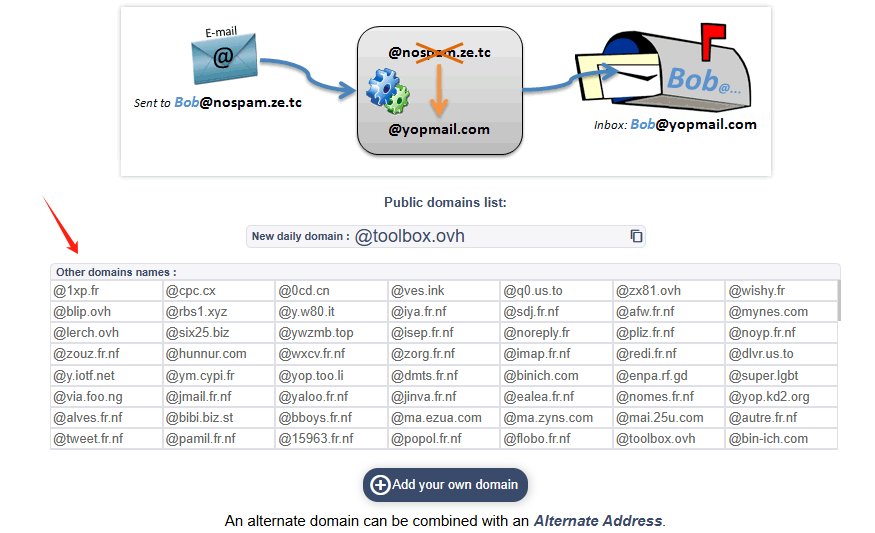 YOPmail supports several domain variations in addition to its primary domain. These alternatives are often used to improve compatibility with websites that block known disposable email providers.
While functionality remains the same, domain variation helps users bypass basic filtering systems used by some platforms.
Simple Inbox Interface
The inbox interface is intentionally lightweight. Users can open emails, read content, and access verification links without navigating complex menus or settings.
However, advanced features such as folder organization, filtering, or search functionality are not included, reflecting its single-purpose design.
Attachment Handling
YOPmail supports email attachments in many cases, allowing users to receive files such as PDFs, documents, or images sent during registration processes.
However, because messages may originate from unknown sources, users should exercise caution when downloading files, as there is no advanced security scanning layer comparable to mainstream providers.
How to Use YOPmail Without Creating an Account
One of the most appealing aspects of YOPmail is that users can begin receiving emails immediately without registration. Understanding how this process works helps explain why so many people searching for "What is YOPmail" eventually decide to try it.
The entire workflow is designed to be fast, simple, and accessible even for individuals who have never used a temporary email service before.
Step 1: Visit the YOPmail Website
Start by navigating to the official YOPmail platform. Unlike conventional email providers, there is no signup button that must be completed before accessing a mailbox.
Users are presented with a straightforward interface where they can immediately enter a mailbox name.
Step 2: Choose a Mailbox Name
Select a unique mailbox identifier. This name becomes the first part of the temporary email address.
For example: [email protected]. The chosen mailbox does not require approval or registration. As soon as the name is entered, the inbox becomes accessible.
Step 3: Access the Inbox
After entering the mailbox name, users can open the inbox instantly. Any emails sent to the corresponding address will appear there once delivered.
This process eliminates the delays associated with traditional account creation and verification procedures.
Step 4: Receive Verification Messages
When registering for an online service, simply provide the temporary YOPmail address. Verification codes, activation links, and confirmation emails can then be viewed directly inside the temporary inbox. For many users, this is the primary reason they use YOPmail in the first place.
Step 5: Discard the Address When Finished
After completing the task, the inbox can simply be abandoned. No cleanup or deletion is required.
What YOPmail Used For
YOPmail is primarily used in scenarios where email verification is required but long-term communication is not.
Temporary Online Registrations
Many websites require email confirmation before granting access. In such cases, users often prefer not to expose their personal inbox to potential marketing lists or tracking systems.
Software Testing and QA
YOPmail is frequently used in development environments for testing email workflows such as:
- Registration flows
- Password reset systems
- Transactional email delivery
- Onboarding sequences
It allows testers to generate unlimited inboxes instantly without creating real accounts.
Privacy Protection in Low-Risk Activities
While YOPmail does not provide anonymity, it helps reduce exposure of personal email addresses during casual browsing or account creation.
It acts as a buffer between users and websites that may otherwise collect email data for marketing purposes.
Content Downloads and Gated Resources
Some platforms require email submission before allowing downloads of ebooks, templates, or software tools. YOPmail provides a way to access these resources without committing a real email address.
Education and Demonstration
Educators and trainers often use disposable emails to demonstrate how email verification systems and spam flows work in real-world environments.
Advantages and Limitations of YOPmail
To determine whether YOPmail is the right solution, users should understand both its strengths and weaknesses.
Advantages
YOPmail is widely used because of its simplicity and accessibility.
- No registration required
- Instant inbox creation
- Free to use
- Useful for spam reduction
- Suitable for testing environments
Its biggest advantage is reducing friction in situations where email ownership is not necessary.
Limitations
Despite its convenience, YOPmail has clear constraints.
- Public inbox access reduces privacy
- Frequently blocked by websites
- Not suitable for account recovery
- No long-term message storage
- Limited security controls
These limitations make it unsuitable for any scenario involving sensitive or persistent accounts.
Is YOPmail Disposable Email Address Safe?
The safety of YOPmail depends entirely on context. It should not be treated as a secure communication tool. Instead, it is best understood as a convenience layer for email verification, not a privacy solution.
When it is generally acceptable
YOPmail is reasonably safe when used for:
- Downloading non-sensitive resources
- Testing applications or workflows
- Registering for temporary or low-risk websites
- Accessing gated content
In these scenarios, the main goal is to reduce spam exposure rather than to protect sensitive data.
When it should NOT be used
YOPmail is not appropriate for any system involving long-term identity or financial risk, including:
- Banking and financial platforms
- Cryptocurrency accounts
- Healthcare systems
- Government services
- Business-critical accounts
If account recovery or security alerts matter, disposable inboxes introduce unacceptable risk.
Core security risks
The main risks come from its design, not external attacks:
- Inbox visibility risk
Anyone who knows or guesses a mailbox name may access its emails. - Message expiration
Important emails may disappear without notice due to automatic deletion. - Domain filtering
Many platforms actively block disposable email providers, which can lead to signup failures.
Best Practices for Safer Use
If you decide to use YOPmail, following a few basic practices can reduce risk:
- Use random mailbox names
- Avoid sensitive registrations
- Save important verification codes immediately
- Never rely on temporary inboxes for account recovery
- Treat every disposable inbox as potentially visible to others
Used correctly, YOPmail can be a practical privacy tool. Problems usually occur when users expect it to function like a permanent email service.
YOPmail vs Traditional Email Providers
YOPmail and traditional providers serve fundamentally different purposes.
| Feature | YOPmail | Gmail / Outlook |
|---|---|---|
| Registration | None | Required |
| Privacy | Low | High |
| Long-term storage | No | Yes |
| Spam protection | High | Medium |
| Account recovery use | Not suitable | Suitable |
| Temporary use cases | Excellent | Limited |
| YOPmail is not designed to replace traditional email services but to complement them in short-term scenarios. |
4 Best YOPmail Alternatives
While YOPmail remains popular, many users seek alternatives that offer stronger privacy controls, custom inbox management, or better website compatibility. Below are four noteworthy options worth considering in 2026.
1. Tempemail.cc
Tempemail.cc is a disposable email service designed for users who need a quick way to receive temporary emails without exposing their personal inboxes. Similar to YOPmail, it allows users to generate email addresses instantly and use them for account registrations, verification codes, and one-time online activities.
The platform includes several practical features such as custom email aliases and basic inbox organization, which can make managing multiple temporary addresses more convenient. For users looking for a straightforward alternative to YOPmail, it offers a balance of simplicity, privacy, and usability.
Best For:
Users who want a simple temporary email service with more inbox management options.
Pros:
- Unlimited temporary email generation
- No registration required
- Custom email aliases
- Password-protected inbox options
- Organized mail management
- Completely free
Cons:
Less well-known than YOPmail
2. Mailinator
Mailinator is one of the oldest names in the disposable email industry and is widely used by developers and QA teams.
The platform specializes in public inboxes that can be accessed without account creation. Its simplicity and strong developer adoption have made it a popular testing tool for software companies around the world.
Mailinator also offers premium plans with private inbox functionality for organizations that require greater control and security.
Best For:
Software developers and QA teams conducting email workflow testing.
Pros:
- Well-established reputation
- Excellent for testing environments
- Fast inbox generation
- Business-focused options available
Cons:
- Public inboxes have privacy limitations
- Some advanced features require paid plans
3. Guerrilla Mail
Guerrilla Mail focuses heavily on anonymity and temporary communication. It allows users to generate disposable email addresses while maintaining a relatively straightforward user experience.
The platform is often preferred by users who prioritize privacy and wish to avoid creating traditional email accounts.
Best For:
Privacy-conscious users seeking anonymous temporary communication.
Pros:
- Easy to use
- Anonymous access
- Temporary address generation
- Long-standing reputation
Cons:
- User interface feels dated
- Fewer inbox management tools
4. Temp-Mail
Temp-Mail has gained popularity thanks to its clean design and mobile-friendly experience. The platform automatically generates email addresses and provides an intuitive interface that appeals to casual users.
For individuals who frequently need verification codes while browsing on mobile devices, Temp-Mail offers a convenient solution.
Best For:
Everyday users who need quick verification emails on desktop and mobile.
Pros:
- Modern interface
- Mobile applications available
- Easy setup process
- Reliable email delivery
Cons:
- Premium features require payment
- Some domains may be recognized by anti-spam systems
FAQs About YOPmail
Why do websites block YOPmail?
Many websites block YOPmail because it is widely used as a disposable email service for spam prevention and repeated signups. These platforms often maintain lists of temporary email domains and automatically reject them during registration.
Can YOPmail be used for account recovery?
It is not recommended. Since YOPmail inboxes are temporary and may expire, users can lose access to password resets or recovery emails. For long-term accounts, a permanent email service is safer.
Can someone access my YOPmail inbox?
Yes, potentially. If someone enters the same mailbox name, they may be able to view its emails. This is why random, unpredictable mailbox names are strongly recommended.
What happens if a verification email expires?
If the inbox or message is removed, the verification link may no longer work. In that case, users need to request a new email from the original website.
Final Words on What Is YOPmail
YOPmail is best understood as a utility tool rather than an email service replacement.
It provides a fast and frictionless way to receive temporary emails, especially for registrations, testing, and low-risk online activities. However, its public inbox architecture and limited security controls make it unsuitable for sensitive or long-term communication.
In 2026, YOPmail remains relevant not because it is the most advanced option, but because it solves a very specific problem efficiently: reducing email friction when permanence is unnecessary.
For users who require stronger privacy controls, better inbox management, or higher reliability, alternatives such as Tempemail.cc, Mailinator, Guerrilla Mail, and Temp-Mail may offer more suitable options depending on the use case.