If you've ever signed up for a website only to receive endless promotional emails afterward, you're not alone. Many users today prefer using disposable email services to protect their personal inboxes, avoid spam, and maintain online privacy. Among the many temporary email providers available, EmailOnDeck has become one of the most recognizable names in the space.
This EmailOnDeck Review takes a detailed look at how the service works, its key features, pricing, security, real-world performance, and whether it's still a good choice in 2026. We also tested the platform ourselves and compared it with several alternatives to help you decide if EmailOnDeck fits your needs.
Whether you're creating accounts, testing websites, verifying registrations, or simply protecting your primary email address, this guide will help you understand exactly what EmailOnDeck offers and where it falls short.
What Is EmailOnDeck?
EmailOnDeck is a disposable email service that allows users to generate temporary email addresses instantly without creating an account. The platform was designed to help people avoid spam, protect their privacy, and receive verification emails without exposing their personal inboxes.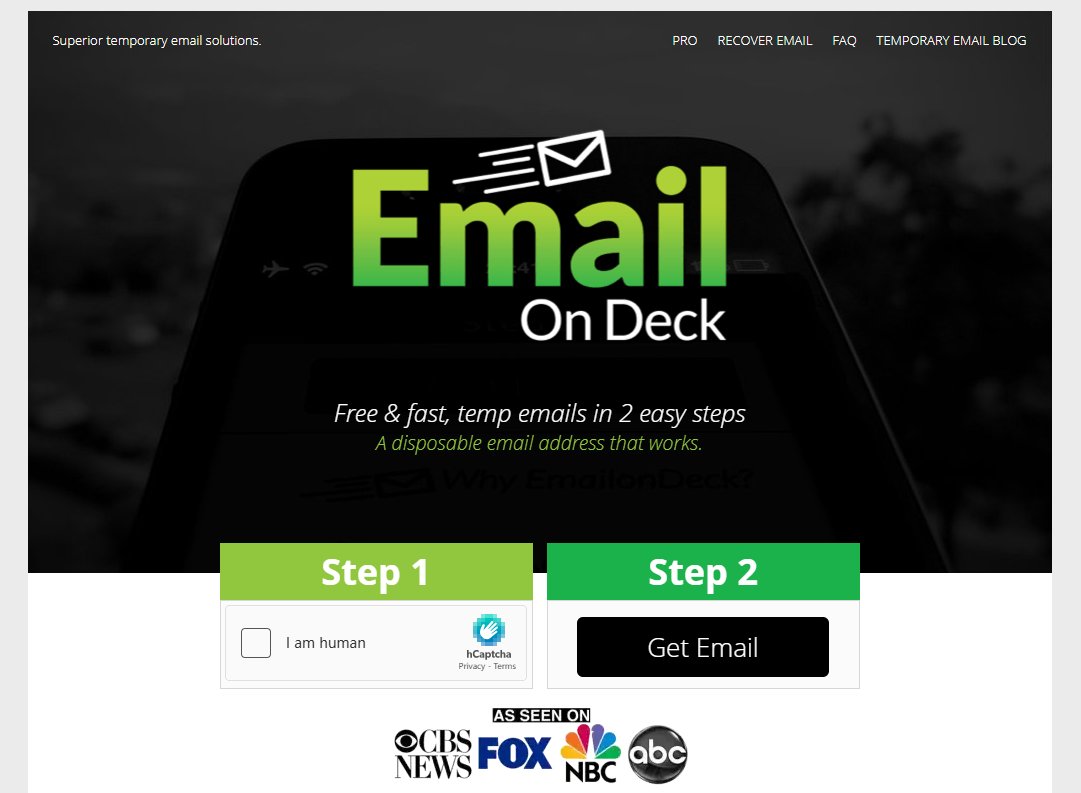 Unlike traditional email providers such as Gmail or Outlook, EmailOnDeck focuses on short-term email usage. Users can create a temporary inbox within seconds and use it to receive messages from websites, online services, newsletters, forums, and applications.
One reason EmailOnDeck has remained popular is its simplicity. There are no lengthy registration forms, password creation requirements, or identity verification steps. Users simply visit the website, generate an email address, and start receiving emails immediately.
The service is commonly used for:
- Creating temporary accounts
- Testing web applications
- Accessing gated content
- Downloading free resources
- Avoiding marketing spam
- Protecting personal email addresses
- Software and QA testing
In this EmailOnDeck Review, we found that the platform remains focused on speed and convenience rather than becoming a full-featured email provider.
Key Features of EmailOnDeck
A proper EmailOnDeck Review would be incomplete without examining its most important features. After testing the service extensively, these are the features that stood out the most.
Instant Temporary Email Generation
The core feature of EmailOnDeck is the ability to create a temporary email address within seconds.
Users do not need to provide personal information, create passwords, or verify identities. This makes the platform one of the fastest disposable email services available today. For users who frequently need temporary inboxes, this speed is a significant advantage.
Spam Protection
One of the primary reasons people use disposable email services is spam prevention.
Instead of exposing a personal inbox to promotional campaigns, newsletters, and sales emails, users can simply use an EmailOnDeck address and discard it later. This helps keep primary email accounts clean and organized.
Multiple Domain Options
EmailOnDeck provides access to various domains that can be used when generating temporary email addresses.
This improves flexibility and increases the likelihood that a generated address will be accepted by websites.
Many websites actively block known disposable email domains, so having multiple options can improve success rates.
Premium Inbox Features
The platform also offers premium functionality through EmailOnDeck Pro.
Compared to the free version, premium users gain access to additional features designed for longer-term use and better inbox management.
These upgrades make the service more suitable for professionals and developers.
Simple User Interface
Some disposable email providers attempt to add numerous tools and customization options, resulting in cluttered interfaces. EmailOnDeck takes the opposite approach.
The dashboard is intentionally simple, allowing users to generate and access temporary inboxes quickly without navigating unnecessary settings.
Mobile-Friendly Experience
Our testing showed that EmailOnDeck works well across desktops, tablets, and smartphones.
Users can access temporary inboxes directly through a mobile browser without needing to install an application. This flexibility is useful when registering for services while on the go.
Our Hands-On Test: How Well Does EmailOnDeck Actually Work?
Many EmailOnDeck reviews simply repeat the company's feature list. To evaluate the service more objectively, we tested EmailOnDeck in several common scenarios that reflect how most users actually use disposable email services.
Testing Methodology
Our testing focused on four key areas:
- Inbox creation speed
- Verification email delivery speed
- Website acceptance rate
- Mobile usability
We generated multiple EmailOnDeck addresses and used them to register for a variety of platforms, including SaaS tools, online communities, content download portals, productivity apps, and developer services.
Website Acceptance Test
One of the biggest concerns with disposable email services is whether websites will accept them.
| Website Category | Result |
|---|---|
| Forums & Communities | Passed |
| SaaS Free Trials | Passed |
| Content Download Sites | Passed |
| Developer Tools | Passed |
| Some High-Security Platforms | Occasionally Blocked |
| Our testing showed that EmailOnDeck performs well on most everyday registrations. However, as expected, some websites that actively block temporary email providers rejected certain EmailOnDeck domains. |
Delivery Speed Results
Speed remains one of EmailOnDeck's strongest advantages.
| Metric | Result |
|---|---|
| Inbox Creation | Under 30 seconds |
| Average Verification Delivery | Under 10 seconds |
| Delayed Messages | Rare |
| Missing Messages | Occasional |
| Most verification emails arrived almost instantly. For account creation, software trials, and newsletter signups, waiting times were minimal. |
Overall Testing Verdict
EmailOnDeck delivered strong results in speed and reliability. While no disposable email service can guarantee acceptance on every website, it successfully handled the vast majority of registrations we tested.
For users who need a fast temporary inbox for verification emails, it remains one of the more dependable options available in 2026.
Pros and Cons of EmailOnDeck
Every disposable email service has strengths and weaknesses. After completing this EmailOnDeck Review, here is a balanced assessment of where the platform excels and where it falls behind.
Pros of EmailOnDeck
Fast Inbox Creation
One of the biggest advantages of EmailOnDeck is speed. Users can generate a temporary email address almost instantly and begin receiving messages without creating an account.
For people who frequently need disposable inboxes, this streamlined process saves time and removes unnecessary friction.
Effective Spam Prevention
Using a disposable inbox instead of a personal email address significantly reduces unwanted marketing emails and promotional messages.
This makes EmailOnDeck useful for downloading free resources, joining online communities, or testing new platforms without cluttering your primary inbox.
Good Verification Email Delivery
During our testing, verification emails arrived quickly and consistently.
Many disposable email services struggle with deliverability, but EmailOnDeck generally performed well when receiving activation links and account confirmation messages.
Available Premium Version
Unlike many free-only disposable email services, EmailOnDeck offers a paid upgrade for users who need additional functionality.
This gives users flexibility depending on their needs and usage frequency.
Cons of EmailOnDeck
Some Websites Block It
A growing number of websites actively detect and block temporary email providers.
While EmailOnDeck still works on many platforms, users may occasionally encounter registration forms that reject its domains.
Limited Inbox Management
Compared with traditional email services, inbox organization tools are minimal. Features such as folders, advanced search capabilities, and detailed message management are largely absent.
Not Suitable for Important Communications
EmailOnDeck is designed for temporary use. It should not be used for banking, healthcare accounts, business communications, or any service where long-term access to messages is critical.
Free Version Has Restrictions
The free service works well for occasional use, but power users may find the limitations restrictive. Those who rely heavily on temporary email addresses may eventually need the Pro plan.
Basic Feature Set
Some competitors now offer browser extensions, custom domains, inbox sharing, API access, and advanced privacy controls. EmailOnDeck remains relatively focused on core disposable email functionality.
EmailOnDeck Pricing
EmailOnDeck offers both a free version and a premium upgrade called EmailOnDeck Pro. According to the official pricing page, Pro access is purchased through a one-time cryptocurrency payment rather than a recurring subscription, with each payment providing 30 days of access.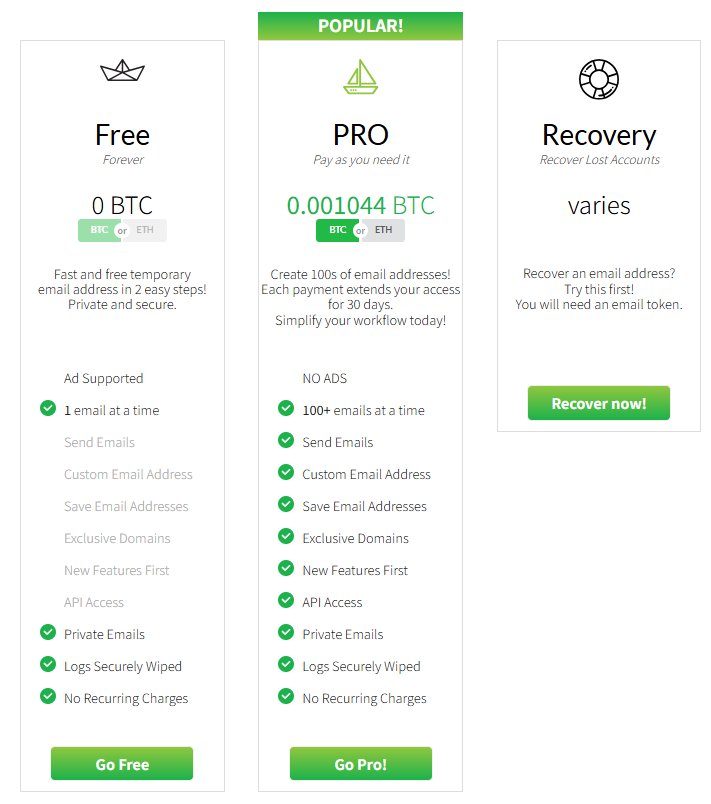
Who Should Use the Free Version?
The free plan is ideal for:
- Occasional registrations
- Download portals
- One-time verifications
- Spam prevention
Most casual users will never need more than the free version.
Who Should Consider Pro?
The Pro plan is better suited for:
- Developers
- QA engineers
- Product testers
- Power users who manage multiple inboxes
- Users who need inbox persistence
Is EmailOnDeck Pro Worth It?
For average users, probably not.
For developers and testers who create multiple accounts daily, need private inboxes, or require API functionality, the Pro version offers meaningful value. Whether it is worth paying for ultimately depends on how frequently you use temporary email services.
Who Is EmailOnDeck Best For?
Not every disposable email service is designed for the same audience. During our EmailOnDeck Review, we found that the platform is particularly effective for certain types of users.
Privacy-Conscious Users
People who want to reduce their digital footprint often use temporary email services to avoid sharing personal addresses online.
EmailOnDeck provides a simple way to register for services without exposing your primary inbox.
Developers and QA Testers
Developers frequently need multiple email addresses when testing registration systems, login workflows, and email notifications.
EmailOnDeck offers a quick and convenient solution for these testing scenarios.
Online Shoppers
Many online stores require email registration before granting access to discounts, coupons, or downloadable resources.
Using EmailOnDeck helps users avoid future promotional campaigns and marketing emails.
Students and Researchers
Students often need temporary access to educational resources, forums, and software trials. Disposable email addresses provide a practical way to manage these registrations without increasing inbox clutter.
However, EmailOnDeck is not ideal for managing long-term accounts or storing important communications. If ongoing access to emails is required, a traditional email provider remains the better option.
Is EmailOnDeck Safe to Use?
For general disposable email purposes, EmailOnDeck is considered safe to use. It helps protect your personal inbox by allowing you to register for websites, free trials, and online services without sharing your primary email address.
However, EmailOnDeck should not be used for important accounts that require long-term access. Temporary inboxes can expire, making it difficult to recover passwords or receive future account notifications.
As a rule of thumb, EmailOnDeck is best suited for spam prevention, privacy protection, and one-time registrations rather than sensitive or business-critical communications.
Can Websites Detect and Block EmailOnDeck?
Yes, some websites can detect and block EmailOnDeck addresses. Many platforms use disposable email detection systems that identify known temporary email domains during the registration process.
In our testing, EmailOnDeck worked successfully on many websites, especially smaller platforms, forums, software trials, and content download sites. However, certain large social networks, financial services, and high-security platforms may reject temporary email addresses.
While EmailOnDeck remains effective for most everyday use cases, users should expect occasional blocks and may need to try another temporary email provider when a website restricts disposable email services.
5 Best Alternatives to EmailOnDeck
Although EmailOnDeck remains a popular option, it isn't the only disposable email service worth considering. Depending on your needs, one of these alternatives may offer better deliverability, more features, or improved usability.
1. TempEmail.cc
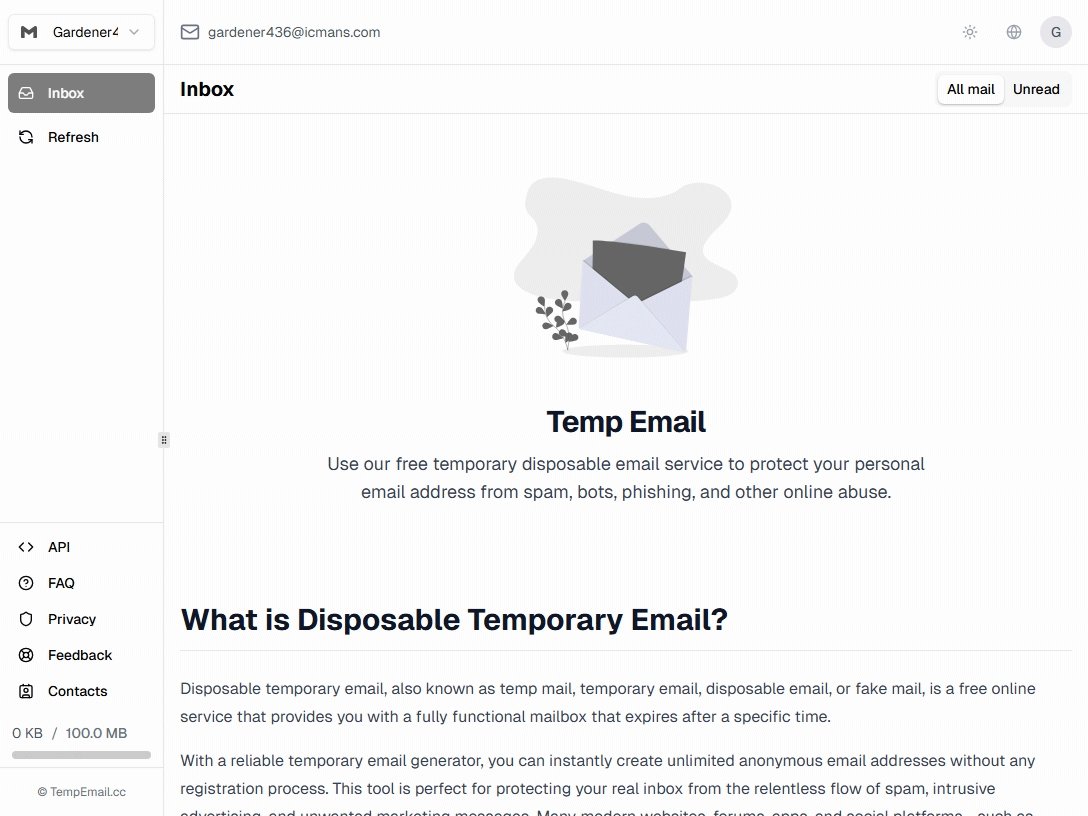 TempEmail.cc has become one of the strongest alternatives to EmailOnDeck for users who want a balance between simplicity and functionality.
Like EmailOnDeck, it allows users to generate temporary email addresses instantly without registration. However, TempEmail.cc focuses heavily on user experience and inbox management. The interface feels modern, clean, and intuitive, making it easy for both beginners and advanced users.
One notable advantage is its strong deliverability performance across a wide variety of websites. During testing, temporary addresses were accepted by many services that often reject disposable email providers. The platform also supports quick inbox refreshes and reliable email reception.
Best For
- Daily disposable email users
- Privacy-focused individuals
- Fast website registrations
- Spam prevention
2. Temp Mail
Temp Mail is one of the most recognized names in the disposable email industry.
The service provides temporary email addresses instantly and has developed a reputation for reliability over many years. One reason users choose Temp Mail is its mobile application support, which allows temporary inboxes to be accessed directly from smartphones.
The platform also offers premium plans that provide additional inbox retention and management features. Compared with EmailOnDeck, Temp Mail has a slightly more polished ecosystem and broader platform support.
Its popularity means some domains are occasionally blocked by websites, but overall deliverability remains strong.
Best For
- Mobile users
- Frequent registrations
- App-based access
- Long-term disposable email users
3. Guerrilla Mail
Guerrilla Mail has been a well-known temporary email provider for years.
Unlike many disposable email services, Guerrilla Mail allows users to send emails in addition to receiving them. This functionality makes it useful for testing email workflows and communication systems.
The platform also offers customizable email addresses, giving users more flexibility than many competitors.
While the interface feels somewhat outdated compared to modern alternatives, the functionality remains highly capable.
Best For
- Developers
- QA testers
- Email workflow testing
- Advanced users
4. 10 Minute Mail
As the name suggests, 10 Minute Mail specializes in ultra-short-term inboxes.
The service automatically generates a temporary email address that expires after a short period. This approach is ideal for quick signups where long-term inbox access is unnecessary.
The platform is extremely easy to use and requires virtually no learning curve.
However, because inboxes expire quickly, it is less suitable for registrations that may require future password resets or follow-up emails.
Best For
- One-time registrations
- Quick verifications
- Temporary downloads
- Privacy-conscious browsing
5. Maildrop
Maildrop takes a minimalist approach to temporary email.
The service focuses on simplicity and ease of access while offering strong anti-spam protections. Users can generate inboxes quickly without registration and immediately start receiving messages.
Maildrop is particularly useful for newsletters, downloads, and testing projects where users want to avoid exposing their primary email addresses.
Although it lacks some premium features found elsewhere, its straightforward design appeals to many users.
Best For
- Basic disposable email needs
- Newsletter signups
- Download portals
- Simple registrations
FAQs
Is EmailOnDeck still free in 2026?
Yes. EmailOnDeck continues to offer a free version that allows users to generate temporary email addresses and receive incoming emails. Users who need additional functionality can upgrade to EmailOnDeck Pro.
How long do EmailOnDeck email addresses last?
The lifespan varies depending on usage and service policies. Temporary inboxes are designed primarily for short-term use, so users should not rely on them for long-term account recovery or important communications.
Can I recover an account created with EmailOnDeck later?
Potentially, but it depends on whether the inbox remains accessible.
This is one of the biggest risks of using disposable email services. If a website requires password resets months later, access to the original temporary inbox may no longer be available. For important accounts, a permanent email provider is a safer choice.
Why do some verification emails never arrive?
Several factors can affect delivery:
- The sender may block disposable email domains.
- The email provider may filter the message.
- The website may delay sending verification emails.
- Temporary inbox servers may experience high traffic.
Trying another temporary email address or provider often resolves the issue.
Can businesses use EmailOnDeck for software testing?
Yes. Many developers, QA engineers, and product teams use EmailOnDeck to test:
- User registration systems
- Email verification workflows
- Password reset functions
- Notification delivery systems
However, businesses should avoid using disposable email addresses for operational communications.
Are disposable email services legal?
In most countries, using a temporary email service is completely legal. Problems arise only when disposable email addresses are used to violate platform terms of service, commit fraud, or abuse online systems.
For privacy protection and spam prevention, disposable email services are widely accepted tools.
Final Verdict on EmailOnDeck Review
After completing this comprehensive EmailOnDeck Review, it's clear that EmailOnDeck remains one of the most practical disposable email services available in 2026.
Its biggest strengths are speed, simplicity, and ease of access. Users can generate temporary email addresses within seconds, receive verification emails quickly, and avoid exposing their personal inboxes to spam. For casual registrations, software testing, online downloads, and privacy protection, EmailOnDeck performs exactly as expected.
That said, it is not a perfect solution. Some websites actively block disposable email domains, inbox management features remain relatively basic, and the service should never be used for important accounts that may require long-term access.
For most users, the free version is sufficient. Power users who rely on temporary inboxes regularly may find value in EmailOnDeck Pro's enhanced features and improved reliability.
Overall, this EmailOnDeck Review gives the service a strong 8.5/10 rating. It remains a dependable choice for temporary email needs, while alternatives such as TempEmail.cc, Temp Mail, and Guerrilla Mail provide excellent backup options when a website blocks EmailOnDeck domains.