Ever signed up for a new app, forum, or free trial—only to regret sharing your real email minutes later? You’re not alone. Modern online registrations flood inboxes with promotions, tracking pixels, and data-hungry newsletters, turning what should be a simple signup into a long-term privacy and spam problem. For many users, protecting their primary inbox has become less about convenience and more about control.
That frustration is why searches for temporary email forwarding keep rising. The idea sounds appealing: use a temporary or disposable email for quick sign-ups, while still receiving critical messages—verification codes, confirmation links, or account details—directly in your main inbox, without exposure or clutter.
But here’s the catch. Forwarding often requires linking your real email address to the temporary one, creating a traceable connection that undermines the very purpose of disposable email: anonymity, minimal data retention, and zero long-term footprint. What looks like a convenience feature may quietly reintroduce the same privacy risks users were trying to avoid in the first place.
In this article, we’ll explain why most privacy-focused temporary email services intentionally avoid forwarding, break down the real security risks behind it, and explore smarter, safer ways to manage temporary emails—without sacrificing privacy or control.
What Is Temporary Email Forwarding?
Many users imagine temporary email forwarding as a simple, hassle-free feature: you generate a disposable email address for a quick sign-up, enter it on a website, and every incoming message—verification codes, reset links, confirmations—automatically lands in your real inbox. No need to bookmark a temporary page, refresh constantly, or worry about the inbox expiring mid-process. It sounds like the perfect bridge between privacy and convenience: use a throwaway address once, keep receiving everything seamlessly, and never expose your primary email to spam or tracking.
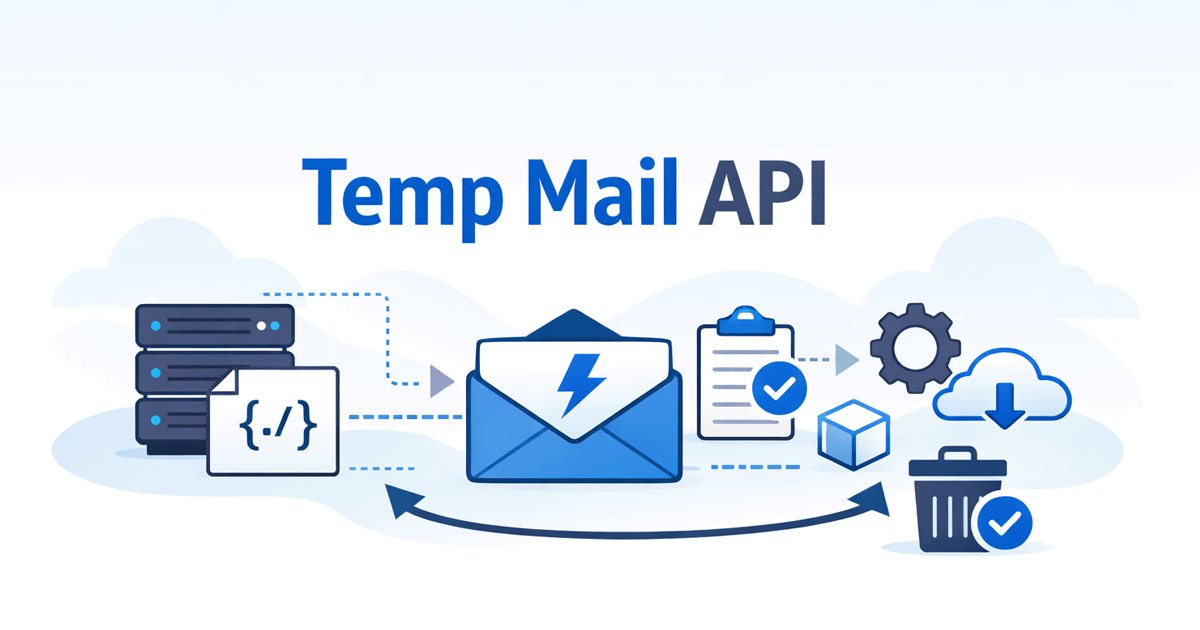
In reality, the mechanics are more involved—and often at odds with the core philosophy of disposable email services. Behind the scenes, temporary email forwarding typically works through an email relay or forwarding rule. When you set it up (on services that offer it), you bind your real email address as the destination. Incoming messages to the temporary address are then routed via the service's servers: they receive the email, process it (sometimes scan or store it briefly), and forward a copy to your primary inbox. This creates a direct chain—your real identity is linked to the disposable address through the forwarding target.
This setup clashes with the fundamental idea of temporary email privacy. Disposable emails are built for anonymity: generate an address on the fly, use it briefly, then let it vanish without logs or traces. Forwarding requires the service to record and store your real email (at least temporarily), maintain delivery logs, and act as a middleman—introducing potential points of failure. Many privacy-first providers avoid this entirely to prevent any permanent association between the temp address and your true identity, which could compromise anonymity if the service is subpoenaed, breached, or abused.
Moreover, email forwarding risks go beyond privacy: relaying can amplify spam (abusers exploit open forwards), trigger deliverability issues (forwarded mail often loses original authentication like SPF/DKIM), or expose content to third-party servers without end-to-end encryption. In short, what feels like a convenience shortcut often undermines the "zero-trace" promise that makes disposable emails valuable in the first place.
Why Most Temporary Email Services Do Not Offer Temporary Email Forwarding
One of the strongest indicators of responsible design in the temporary email space is the deliberate decision by most providers to avoid offering temporary email forwarding. While a handful of services experiment with it, the vast majority—especially pure disposable inboxes—steer clear. This isn't laziness or missing features; it's a principled choice rooted in privacy, security, and abuse prevention.
Forwarding Breaks the Core Idea of Anonymity
At its heart, disposable email privacy relies on complete separation: generate a throwaway address, use it for a single purpose (like a one-time registration or OTP check), then let it vanish without any lingering connection to you. Enabling forwarding shatters this by requiring users to bind their real email address as the destination. Once set up, the service now knows exactly which permanent identity is linked to each disposable address—creating a traceable chain that can be followed backward through logs, delivery records, or subpoenas. What was meant to be anonymous becomes pseudonymous at best, and potentially identifiable at worst. True anonymity demands no bridges back to your real self; forwarding builds exactly that bridge.
Forwarding Increases Spam and Abuse Risks
Forwarding features are magnets for abuse. Spammers and automated bots love open relays because they can send bulk junk through temporary addresses that auto-forward to victims, amplifying spam campaigns while hiding the origin. Services that enable forwarding often see their IP addresses and domains flagged by major email providers (Gmail, Outlook, etc.), leading to blacklisting, poor deliverability, and blocked messages even for legitimate users. Maintaining forwarding safely requires constant monitoring, rate-limiting, and abuse detection—overhead that many free or lightweight temporary email services simply can't sustain without compromising performance or turning into paid-only features.
Privacy-First Services Avoid Email Forwarding by Design
Leading privacy-oriented providers recognize that forwarding inherently conflicts with zero-knowledge and zero-log principles. To enable it, the service must:
• Permanently record the target (real) email address
• Log delivery events, timestamps, and metadata for troubleshooting or compliance
• Act as a persistent relay, storing or processing content longer than a pure disposable inbox would
This directly contradicts the "zero logs" ethos that defines trustworthy temporary email services. Privacy-focused alternatives like ProtonMail's aliases or Tutanota deliberately avoid permanent forwarding features—instead offering short-lived or revocable aliases without binding logs. Industry observations back this: as of 2025–2026 data from reviews,e.g., PCMag, almost all top-ranked pure temporary/disposable providers do not natively support forwarding. Those that do are typically hybrid alias services, not strict one-and-done disposables.
In short, skipping forwarding isn't a limitation—it's often the responsible choice. By design, these services prioritize unbreakable anonymity over convenience shortcuts that introduce traceable links, logging risks, and abuse vectors. If maximum privacy is the goal, the absence of forwarding is a feature, not a bug.
The Real Security Risks Behind Temporary Email Forwarding
Even if a service promises “secure” or “private” temporary email forwarding, the reality is that you're handing over far more control—and exposure—than you might realize. From a user's perspective, the convenience of auto-forwarding can feel worth the trade-off… until something goes wrong. Below are the most tangible risks you actually face when you enable forwarding, risks that go beyond theoretical privacy concerns and directly impact your security and anonymity.
Linking Temporary and Real Identities
A temporary email is only as anonymous as its lack of connection to you. The whole point is that it creates a disposable, unlinkable identity: no name, no history, no ties back to your real life. But temporary email forwarding changes that instantly. By entering your real email as the forwarding destination, you create a permanent bridge between the throwaway address and your primary identity.
Service logs (even if “temporary”) now record: this disposable address → forwarded to this real email. If the provider ever suffers a data breach, faces a legal request, or gets compromised by an insider, attackers or authorities can trace activity backward. What was supposed to be a one-time anonymous registration suddenly links to your long-term email—the same one tied to your social accounts, banking, work, and personal life. Temporary email ≠ temporary identity when forwarding is involved; it becomes a persistent, traceable alias.
Data Leakage Through Third-Party Relays
Most temporary email forwarding doesn't happen magically on your device—it relies on the service acting as a relay. Your incoming message hits their server first: they receive it, store it (at least briefly), decrypt if needed, then forward a copy to your real inbox. Every hop in that chain is a potential leak point.
Third-party relays introduce risks you can't control:
• The service might log metadata (sender, subject, timestamps, IP addresses) for “debugging” or compliance.
• Forwarded emails can lose original authentication (SPF, DKIM, DMARC), making them easier to spoof or flag as spam/phishing.
• If the relay provider is based in a jurisdiction with weak privacy laws, or gets subpoenaed/hacked, your message content and destination become exposed.
Unlike a pure disposable inbox that discards everything after a short window, forwarding forces longer retention and external transmission—multiplying points where data can leak without your knowledge.
Why Forwarding Is Not Suitable for Sensitive Use Cases
The risks compound dramatically in high-stakes scenarios where true anonymity matters most:
• Testing accounts (e.g., beta apps, developer sandboxes): Forwarding links your dev/test identity to your real email, potentially exposing work credentials or IP in a breach.
• Anonymous registrations (forums, whistleblower platforms, political activism): Any traceable chain defeats the purpose—adversaries can correlate activity across services.
• General privacy protection (avoiding data brokers, reducing spam targeting): Forwarding creates a single point of failure that data aggregators or marketers can exploit to build richer profiles.
In short, if you're using a temporary email to protect something important—your reputation, safety, or freedom—forwarding isn't a shortcut; it's a vulnerability. Privacy-first users and experts consistently warn that the perceived convenience rarely outweighs the real, lasting exposure it introduces.
By understanding these risks firsthand, you can make informed choices that actually safeguard your identity instead of unintentionally compromising it.
Smarter Ways to Manage Temporary Emails Without Forwarding
The good news? You don't need temporary email forwarding to handle registrations, verifications, or short-term needs effectively. By shifting to smarter, privacy-respecting habits, you gain more control, reduce risks, and often end up with a cleaner workflow. Below are practical, battle-tested approaches that thousands of users rely on daily—focusing on session-based use, active inbox management, multi-address organization, and manual handling of key info. These methods align perfectly with the "zero-trace" ethos of disposable email while avoiding the pitfalls of relays and bindings.
Use Temporary Emails for Session-Based Tasks
The simplest and safest mindset: treat every temporary email as strictly one-and-done. Generate a fresh address for each registration or test, complete the task (sign-up, verification, download link), grab what you need, and walk away—never reuse it.
This approach eliminates long-term dependency: no need to monitor an inbox forever, no risk of accumulated spam, and zero chance of linking identities across services. It's ideal for one-off scenarios like claiming a free trial, joining a forum, or testing an app. Once the session ends, delete the inbox (or let it expire naturally). Result? Your real email stays untouched, and there's no persistent footprint.
Keep a Temporary Inbox Active Instead of Forwarding
For cases where you might need to check back (e.g., delayed OTPs or follow-up emails), simply keep the inbox live rather than forwarding. Most modern temporary email services let you extend validity or make it indefinite until you choose to delete.
Manually refresh the page or app every few minutes/hours as needed—it's quick and keeps you in full control. No third-party relays mean no extra logging or leakage points. This method is far more secure than auto-forwarding because you decide exactly when and how long the inbox exists.
How Long Can a Good Temporary Inbox Last?
A common question in 2026: how long do temp emails really stay active? Traditional "10-minute mail" services expire in 10–60 minutes, but better providers offer much more flexibility.
Many allow extensions (refresh to reset the timer) or user-controlled lifespans—some keep inboxes alive for hours, days, weeks, or even indefinitely until manually deleted. For example, services with custom duration or password protection let you decide: short for quick verifications, longer for ongoing short-term projects. Always check the provider's policy—aim for ones that avoid forced short timers and give you the power to extend without hassle.
Best Temporary Email for OTP / Verification Codes
OTP and verification codes are the #1 reason people reach for temp mail—and they need fast, reliable delivery without blocks.
Look for services optimized for high-acceptance platforms (social media, apps, SaaS): ad-free interfaces, refreshed domain pools to evade detection, instant generation, and strong deliverability. Features like password-protected inboxes add extra security for sensitive codes.
TempEmail.cc excels here: it generates unlimited custom addresses instantly, supports high block resistance on tough sites, offers full user control over inbox lifespan (extend as needed or delete with one click), and maintains a clean, no-logs setup with HTTPS encryption. Perfect for copying OTPs safely without auto-forward risks—many users report near-perfect success rates for verifications in 2026.
Manage Multiple Temporary Addresses at the Same Time
Instead of relying on one forwarded inbox (which muddles everything), create separate addresses for different purposes. One for social sign-ups, another for shopping trials, a third for forums—label them mentally or in notes.
This is clearer and safer than forwarding: no single point of failure, easier to track which address got what email, and better organization. Browser bookmarks, a simple note app, or even a password manager can store your active temp addresses without exposing them.
Using Multiple Temp Emails Without Getting Confused
To avoid chaos with multiples:
• Use custom usernames (if supported) for instant recognition.
• Open each in a separate browser tab or incognito window.
• Keep a quick list: copy the address + purpose right after generation.
• Delete finished ones immediately to declutter.
Choose providers that make managing multiple inboxes seamless—no ads, fast load times, and easy switching.
Copy Important Information Manually When Necessary
When an important email arrives (OTP, magic link, confirmation code), copy-paste it immediately into your notes, clipboard, or the target app. This puts you in the driver's seat: you control what gets saved, where, and for how long—no automatic relay sending copies elsewhere.
Manual copying reinforces active control—scan the subject/sender quickly, grab the payload, then delete or archive the temp inbox. It's a tiny extra step that eliminates forwarding's biggest dangers: traceable chains, third-party exposure, and unintended long-term storage.
In practice, this workflow feels effortless after a few uses. You stay anonymous, avoid spam buildup, and sidestep the security compromises of forwarding. Services built for this— with its ad-free design, password options, and flexible durations—make it even smoother. The result? Stronger privacy, fewer headaches, and real efficiency without shortcuts that backfire.
Choosing the Right Tool for Different Email Scenarios
Not every email need is the same. The key to staying safe and efficient online is matching the right approach to the actual scenario—rather than forcing a one-size-fits-all solution like temporary email forwarding. Below, we break it down by common use cases, highlighting when a pure temporary email shines, when forwarding becomes a liability you should avoid entirely, and why smarter alternatives deliver better protection and peace of mind.
When a Temporary Email Is the Right Choice
Temporary email services excel in short-lived, low-commitment situations where privacy and speed matter most:
Quick registrations — Signing up for a forum, newsletter, or one-off account you may never revisit. Generate a disposable address, complete the form, grab any confirmation if needed, and move on—no spam in your real inbox.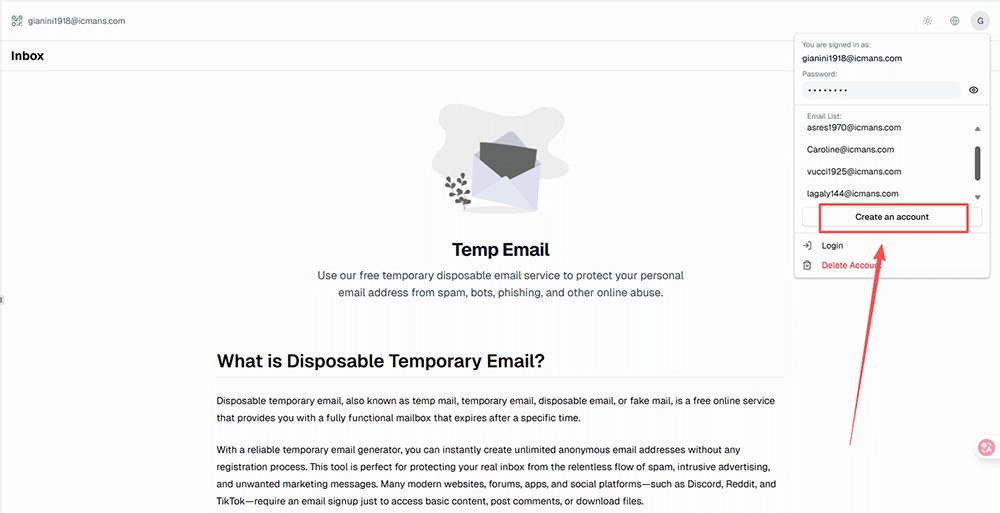
Product trials and testing — Trying free trials, beta apps, SaaS tools, or downloads. Use a fresh temp address to avoid clutter and keep your primary email clean.
Spam / junk protection — Any site or service that feels sketchy or promotion-heavy. A throwaway inbox absorbs the inevitable spam flood so your real address stays untouched.
In these moments, the goal is speed + zero long-term footprint. A good disposable email does exactly that without extra layers of complexity.
When You Should Avoid Forwarding Entirely
On the flip side, temporary email forwarding introduces unacceptable risks in scenarios that involve ongoing access, value, or sensitivity:
Long-term or recurring communication — Anything that requires checking emails repeatedly over weeks or months (e.g., community groups, freelance gigs, hobby projects). Forwarding creates a persistent link that defeats anonymity and invites spam escalation.
Financial accounts, work email, or high-trust services — Banking apps, payment platforms, job applications, or professional tools. These demand verified, long-term identity control—forwarding from a temp address can trigger flags, blocks, or worse, link your disposable experiments to sensitive real-world accounts.
Whenever continuity, security, or real identity matters, stick to your primary email (or a dedicated privacy alias service). Forwarding shortcuts here are more dangerous than helpful.
Scenario Comparison Table
Here's a quick side-by-side to help you decide at a glance. This comparison focuses on real-world outcomes rather than features.
Temporary Email Forwarding vs Better Alternatives (2026 Comparison)
| Scenario | Temporary Email Forwarding | Better Alternative | Why Better? |
|---|---|---|---|
| One-time signup | Not recommended | Disposable inbox (one-use) | No binding to real identity, zero trace left |
| Short-term testing / OTP verification | High risk (if auto-forward) | Keep inbox active + manual copy | Safer control, no relay leakage; good for 10-60min+ validity |
| Long-term use / ongoing communication | Unsafe | Real email or alias service | Forwarding creates traceable chain; use privacy alias if needed |
| Privacy-sensitive (anonymous reg) | High risk | No forwarding + session-based temp email | Avoids permanent link between temp & real email |
Choosing based on the scenario keeps things simple: use temporary email where it's designed to shine (quick, disposable tasks), skip forwarding where it creates unnecessary exposure, and lean on real or alias emails for anything that needs longevity or trust. This mindset delivers stronger privacy without sacrificing convenience—exactly what most users are actually searching for when they type “temporary email forwarding” into Google.
Frequently Asked Questions About Temporary Email Forwarding
Is temporary email forwarding safe?
No, temporary email forwarding is generally not safe for privacy-focused use. It links your disposable address directly to your real email, creating a permanent traceable chain that can be exploited in breaches, logs, or subpoenas. Third-party relays add uncontrollable risks like metadata leakage and lost email authentication. For maximum security, avoid forwarding entirely and manage temp inboxes manually instead.
Why don’t most temporary email services support forwarding?
Most temporary email services do not support forwarding by design. The core reason is that forwarding requires binding your real email address, which creates a traceable link and breaks anonymity. It also forces the service to log delivery data and act as a relay, conflicting with zero-log, privacy-first principles. Skipping forwarding is a deliberate choice to protect users from spam amplification, abuse risks, and data exposure—making it the responsible default for true disposable inboxes.
Can disposable email messages be forwarded at all?
Yes, some services offer disposable email forwarding, but it's rare among pure temporary providers. Hybrid alias tools (e.g., certain temp-mail variants or privacy alias services) sometimes include it as an optional feature. However, most strict disposable inboxes avoid it completely because forwarding undermines anonymity, increases logging, and invites abuse—making true one-and-done temp emails incompatible with reliable forwarding.
When is temporary email forwarding not recommended?
Avoid temporary email forwarding whenever anonymity, security, or long-term control matters: one-time sign-ups, privacy-sensitive registrations, OTP verifications, anonymous forums, testing accounts, or any scenario where linking temp and real identities could expose you. It's especially risky for financial, work, or ongoing communication needs—stick to real email or revocable aliases there instead.
Can I use temporary email forwarding for verification codes?
You can technically, but it's not recommended for verification codes (OTPs). Forwarding creates a traceable link between the temp address and your real inbox, risking privacy leaks or spam escalation. Many services also flag or block forwarded OTPs due to relay issues. Safer: generate a temp inbox, keep it active briefly, copy the code manually, and delete immediately after use.
What is the safest alternative to temporary email forwarding?
The safest alternative is using session-based temporary email without forwarding: generate a fresh disposable address for each task, keep the inbox active as needed (extend validity if possible), manually copy important info like OTPs or links, then delete or let it expire. This keeps full control, avoids relays and bindings, and preserves true anonymity—far better than any forwarding setup.
Does TempEmail.cc offer forwarding?
No, TempEmail.cc does not offer forwarding—and that's by design. We prioritize unbreakable privacy and zero-trace usage, so we avoid features that require binding real emails, logging deliveries, or acting as relays. Instead, TempEmail.cc gives you fast generation, flexible inbox durations, password protection, and easy manual management—delivering stronger security and control without the risks forwarding introduces.
Final Thoughts: Privacy Comes First
Temporary email forwarding looks like the perfect shortcut: automatic delivery to your real inbox, no more switching tabs, no missed codes. It promises convenience in a world full of registrations and verifications. But as we've seen, that convenience often comes at a steep cost—traceable links, third-party relays, logging risks, and a permanent bridge between your disposable and real identities. What feels like efficiency usually adds exposure instead of reducing it.
The best temporary email experiences aren't about forcing everything into one inbox. They're built on simplicity, user control, and zero unnecessary traces: generate what you need, use it for the moment, manage it actively (or let it vanish), and walk away clean. No bindings, no relays, no hidden logs—just tools that respect your privacy from the start.
Next time you need a temporary email, pause and ask yourself: Do I really need “automatic forwarding,” or do I need controllable, leak-proof privacy? Choosing the latter is almost always the smarter, longer-lasting path to peace of mind.
Prioritize privacy first. The right tool for your scenario will follow—and you'll thank yourself later.