Bạn có thể sử dụng email tạm thời cho Facebook mà không bị khóa không?
Câu trả lời ngắn gọn là có — nhưng tùy thuộc vào cách bạn sử dụng.
Facebook không trực tiếp chặn các địa chỉ email tạm thời. Thay vào đó, họ đánh giá các yếu tố như địa chỉ IP, hành vi đăng ký và mô hình hoạt động của bạn. Điều này có nghĩa là email tạm thời có thể hoạt động hoàn hảo cho các mục đích sử dụng ít rủi ro, nhưng có thể thất bại nếu hành vi của bạn trông có vẻ đáng ngờ.
Đối với nhiều người dùng, câu hỏi thực sự không chỉ là "nó có hoạt động không" — mà là liệu nó có xứng đáng với sự đánh đổi về quyền riêng tư hay không.
Theo một khảo sát của Pew Research năm 2023, 81% người trưởng thành tại Mỹ lo ngại về cách các công ty sử dụng dữ liệu của họ. Vì các nền tảng như Facebook thường sử dụng địa chỉ email làm định danh lâu dài, việc đăng ký bằng hộp thư cá nhân có thể dẫn đến thư rác, theo dõi và lộ thông tin không mong muốn theo thời gian.
Đây là lý do tại sao ngày càng nhiều người dùng chuyển sang sử dụng email tạm thời cho Facebook.
Một email tạm thời cho phép bạn nhận mã xác minh ngay lập tức, hoàn tất đăng ký mà không gặp trở ngại và tránh việc liên kết hộp thư thực của bạn với một nền tảng khác. Nó đóng vai trò như một lớp đệm bảo mật — đặc biệt hữu ích cho việc thử nghiệm, tạo tài khoản phụ hoặc truy cập ngắn hạn.
Trong hướng dẫn này, bạn sẽ tìm hiểu khi nào email tạm thời hoạt động với Facebook, khi nào không và cách sử dụng nó một cách an toàn mà không bị gắn cờ.
Bạn đang tìm kiếm một cái nhìn tổng quan hơn?
Hãy xem hướng dẫn đầy đủ của chúng tôi về email tạm thời cho mạng xã hội để so sánh cách các nền tảng khác nhau xử lý email dùng một lần.
Bạn có thể sử dụng email tạm thời cho Facebook mà không bị khóa không? (Câu trả lời đầy đủ)
Vào năm 2026, câu trả lời ngắn gọn là Có — nhưng có một lưu ý nhỏ. Mặc dù các hệ thống bảo mật của Facebook, được thúc đẩy bởi phân tích hành vi nâng cao và AI, đã trở nên nghiêm ngặt hơn, email tạm thời vẫn là một lá chắn khả thi cho danh tính kỹ thuật số của bạn khi được sử dụng đúng cách.
Thực tế rất đơn giản: Facebook không nhắm mục tiêu vào chính email tạm thời; họ nhắm mục tiêu vào thư rác tự động. Nếu bạn sử dụng email dùng một lần chất lượng cao và bắt chước hành vi tự nhiên của con người, bạn có thể đăng ký thành công mà không cần liên kết hộp thư cá nhân của mình.
Tóm tắt nhanh cho năm 2026:
- Tỷ lệ thành công: ~75% (Phụ thuộc nhiều vào uy tín IP của bạn).
- Phù hợp nhất cho: Thử nghiệm, tài khoản phụ "để theo dõi" và tránh theo dõi dữ liệu.
- Rủi ro hàng đầu: Việc khôi phục tài khoản gần như không thể thực hiện được sau khi hộp thư tạm thời hết hạn.
- Chiến lược chiến thắng: Sử dụng IP sạch + Trình duyệt riêng tư + Nhà cung cấp đáng tin cậy như TempEmail.cc.
Cách thức hoạt động thực sự của hệ thống phát hiện của Facebook
Facebook không cấm rõ ràng các địa chỉ email tạm thời hoặc dùng một lần. Trong hầu hết các trường hợp, bất kỳ email nào có khả năng nhận mã xác minh 6 chữ số đều sẽ hoạt động trong quá trình đăng ký.
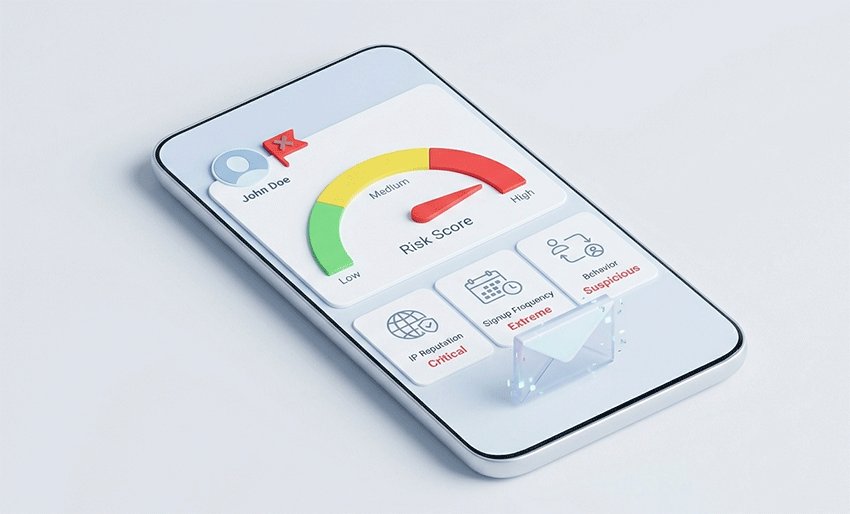
Tuy nhiên, lớp bảo mật của Facebook đánh giá nhiều thứ hơn là chỉ tên miền. Họ sử dụng Điểm rủi ro (Risk Scoring) dựa trên:
- Uy tín IP: Bạn có đang sử dụng VPN bị gắn cờ hoặc proxy chia sẻ không?
- Dấu vân tay trình duyệt: Thiết bị của bạn trông giống người dùng thật hay bot?
- Tốc độ đăng ký: Bạn có đang tạo nhiều tài khoản trong một khoảng thời gian ngắn không?
Phán quyết: Công cụ quyền riêng tư hay Công cụ vượt rào?
Điều này có nghĩa là rủi ro thực sự không nằm ở chính email tạm thời — mà nằm ở các tín hiệu hành vi của bạn.
Nếu bạn tạo tài khoản theo cách "giống con người" với số lượng ít (ví dụ: để thử nghiệm ngắn hạn hoặc cho một dự án một lần), email tạm thời hoạt động hoàn hảo. Nếu bạn sử dụng nó một cách tích cực để đăng ký hàng loạt, bạn sẽ kích hoạt lỗi xác minh hoặc bị hạn chế tài khoản ngay lập tức.
Tóm lại: Email tạm thời là một công cụ quyền riêng tư mạnh mẽ, không phải là công cụ để vượt qua Điều khoản dịch vụ cốt lõi của Facebook. Khi được sử dụng có trách nhiệm, nó bảo vệ hiệu quả hộp thư chính của bạn khỏi việc thu thập dữ liệu lâu dài của Facebook.
Email tạm thời có thực sự hoạt động với Facebook không? (Giải thích tỷ lệ thành công)
Có — email tạm thời hoạt động với Facebook, nhưng tỷ lệ thành công không phải là 100%.
Trong thực tế, hiệu quả của email tạm thời phụ thuộc ít hơn vào chính email đó và nhiều hơn vào cách tài khoản được tạo và sử dụng. Dựa trên các mô hình sử dụng phổ biến và phản hồi của người dùng, tỷ lệ thành công thường ở mức trung bình (khoảng 60–80%) khi được sử dụng đúng cách.
Khi nào email tạm thời hoạt động tốt
Email tạm thời có nhiều khả năng hoạt động trong các điều kiện bình thường, ít rủi ro:
- Tạo một tài khoản duy nhất, không tạo nhiều tài khoản hàng loạt
- Sử dụng địa chỉ IP ổn định (không thay đổi vị trí thường xuyên)
- Tuân theo quy trình đăng ký tự nhiên (không tự động hóa hoặc hành vi bất thường)
- Sử dụng tên miền email tạm thời đáng tin cậy không bị gắn cờ
Trong những trường hợp này, Facebook coi email tạm thời như một hộp thư tiêu chuẩn, cho phép bạn nhận mã xác minh và hoàn tất đăng ký mà không gặp vấn đề gì.
Khi nào email tạm thời thất bại
Các vấn đề thường xảy ra khi hành vi kích hoạt hệ thống phát hiện rủi ro của Facebook:
- Tạo nhiều tài khoản trong một khoảng thời gian ngắn
- Thường xuyên thay đổi vị trí VPN hoặc địa chỉ IP
- Sử dụng các tên miền email tạm thời đã bị gắn cờ hoặc bị lạm dụng
- Thao tác quá nhanh hoặc theo cách giống như các tập lệnh tự động
Trong những trường hợp này, bạn có thể gặp các vấn đề như không nhận được email xác minh, đăng ký thất bại hoặc bị hạn chế tài khoản tạm thời.
Điều gì thực sự ảnh hưởng đến tỷ lệ thành công?
Một quan niệm sai lầm phổ biến là "email tạm thời không hoạt động". Trên thực tế, hầu hết các thất bại đều do các tín hiệu hành vi — chứ không phải do loại email.
Hệ thống của Facebook đánh giá:
- Uy tín IP
- Tần suất tạo tài khoản
- Các mô hình tương tác trong khi đăng ký
Điều này có nghĩa là ngay cả một email thật cũng có thể thất bại trong các điều kiện đáng ngờ, trong khi email tạm thời có thể thành công khi được sử dụng bình thường.
Thông tin chính:
Email tạm thời cho Facebook hoạt động đáng tin cậy trong các tình huống ít rủi ro, nhưng thành công phụ thuộc vào tính nhất quán của hành vi, không chỉ địa chỉ email.
Khi nào bạn nên sử dụng email tạm thời cho Facebook? (Các trường hợp sử dụng tốt nhất)
Email tạm thời không phải là giải pháp vạn năng. Nó hoạt động tốt nhất trong các tình huống cụ thể nơi quyền riêng tư và quyền truy cập ngắn hạn quan trọng hơn sự ổn định của tài khoản lâu dài.
Hiểu khi nào nên sử dụng email tạm thời cho Facebook có thể giúp bạn tránh những rủi ro không cần thiết và tận dụng tối đa nó.
✅ Các trường hợp sử dụng tốt
Email tạm thời là một lựa chọn thông minh trong các tình huống bạn không cần quyền truy cập vĩnh viễn hoặc liên lạc lâu dài:
- Tài khoản thử nghiệm
Lý tưởng cho các nhà phát triển, nhà tiếp thị hoặc quy trình làm việc QA cần kiểm tra các tính năng, tích hợp hoặc hệ thống đăng nhập mà không cần liên kết dữ liệu cá nhân. - Dự án tạm thời
Hữu ích cho các chiến dịch ngắn hạn, thử nghiệm hoặc thiết lập một lần mà tài khoản sẽ không được duy trì lâu dài. - Hồ sơ phụ
Giúp tạo thêm tài khoản mà không làm lộ email chính của bạn, đặc biệt là khi bạn muốn tách biệt các hoạt động hoặc giảm bớt sự lộn xộn trong hộp thư đến.
Trong những trường hợp này, việc sử dụng email tạm thời để đăng ký Facebook giúp giảm thiểu thư rác, bảo vệ hộp thư chính của bạn và giữ cho dấu chân kỹ thuật số của bạn ở mức hạn chế.
❌ Không khuyến khích
Cũng có những tình huống mà email tạm thời có thể gây ra nhiều vấn đề hơn là lợi ích:
- Tài khoản cá nhân chính
Nếu bạn sử dụng Facebook để liên lạc hàng ngày, việc mất quyền truy cập vào hộp thư tạm thời có thể khiến việc khôi phục tài khoản trở nên khó khăn hoặc không thể. - Tài khoản doanh nghiệp hoặc quảng cáo
Các công cụ kinh doanh thường yêu cầu xác minh liên tục và liên lạc ổn định. Email dùng một lần có thể dẫn đến gián đoạn hoặc các vấn đề về tài khoản. - Sử dụng lâu dài
Các địa chỉ email tạm thời được thiết kế để hết hạn. Việc dựa vào chúng cho các tài khoản lâu dài làm tăng nguy cơ mất quyền truy cập theo thời gian.
Hướng dẫn quyết định nhanh
Nếu mục tiêu của bạn là quyền riêng tư, thử nghiệm hoặc sử dụng ngắn hạn, email tạm thời là một giải pháp thiết thực và hiệu quả.
Nếu mục tiêu của bạn là sự ổn định, khôi phục hoặc truy cập lâu dài, email thật là lựa chọn an toàn hơn.
Điểm mấu chốt:
Sử dụng email tạm thời để linh hoạt — không dùng cho các tài khoản mà bạn không thể để mất.
Tại sao Facebook đôi khi chặn email tạm thời (Lý do thực sự)
Nhiều người dùng cho rằng Facebook chặn trực tiếp các địa chỉ email tạm thời. Trên thực tế, hệ thống không hoạt động như vậy.
Facebook không nhắm mục tiêu vào chính email tạm thời — thay vào đó, họ dựa vào hệ thống theo dõi hành vi và chấm điểm rủi ro để phát hiện hoạt động đáng ngờ trong quá trình tạo tài khoản.
Điều này có nghĩa là email tạm thời không phải là vấn đề theo mặc định. Vấn đề phát sinh khi các tín hiệu nhất định cho thấy hành vi bất thường hoặc có rủi ro cao.
Thông tin chính:
Không phải do email — mà là do cách bạn hành xử.
Sự thay đổi về quyền riêng tư năm 2026: Tại sao email tạm thời không còn là tùy chọn
Theo các Dự báo về quyền riêng tư dữ liệu năm 2026 gần đây, chúng ta đang bước vào kỷ nguyên của "Theo dõi lấy danh tính làm trung tâm". Khi các nền tảng lớn chuyển sang mã hóa chống lượng tử và lập hồ sơ hành vi dựa trên AI, địa chỉ email cá nhân của bạn đã trở thành một "Dấu vân tay kỹ thuật số vĩnh viễn".
- Thông tin xu hướng: Vào năm 2026, hơn 20 tiểu bang của Mỹ đã ban hành các luật quyền riêng tư toàn diện (như CCPA/Delete Act cập nhật), trao cho người dùng nhiều quyền xóa dữ liệu hơn. Tuy nhiên, cách dễ nhất để "xóa" dữ liệu là không bao giờ cung cấp nó ngay từ đầu.
- Người gác cổng AI: Các nhà cung cấp hộp thư vào năm 2026 (Google, Apple) hiện sử dụng "Hộp thư thông minh" để tóm tắt và lọc nội dung. Việc sử dụng email tạm thời cho Facebook giúp ngăn chặn tiếng ồn từ mạng xã hội "làm ô nhiễm" hộp thư cá nhân chính được quản lý bởi AI của bạn.
Phán quyết của chuyên gia: Sử dụng một dịch vụ như TempEmail.cc không chỉ là để tránh thư rác nữa; đó là về Tách biệt dữ liệu (Data Decoupling) — đảm bảo hoạt động mạng xã hội của bạn không thể được đối chiếu với danh tính tài chính hoặc chuyên môn của bạn.
Cách Facebook phát hiện rủi ro
Facebook đánh giá nhiều yếu tố trong quá trình đăng ký và xác minh, bao gồm:
- Uy tín IP — liệu địa chỉ IP của bạn có liên quan đến thư rác hoặc đăng ký lặp lại hay không
- Mô hình đăng ký — tần suất tạo tài khoản trong một khoảng thời gian ngắn
- Hành vi người dùng — liệu các hành động trông giống con người (gõ phím bình thường, thời gian) hay tự động
Các tín hiệu này được kết hợp thành một điểm rủi ro. Nếu điểm số quá cao, Facebook có thể trì hoãn việc xác minhn, chặn email nhận mã hoặc hạn chế hoàn toàn tài khoản.
Những lý do phổ biến khiến Temp Mail thất bại
Dưới đây là những nguyên nhân phổ biến nhất dẫn đến các vấn đề với email tạm thời trên Facebook:
- Các tên miền dùng một lần bị gắn cờ
Một số tên miền email tạm thời bị lạm dụng rộng rãi và có thể đã nằm trong danh sách chặn nội bộ, khiến email xác minh không được gửi đến. - Uy tín IP thấp
Việc sử dụng VPN công cộng, proxy hoặc thay đổi vị trí thường xuyên có thể khiến kết nối của bạn trông đáng ngờ. - Hành vi đăng ký bất thường
Tạo nhiều tài khoản nhanh chóng, làm mới trang liên tục hoặc thử lại quá nhiều lần có thể kích hoạt các cơ chế phòng thủ tự động.
Điều này có ý nghĩa gì trong thực tế
Ngay cả khi bạn sử dụng email thật, các hạn chế tương tự vẫn có thể áp dụng trong các điều kiện đáng ngờ. Tương tự, một email tạm thời có thể hoạt động trơn tru nếu hành vi của bạn có vẻ bình thường và ít rủi ro.
Việc hiểu rõ điều này giúp giải thích tại sao một số người dùng báo cáo rằng “temp mail cho Facebook không hoạt động”, trong khi những người khác lại không gặp vấn đề gì.
Điểm mấu chốt:
Email tạm thời không mặc định bị chặn — nhưng nó hoạt động trong hệ thống phát hiện rủi ro rộng lớn hơn của Facebook.
Cách dễ nhất để bảo vệ quyền riêng tư của bạn trên Facebook
Nếu bạn muốn một giải pháp nhanh chóng, sử dụng email tạm thời là một trong những cách đơn giản nhất để giảm thiểu việc bị lộ thông tin.
Không cần thiết lập, không yêu cầu kỹ năng kỹ thuật và nó có thể giảm ngay lập tức các rủi ro về thư rác và theo dõi. So với các công cụ bảo mật khác, email tạm thời mang lại hiệu quả cao nhất với nỗ lực thấp nhất.
Trong nhiều trường hợp, nó có thể loại bỏ tới 80% lượng email không mong muốn trong quá trình đăng ký.
Cách sử dụng Temp Mail cho Facebook (mà không bị gắn cờ)
Sử dụng email tạm thời cho Facebook rất đơn giản — nhưng thực hiện đúng cách mới là yếu tố tạo nên sự khác biệt giữa thành công và thất bại.
Hãy làm theo các bước dưới đây để hoàn tất đăng ký Facebook một cách an toàn, đồng thời giảm thiểu rủi ro về vấn đề xác minh hoặc hạn chế tài khoản.
Bước 1 – Tạo địa chỉ email tạm thời
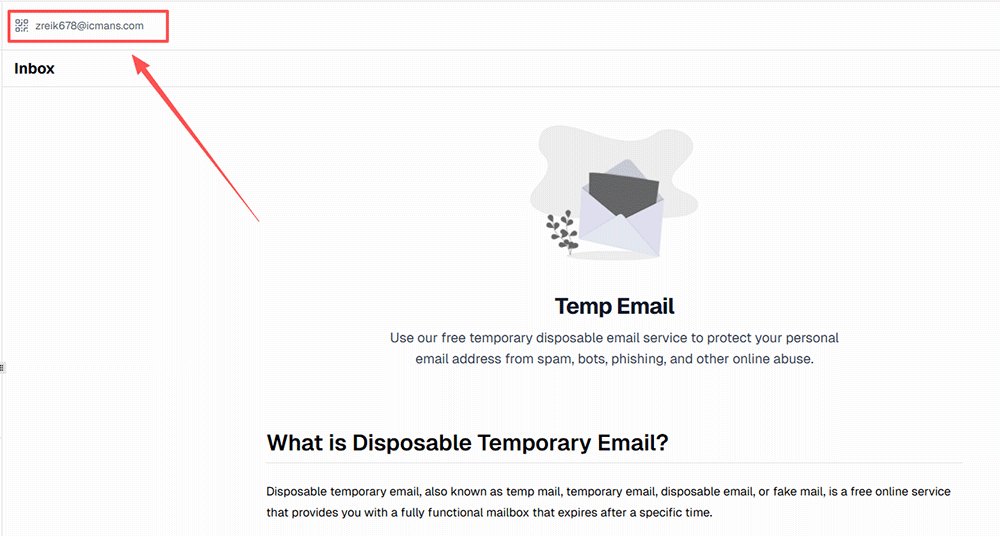
Bắt đầu bằng cách mở một dịch vụ email tạm thời đáng tin cậy và tạo ngay một địa chỉ email mới.
Cách tốt nhất:
- Sử dụng nhà cung cấp email tạm thời đáng tin cậy với các tên miền ổn định và tốc độ gửi nhanh
- Giữ hộp thư mở trong một tab riêng để truy cập nhanh
Tránh:
- Sử dụng lại các hộp thư công cộng hoặc dùng chung có thể đã bị gắn cờ
- Chọn các dịch vụ chất lượng thấp với tên miền chậm hoặc đã bị chặn
Một địa chỉ email sạch, mới sẽ cải thiện cơ hội nhận mã xác minh Facebook mà không bị chậm trễ.
Hành động nhanh: Nhận email sẵn sàng cho FB của bạn
Trước khi chuyển sang Bước 2, bạn cần một tên miền sạch, chưa bị gắn cờ. Hầu hết các danh sách đen công cộng cập nhật mỗi giờ — các tên miền của chúng tôi được làm mới hàng ngày để duy trì tỷ lệ chấp nhận của Facebook trên 75%.
👉 [Tạo email tạm thời riêng tư ngay tại TempEmail.cc]
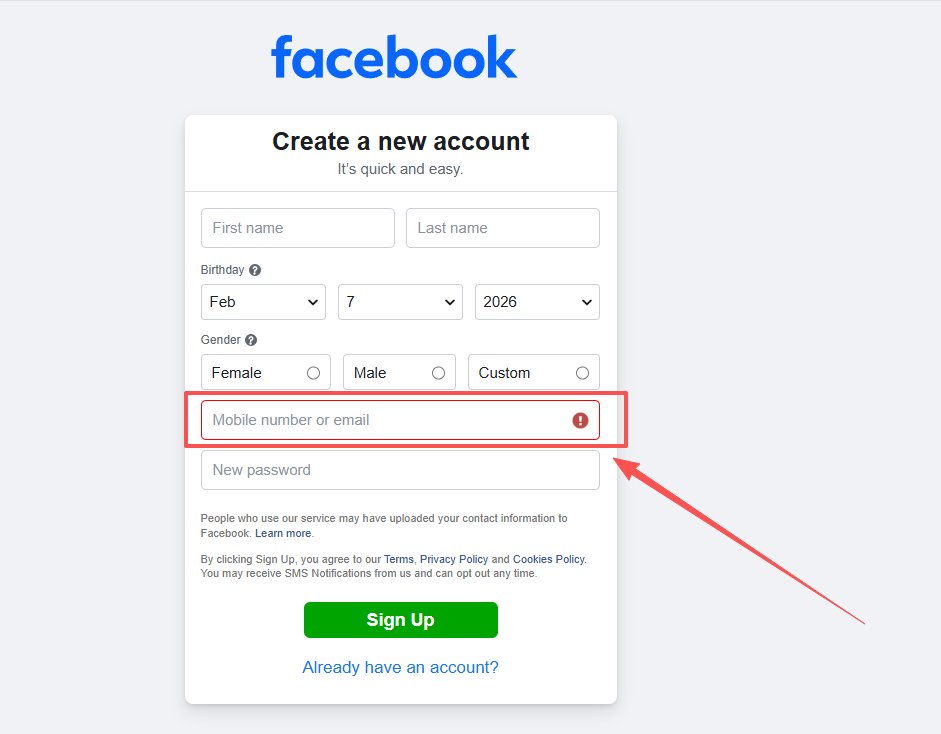
Bước 2 – Đăng ký trên Facebook
Truy cập trang đăng ký của Facebook và nhập địa chỉ email tạm thời của bạn như cách bạn làm với email bình thường.
Cách tốt nhất:
- Điền thông tin thực tế và nhất quán (tên, ngày sinh, v.v.)
- Hoàn thành biểu mẫu với tốc độ bình thường của con người
Tránh:
- Tạo nhiều tài khoản trong thời gian ngắn
- Sử dụng bot, tập lệnh hoặc công cụ tự động điền quá mức
Facebook giám sát các kiểu hành vi, vì vậy việc nhập liệu tự nhiên quan trọng hơn loại email.
Bước 3 – Nhận mã xác minh
Sau khi gửi thông tin chi tiết, Facebook sẽ gửi mã xác minh hoặc liên kết xác nhận đến hộp thư tạm thời của bạn.
Cách tốt nhất:
- Giữ hộp thư email tạm thời mở và hoạt động
- Làm mới một lần nếu email không xuất hiện ngay lập tức
Tránh:
- Nhấp vào “gửi lại mã” nhiều lần
- Thay đổi địa chỉ email giữa chừng
Việc thử lại quá nhiều lần có thể kích hoạt tính năng phát hiện thư rác và làm chậm quá trình gửi.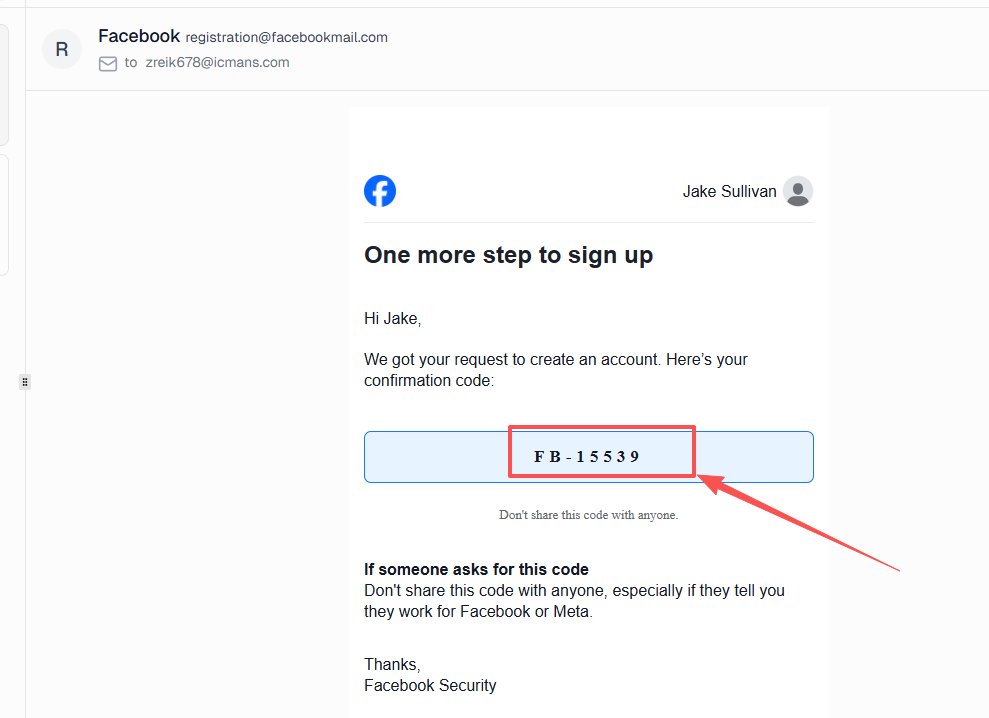
Bước 4 – Hoàn tất xác minh ngay lập tức
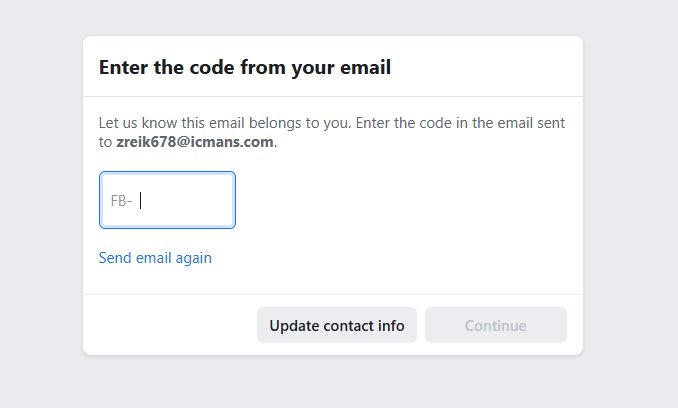
Nhập mã xác minh hoặc nhấp vào liên kết xác nhận để kích hoạt tài khoản của bạn.
Cách tốt nhất:
- Hoàn tất xác minh ngay khi email đến
- Kiểm tra kỹ mã trước khi gửi
Tránh:
- Trì hoãn quá trình (mã có thể hết hạn)
- Để việc đăng ký dang dở quá lâu
Việc hoàn tất nhanh chóng làm giảm khả năng hết hạn phiên làm việc hoặc các bước kiểm tra xác minh bổ sung.
Mẹo cuối cùng: Giữ mọi thứ nhất quán
Để có kết quả tốt nhất, hãy giữ địa chỉ IP, thiết bị và hành vi của bạn nhất quán trong suốt quá trình. Những thay đổi đột ngột có thể làm tăng điểm rủi ro của bạn, ngay cả khi mọi thứ khác trông có vẻ bình thường.
Mẹo chuyên nghiệp:
Hãy thực hiện đăng ký như một người dùng thực thụ — ổn định, đơn giản và tần suất thấp.
Temp Mail so với Gmail Alias so với Email thật (Cái nào tốt hơn cho Facebook?)
Việc chọn đúng loại email để đăng ký Facebook có thể ảnh hưởng trực tiếp đến tỷ lệ thành công, mức độ riêng tư và nguy cơ bị gắn cờ của bạn.
Mặc dù nhiều người dùng cho rằng tất cả các phương pháp email đều hoạt động giống nhau, nhưng có những khác biệt quan trọng trong cách Facebook đánh giá chúng — đặc biệt là khi nói đến xác minh và sự ổn định của tài khoản lâu dài.
Bảng so sánh
Bảng so sánh nhanh này giúp bạn chọn phương pháp email tốt nhất dựa trên mục tiêu của mình — quyền riêng tư, tỷ lệ thành công hoặc sự ổn định lâu dài.
| Phương pháp | Mức độ riêng tư | Mức độ rủi ro | Tỷ lệ thành công | Trường hợp sử dụng tốt nhất |
|---|---|---|---|---|
| Temp Mail | Cao | Trung bình | Trung bình | Kiểm thử, tài khoản tạm thời |
| Gmail Alias | Trung bình | Thấp | Cao | Tài khoản phụ |
| Email thật | Thấp | Thấp nhất | Cao nhất | Tài khoản chính |
Ý nghĩa của từng tùy chọn
Temp Mail (Email dùng một lần)
Email tạm thời cung cấp mức độ riêng tư cao nhất vì nó hoàn toàn ẩn danh và tự động xóa sau khi sử dụng. Tuy nhiên, tỷ lệ thành công ở mức trung bình vì một số tên miền có thể bị gắn cờ. Nó hoạt động tốt nhất cho việc kiểm thử, truy cập ngắn hạn hoặc tài khoản phụ, nhưng không dành cho các tài khoản bạn dự định giữ lâu dài.
Gmail Alias (ví dụ: [email protected])
Gmail alias là các biến thể của địa chỉ email chính của bạn. Chúng dễ sử dụng và được Facebook chấp nhận rộng rãi, dẫn đến tỷ lệ thành công cao. Tuy nhiên, chúng vẫn liên kết ngược lại với hộp thư chính của bạn, nghĩa là quyền riêng tư chỉ là một phần. Phương pháp này lý tưởng cho các hồ sơ phụ hoặc quản lý tài khoản.
Địa chỉ email thật
Sử dụng email thật mang lại độ tin cậy cao nhất và rủi ro thấp nhất về các vấn đề xác minh. Facebook hoàn toàn tin tưởng các nhà cung cấp email tiêu chuẩn, khiến đây là lựa chọn tốt nhất cho tài khoản cá nhân, doanh nghiệp hoặc tài khoản lâu dài. Sự đánh đổi là quyền riêng tư thấp hơn, vì danh tính thật và hộp thư của bạn có thể bị lộ trước thư rác hoặc theo dõi.
Điểm mấu chốt
Không có tùy chọn “tốt nhất” duy nhất — nó phụ thuộc vào mục tiêu của bạn.
- Muốn quyền riêng tư tối đa → sử dụng temp mail
- Muốn sự cân bằng → sử dụng Gmail alias
- Muốn sự ổn định tối đa → sử dụng email thật
Điểm mấu chốt:
Sử dụng temp mail một cách chiến lược, không mù quáng.
Các vấn đề thường gặp khi sử dụng Temp Mail cho Facebook (Và cách khắc phục)
Ngay cả khi bạn tuân thủ các phương pháp tốt nhất, bạn vẫn có thể gặp sự cố khi sử dụng temp mail để đăng ký Facebook. Hầu hết các vấn đề này không phải là ngẫu nhiên — chúng thường do uy tín tên miền, tín hiệu hành vi hoặc sự chậm trễ tạm thời của hệ thống.
Dưới đây là những vấn đề phổ biến nhất mà người dùng gặp phải, cùng với các cách khắc phục thực tế mà bạn có thể áp dụng ngay lập tức.
Không nhận được mã xác minh
Đây là vấn đề phổ biến nhất mà người dùng báo cáo khi sử dụng temp mail.
Tại sao nó xảy ra:
- Tên miền temp mail có thể bị gắn cờ hoặc bị giới hạn tốc độ
- Facebook trì hoãn gửi mã do phát hiện rủi ro
- Hộp thư không làm mới đúng cách
Cách khắc phục:
- Chuyển sang tên miền hoặc nhà cung cấp temp mail khác
- Làm mới hộp thư và đợi ít nhất 30–60 giây
- Chỉ nhấp “gửi lại mã” một lần để tránh các tín hiệu thư rác
Điều này giải quyết trực tiếp các tìm kiếm như “facebook không gửi mã temp mail” và cải thiện tỷ lệ thành công của bạn một cách nhanh chóng.
Tài khoản Facebook bị khóa hoặc xác minh thất bại
Đôi khi, ngay cả sau khi nhập mã, tài khoản có thể bị khóa tạm thời hoặc yêu cầu xác minh bổ sung.
Tại sao nó xảy ra:
- Quá nhiều lần thử đăng ký trong thời gian ngắn
- Địa chỉ IP đáng ngờ (VPN/proxy)
- Hành vi bất thường trong quá trình đăng ký
Cách khắc phục:
- Đợi vài giờ trước khi thử lại
- Tránh thay đổi địa chỉ IP liên tục
- Sử dụng phiên trình duyệt sạch và thử lại
Trong hầu hết các trường hợp, đây là một hạn chế tạm thời — không phải là lệnh cấm vĩnh viễn.
Tên miền Temp Mail bị chặn
Trong một số trường hợp, Facebook có thể không chấp nhận hoàn toàn một số tên miền temp mail nhất định.
Tại sao nó xảy ra:
- Tên miền đã bị lạm dụng rộng rãi và được thêm vào các bộ lọc nội bộ
- Khối lượng đăng ký lớn từ cùng một tên miền
Cách khắc phục:
- Tạo email tạm thời mới với tên miền khác
- Sử dụng nhà cung cấp chất lượng cao hơn với các tên miền xoay vòng
- Tránh sử dụng lại cùng một email nhiều lần
Đây là giải pháp chính cho các truy vấn “vấn đề xác minh temp mail facebook”.
Mẹo chuyên nghiệp: Giảm thiểu vấn đề trước khi chúng xảy ra
Hầu hết các vấn đề có thể tránh được bằng cách giữ hành vi của bạn ít rủi ro và nhất quán:
- Sử dụng một tài khoản cho mỗi phiên
- Tránh thử lại quá mức
- Giữ IP và thiết bị của bạn ổn định
Nếu temp mail thất bại, đó thường là tín hiệu cảnh báo — không phải do chính công cụ đó.
Các dịch vụ Temp Mail tốt nhất cho Facebook (Lựa chọn nhanh)
Việc chọn một nhà cung cấp email tạm thời đáng tin cậy có thể tạo ra sự khác biệt đáng kể trong việc bạn có nhận được mã xác minh Facebook một cách suôn sẻ hay không. Thay vì liệt kê hàng chục tùy chọn, dưới đây là một vài lựa chọn nhanhcác thủ thuật thường được sử dụng và nhìn chung hoạt động hiệu quả.
- TempEmail.cc — Cung cấp tính năng làm mới hộp thư đến nhanh chóng, tên miền sạch và không yêu cầu đăng ký, biến nó thành lựa chọn thiết thực để xác minh Facebook nhanh chóng.
- temp-mail.org — Một dịch vụ email dùng một lần được sử dụng rộng rãi với khả năng gửi thư ổn định, mặc dù một số tên miền đôi khi có thể bị giới hạn tốc độ.
- temp-mail.io — Cung cấp quyền truy cập hộp thư tạm thời đơn giản với độ tin cậy khá tốt cho các nhu cầu đăng ký cơ bản.
Nếu một dịch vụ không hoạt động, việc chuyển đổi nhà cung cấp hoặc tên miền thường giải quyết vấn đề ngay lập tức.
Kết luận cuối cùng: Có nên dùng Temp Mail cho Facebook không?
Vậy, việc sử dụng email tạm thời cho Facebook có thực sự đáng không?
✔ Có — cho các trường hợp sử dụng ngắn hạn và ít rủi ro.
Nếu bạn đang tạo tài khoản thử nghiệm, hồ sơ phụ hoặc đăng ký để truy cập tạm thời, email tạm thời là cách nhanh chóng và hiệu quả để bảo vệ hộp thư chính của bạn khỏi thư rác và theo dõi.
❌ Không — cho các tài khoản dài hạn hoặc quan trọng.
Nếu tài khoản gắn liền với danh tính cá nhân, hoạt động kinh doanh hoặc quảng cáo, sử dụng email thật là lựa chọn an toàn và ổn định hơn.
Bạn nên làm gì tiếp theo
Nếu mục tiêu của bạn là quyền riêng tư, tốc độ và sự đơn giản, email tạm thời vẫn là một trong những cách dễ dàng nhất để bắt đầu — không cần đăng ký, không ràng buộc và không gây rủi ro cho hộp thư thật của bạn.
Hãy tạo một email tạm thời và đăng ký Facebook mà không cần để lộ hộp thư thật của bạn.
Câu hỏi thường gặp: Email tạm thời cho Facebook
1. Facebook có cho phép sử dụng email tạm thời không?
Có, Facebook không cấm rõ ràng các địa chỉ email tạm thời. Tuy nhiên, họ đánh giá hành vi người dùng, uy tín IP và mô hình đăng ký thay vì chỉ dựa vào loại email. Email tạm thời có thể hoạt động cho các trường hợp ít rủi ro như thử nghiệm hoặc tài khoản phụ, nhưng việc lạm dụng — chẳng hạn như đăng ký hàng loạt hoặc hoạt động đáng ngờ — có thể dẫn đến các vấn đề xác minh hoặc hạn chế tài khoản.
2. Tại sao Facebook không gửi mã xác minh?
Nếu Facebook không gửi mã xác minh đến email tạm thời của bạn, thường là do bộ lọc tên miền hoặc phát hiện rủi ro. Một số tên miền email dùng một lần có thể đã bị gắn cờ, hoặc việc yêu cầu lặp đi lặp lại có thể gây ra sự chậm trễ. Hãy thử chuyển sang nhà cung cấp email tạm thời khác, đợi 30–60 giây và tránh nhấp vào nút “gửi lại mã” nhiều lần.
3. Tôi có thể khôi phục tài khoản Facebook bằng email tạm thời không?
Việc khôi phục tài khoản Facebook bằng email tạm thời rất khó khăn và thường không đáng tin cậy. Vì email tạm thời sẽ hết hạn hoặc không thể truy cập vĩnh viễn, bạn có thể mất quyền truy cập vào mã khôi phục hoặc liên kết đặt lại mật khẩu. Đối với các tài khoản dài hạn, bạn nên sử dụng địa chỉ email thật để đảm bảo có thể khôi phục tài khoản nếu cần.
4. Email tạm thời có an toàn cho mạng xã hội không?
Email tạm thời nhìn chung an toàn cho việc sử dụng mạng xã hội ngắn hạn hoặc ít rủi ro, chẳng hạn như thử nghiệm hoặc tạo tài khoản phụ. Nó giúp bảo vệ hộp thư chính của bạn khỏi thư rác và theo dõi. Tuy nhiên, không nên sử dụng nó cho các tài khoản quan trọng hoặc dài hạn vì bạn có thể mất quyền truy cập nếu hộp thư tạm thời hết hạn hoặc không còn khả dụng.
5. Facebook có thể phát hiện email tạm thời không?
Facebook có thể xác định một số tên miền email tạm thời, đặc biệt là những tên miền bị lạm dụng rộng rãi. Tuy nhiên, việc phát hiện không chỉ dựa trên chính email đó. Hệ thống của Facebook tập trung nhiều hơn vào các tín hiệu hành vi, chẳng hạn như uy tín IP và hoạt động đăng ký. Email tạm thời vẫn có thể hoạt động nếu hành vi tổng thể có vẻ bình thường và ít rủi ro.