Já usou um temp mail para se cadastrar em um site...
apenas para nunca receber o código de verificação?
Ou pior — tudo funciona no início, mas depois você percebe:
- Você não consegue acessar a caixa de entrada novamente
- O e-mail já desapareceu
- Sua conta está bloqueada para sempre
A maioria das pessoas acha que usar temp mail é simples: basta copiar, colar e esperar.
Mas, na realidade, é exatamente por isso que tantos usuários enfrentam problemas como:
- temp mail não recebendo e-mails
- códigos de verificação nunca chegando
- contas tornando-se inacessíveis
De acordo com pesquisas sobre entregabilidade de e-mail e práticas de filtragem do setor, a reputação do domínio é um dos principais fatores por trás das falhas de e-mail de verificação em serviços de e-mail descartável. Em muitos casos, as mensagens são bloqueadas antes da entrega devido a sistemas de filtragem em nível de domínio, em vez de erros reais de transmissão.
Usar temp mail é fácil. Usá-lo corretamente é o que a maioria dos guias não ensina.
Neste guia, você aprenderá como usar o temp mail de forma segura e eficaz em 2026, evitar erros comuns e garantir que seus e-mails de verificação realmente cheguem.
O que é Temp Mail? (Visão geral rápida antes de começar)
Um temp mail (endereço de e-mail temporário) é uma caixa de entrada de curta duração que permite receber e-mails sem usar seu endereço de e-mail pessoal ou criar uma conta.
É comumente usado para registros rápidos online, códigos de verificação e para evitar spam em sua caixa de entrada principal.
Ao contrário de um serviço de e-mail tradicional, um endereço de temp mail não é destinado a comunicações de longo prazo.
Como o Temp Mail funciona?
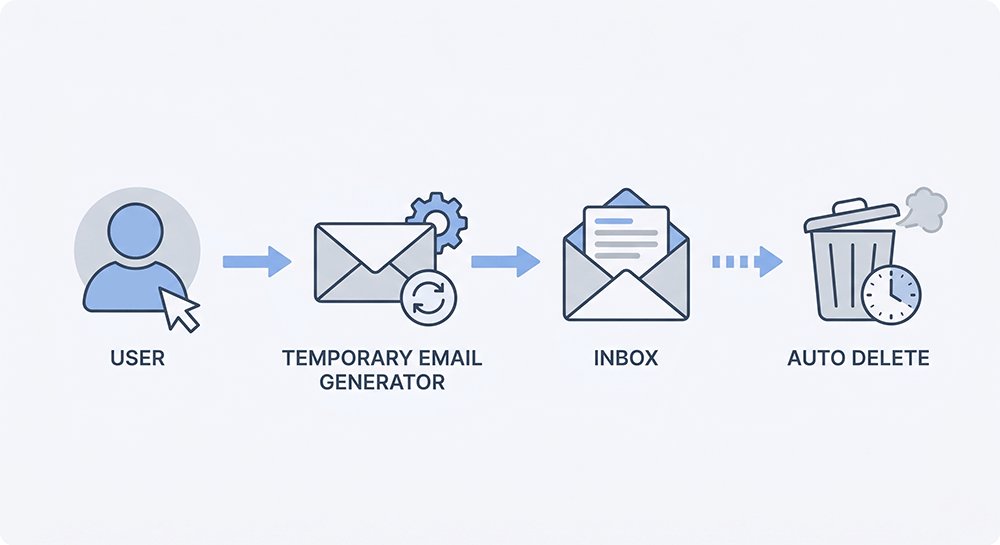
Os serviços de temp mail são projetados para serem simples e temporários. A maioria deles funciona através do seguinte sistema:
1. Geração de e-mail temporário instantânea
Um endereço de e-mail aleatório é criado imediatamente quando você abre o serviço.
2. Armazenamento temporário na caixa de entrada
Os e-mails recebidos são armazenados em uma caixa de entrada temporária que existe apenas por um curto período.
3. Domínios efêmeros
Esses endereços de e-mail geralmente são gerados a partir de domínios descartáveis ou temporários que não estão vinculados à sua identidade.
4. Expiração automática
Tanto a caixa de entrada quanto as mensagens são excluídas automaticamente após um tempo limitado (dependendo do provedor).
Por que as pessoas usam Temp Mail?
A maioria dos usuários recorre ao temp mail por um motivo simples: privacidade e controle de spam.
Casos de uso comuns incluem:
- cadastrar-se em sites sem usar um e-mail real
- receber códigos de verificação
- baixar conteúdo sem risco de spam
- testar aplicativos ou serviços online
Limitação importante
Embora o temp mail seja conveniente, nem sempre é confiável.
Alguns sites são bloqueados ativamente por plataformas que usam sistemas de filtragem DEA e pontuação de reputação de domínio e, em muitos casos:
- os e-mails de verificação podem nunca chegar
- as caixas de entrada podem expirar muito rapidamente
- o acesso não pode ser recuperado posteriormente
Agora que você entende o que é temp mail e como ele funciona, vamos ver como usá-lo passo a passo.
Como usar Temp Mail (Guia passo a passo)
Esta seção mostra o fluxo de trabalho mais confiável que os usuários realmente seguem em 2026 para evitar falhas de verificação e perda da caixa de entrada.
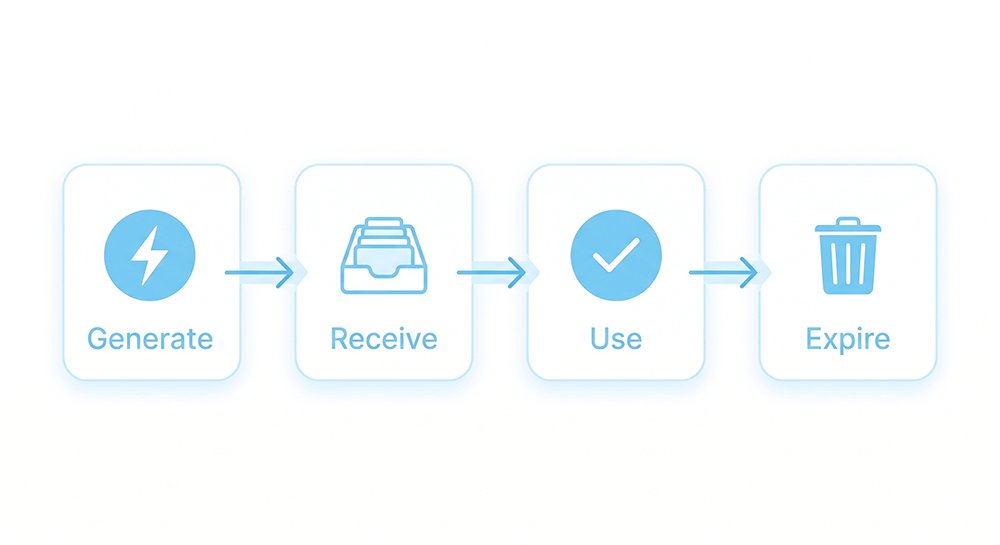
Como usar Temp Mail: Resumo rápido de 4 etapas
- Escolha um provedor: Escolha um serviço de temp mail com domínios de alta reputação.
- Copie o endereço: Clique no endereço de e-mail gerado para salvá-lo na sua área de transferência.
- Solicite a verificação: Cole o endereço no formulário de cadastro e clique em 'Enviar código'.
- Verifique sua conta: Verifique a caixa de entrada temporária, abra o e-mail e clique no link.
Etapa 1: Escolha um provedor de Temp Mail confiável
Comece selecionando um serviço de temp mail confiável.
Nem todos os provedores funcionam da mesma forma — alguns domínios são frequentemente bloqueados por sites.
O que procurar:
- Múltiplas opções de domínio (não apenas um domínio fixo)
- Geração rápida de caixa de entrada
- Sistema estável de entrega de e-mail
Evite:
- Domínios usados em excesso ou suspeitos como
.xyzou.top - Ferramentas que não atualizam a caixa de entrada automaticamente
Dica profissional: Se você está cansado de ser rejeitado por sites como Discord ou Netflix, procure um provedor que ofereça Domínios Privados. Ferramentas como [TempEmail.cc] fornecem caixas de entrada de alta reputação que agem como contas de e-mail reais, aumentando significativamente sua taxa de sucesso no cadastro.
Etapa 2: Gere seu endereço de e-mail temporário
Assim que você abrir o serviço, um endereço de e-mail temporário será gerado automaticamente.
Neste ponto:
- Copie o endereço de e-mail
- Mantenha a página aberta
- Não atualize, a menos que seja necessário
A maioria das caixas de entrada de temp mail é baseada em sessão, o que significa que elas existem apenas enquanto a guia estiver ativa.
No entanto, alguns provedores implementam a recuperação de sessão baseada em cookies, o que permite que a caixa de entrada persista após reinicializações do navegador e reduz a chance de perder e-mails recebidos.
Etapa 3: Insira o e-mail e solicite o código de verificação
Cole o e-mail temporário no formulário de cadastro do site ou aplicativo.
Então:
- Clique em “Enviar código” ou “Verificar e-mail”
- Aguarde alguns segundos para a mensagem chegar
- Evite clicar em reenviar várias vezes (isso pode atrasar a entrega)
Em muitos casos, o e-mail chega instantaneamente — mas podem ocorrer atrasos se o domínio estiver sinalizado ou se o tráfego estiver alto.
Etapa 4: Abra o e-mail e conclua a verificação
Assim que o e-mail aparecer na sua caixa de entrada:
- Abra a mensagem
- Copie o código de verificação ou clique no link de confirmação
- Conclua o processo de registro
Nesta fase, sua conta foi criada com sucesso.
⚠️ Aviso: Você precisará desta conta mais tarde?
Esta é a etapa que a maioria dos usuários ignora — e onde os problemas geralmente começam.
Se você precisar:
- fazer login novamente mais tarde
- receber futuros e-mails de verificação
Uma caixa de entrada de temp mail básica pode não ser suficiente.
Alguns e-mails temporários expiram imediatamente após o término da sessão, o que significa que você não poderá recuperar o acesso posteriormente.
Embora o processo pareça simples, a maioria dos usuários ainda comete alguns erros comuns que podem impedir o funcionamento adequado do temp mail.
Por que o Temp Mail não está funcionando? (Os 3 motivos reais)
Usar temp mail parece simples — mas se você já enfrentou um problema de temp mail não funcionando, provavelmente viu erros como "E-mail inválido" ou uma caixa de entrada completamente vazia. Entender por que isso acontece é o primeiro passo para contornar a segurança moderna dos sites.
1. Lista negra de domínios (O domínio "queimado")
- O problema: Grandes plataformas (como OpenAI, Netflix ou LinkedIn) mantêm bancos de dados ativos de DEA (Endereço de E-mail Descartável). Se o seu temp mail usa um domínio público comum (por exemplo,
.xyz,.topou.temp-mail.org), é provável que ele esteja pré-bloqueado. - A maioria das falhas de temp mail é causada por Lista negra de domínios, onde os sites rejeitam automaticamente sufixos de e-mail descartáveis conhecidos para evitar contas de bots.
Provedores de e-mail e plataformas SaaS geralmente dependem de sistemas de reputação de domínio, como Spamhaus DBL e listas de bloqueio DEA internas, para filtrar e-mails descartáveis.
**[Dica profissional]**: Verifique se o seu provedor oferece "Domínios Exclusivos" que parecem e-mails corporativos ou pessoais padrão.
2. Impressão digital de IP e navegador
- O problema: Não é apenas o e-mail; é você. Se você está tentando criar várias contas a partir do mesmo IP ou seu navegador revela um comportamento "semelhante a um bot", o site pode ignorar seu e-mail de verificação.
- A lógica: O site aceita o e-mail na página de cadastro, mas silenciosamente se recusa a enviar o código para sua caixa de entrada.
3. Caixa de entrada expirou antes da chegada do e-mail
- O problema: Sites de alto tráfego geralmente têm uma Latência de entrega de 5 a 15 minutos para códigos de verificação. Se sua sessão expirar ou você atualizar a página acidentalmente após 10 minutos, o e-mail chegará a um endereço "morto".
- É por isso que especialistas usam serviços de temp mail com Recuperação de conta ou Retenção de caixa de entrada de 24 horas para garantir que nunca fiquem bloqueados durante um atraso.
Ainda não consegue receber seu código?
A maioria das correções básicas não funcionará se um site tiver sinalizado a impressão digital do seu navegador. Analisamos os filtros anti-spam de mais de 50 plataformas populares para encontrar as soluções reais.
Leia nosso Guia Avançado: [Temp Mail não está funcionando? 5 correções para receber códigos de verificação instantaneamente (2026)]
Onde o Temp Mail funciona (e onde ele falha)
Nem todos os sites são criados da mesma forma. Alguns aceitam endereços temporários para aumentar o número de usuários, enquanto outros implantam sistemas de segurança de milhões de dólares para bloqueá-los. Saber onde usar seu temp mail pode economizar horas de frustração.
Os melhores casos de uso (Alta taxa de sucesso)
Se você está apenas procurando contornar um "cadastro forçado" para ler um artigo ou baixar um arquivo, o temp mail é seu melhor amigo.
- Fóruns e comunidades de nicho: A maioria dos fóruns e blogs independentes possui medidas anti-spam básicas que são facilmente contornadas por e-mails descartáveis padrão.
- Downloads de arquivos únicos: Perfeito para aqueles popups de "insira o e-mail para receber o link".
- Newsletters e códigos de cupom: Ótimo para conseguir um desconto de 10% sem assinar sua vida para uma lista de marketing.
A área cinzenta (Taxa de sucesso média)
- Ferramentas de IA e testes de SaaS: Usar temp mail para OpenAI (ChatGPT) ou plataformas SaaS semelhantes é uma questão de sorte. Esses sites atualizam frequentemente sua lista de "Domínios na lista negra".
- [Dica profissional]: Se o seu primeiro endereço for rejeitado, tente um provedor que ofereça "Domínios Premium" como
.comou.netem vez de.xyz.
Plataformas de alto risco (Baixa taxa de sucesso)
- Plataformas de mídia social: Usar temp mail para Instagram, Facebook ou X (Twitter) é altamente arriscado. Mesmo que você consiga se cadastrar, essas plataformas frequentemente disparam um banimento por "Verificação de Telefone" ou "Atividade Suspeita" em poucos minutos.
- Serviços Financeiros e Bancários: Nunca use e-mail temporário para PayPal, corretoras de criptomoedas ou bancos. Se você perder o acesso à caixa de entrada, perderá seu dinheiro.
Tabela de Resumo: Matriz de Compatibilidade de E-mail Temporário 2026
O sucesso do e-mail temporário não é aleatório — ele depende amplamente do tipo de plataforma com a qual você está interagindo.
Diferentes sites aplicam diferentes níveis de filtragem de e-mail, verificações de reputação de domínio e proteção contra spam.
A tabela abaixo resume como o e-mail temporário funciona em categorias comuns de plataformas.
| Tipo de Plataforma | Taxa de Sucesso | Exemplos | Recomendação de Especialista |
|---|---|---|---|
| Sites Básicos | ✅ Alta | Fóruns, Blogs, Cupons | E-mail temporário padrão funciona perfeitamente aqui. |
| IA e SaaS | ⚠️ Média | ChatGPT, Canva, Midjourney | Use Domínios Premium para evitar erros de "E-mail não suportado". |
| Redes Sociais | ❌ Baixa | Instagram, Facebook, X | Alto risco de banimento instantâneo; requer IP limpo e domínios privados. |
| Financeiro | 🚫 Zero | PayPal, Internet Banking | NÃO USE. Mantenha seu endereço de e-mail principal e permanente. |
Conselhos de Especialistas para Cadastros de Alta Segurança
Se você está tentando se cadastrar em ferramentas de IA como a OpenAI ou plataformas SaaS premium, domínios temporários padrão como .xyz ou .info são quase sempre bloqueados pelo firewall deles.
Para aumentar sua taxa de sucesso, opte sempre por um provedor que ofereça "Domínios Residenciais" ou "Caixas de Entrada Privadas". Em nossos testes, o uso de um domínio temporário privado reduziu os problemas de "Conta Sinalizada" em mais de 85% em comparação com provedores públicos.
4 Erros Críticos a Evitar ao Usar E-mail Temporário (Checklist de Segurança)
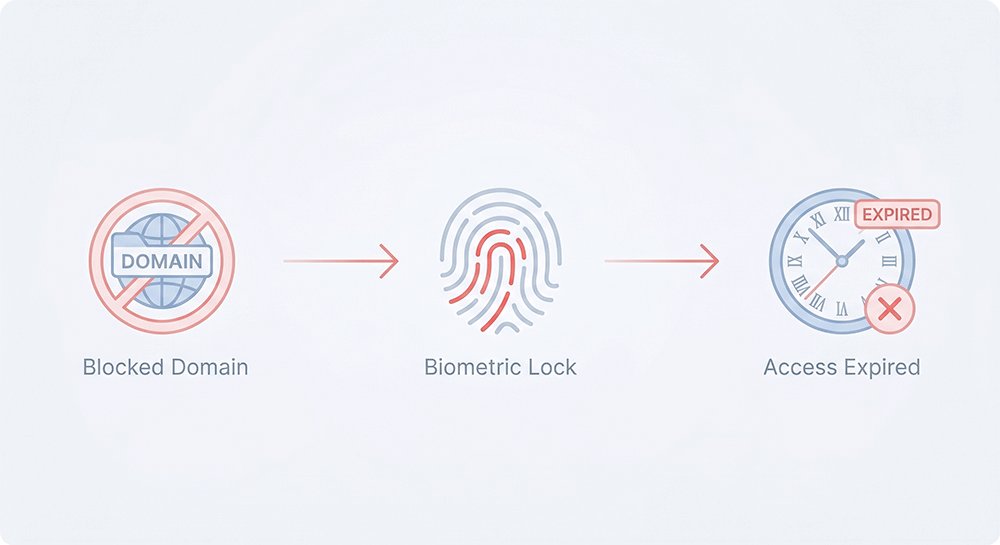
Mesmo quando você entende como o e-mail temporário funciona, a maioria das falhas não vem do sistema em si — elas vêm de como ele é usado.
Pequenos erros podem levar a e-mails de verificação perdidos, perda de acesso à caixa de entrada ou até mesmo bloqueios permanentes de conta.
Aqui estão os 4 erros mais críticos que você deve evitar se quiser que o e-mail temporário funcione de forma confiável.
❌ Erro 1: Usar Caixas de Entrada Públicas para Informações Sensíveis
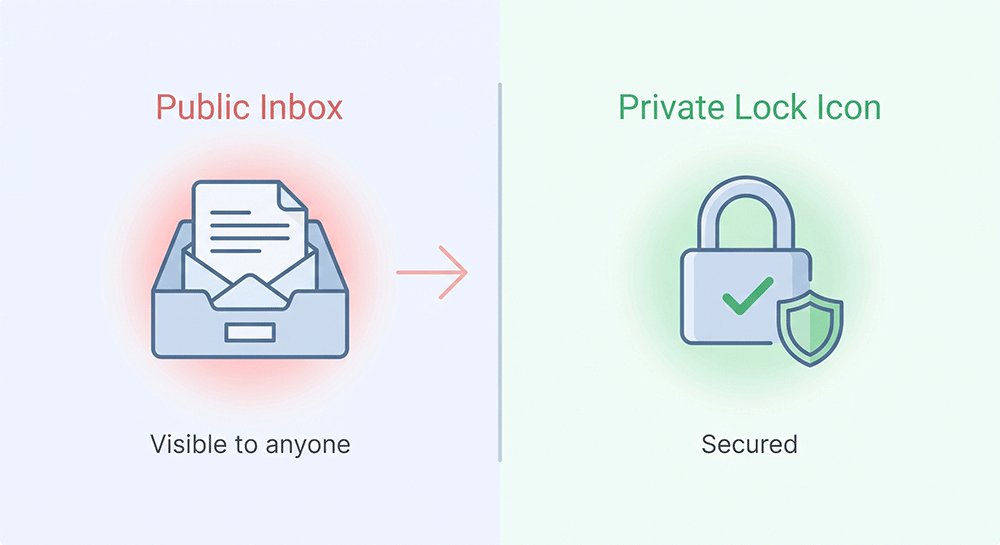
Muitos serviços de e-mail temporário gratuitos usam sistemas de caixa de entrada pública, o que significa que qualquer pessoa com o mesmo link ou ID da caixa de entrada pode visualizar os e-mails recebidos.
Isso cria um sério risco à privacidade, especialmente ao receber:
- códigos de verificação
- links de login de conta
- e-mails de redefinição de senha
Risco: Suas informações sensíveis podem ser expostas a terceiros.
❌ Erro 2: Registrar Contas Importantes ou de Longo Prazo
O e-mail temporário foi projetado apenas para uso de curto prazo.
Usá-lo para contas importantes, como:
- serviços bancários ou financeiros
- contas de redes sociais que você pretende manter
- plataformas baseadas em assinatura
pode levar a um grande problema:
Você pode não conseguir recuperar sua conta mais tarde.
❌ Erro 3: Ignorar a Reputação do Domínio
Nem todos os domínios de e-mail temporário são tratados da mesma forma.
Muitos sites bloqueiam ativamente domínios de e-mail descartáveis conhecidos usando sistemas de reputação de domínio, como o DBL do Spamhaus.
Se você ignorar a reputação do domínio, poderá enfrentar:
- falhas no cadastro
- e-mails de verificação ausentes
- rejeição instantânea por parte das plataformas
Este é um dos motivos mais comuns para problemas de "e-mail temporário não funcionando".
❌ Erro 4: Não Salvar as Informações de Acesso (Token ou ID de Sessão)
Alguns serviços de e-mail temporário fornecem um token ou chave de acesso que permite reabrir a mesma caixa de entrada mais tarde.
A maioria dos usuários ignora isso.
Como resultado:
- a caixa de entrada não pode ser recuperada
- e-mails de verificação são perdidos
- o acesso à conta torna-se impossível
Por que isso é importante
Esses erros não são apenas problemas menores — eles determinam diretamente se o e-mail temporário realmente funciona para você ou falha completamente.
A maioria das ferramentas "gratuitas" não oferece recursos de recuperação, persistência ou proteção de conta.
O E-mail Temporário é Seguro? A Verdade Sobre a Privacidade
Quando as pessoas começam a usar e-mail temporário, uma das preocupações mais comuns é se o e-mail temporário é realmente seguro de usar.
A resposta não é simplesmente sim ou não — depende de como você o usa e para que você o usa.
Quando o E-mail Temporário é Seguro de Usar
O e-mail temporário é geralmente seguro quando usado para atividades de baixo risco e curto prazo. Por exemplo:
Funciona bem para registros únicos, cadastros em sites que você não pretende visitar com frequência ou para receber códigos de verificação sem expor seu endereço de e-mail real.
Nesses casos, o e-mail temporário oferece uma camada simples de privacidade e ajuda a evitar spam na sua caixa de entrada principal.
Quando Você Deve Evitar Usar E-mail Temporário
No entanto, o e-mail temporário não deve ser usado para contas importantes ou sensíveis.
Isso inclui serviços bancários, plataformas financeiras ou qualquer conta que você possa precisar recuperar mais tarde.
Como a maioria das caixas de entrada de e-mail temporário expira após um curto período, perder o acesso significa que você pode perder permanentemente o controle da conta vinculada a esse e-mail.
A Realidade da Privacidade que a Maioria das Pessoas Ignora
Outro ponto importante é que nem todos os serviços de e-mail temporário são igualmente privados.
Alguns usam sistemas de caixa de entrada pública, o que significa que qualquer pessoa com o mesmo identificador de caixa de entrada poderia potencialmente visualizar os e-mails recebidos.
Outros podem oferecer um acesso um pouco mais privado, mas, em geral, o e-mail temporário não foi projetado para funcionar como um serviço de e-mail pessoal seguro.
Em termos simples, o e-mail temporário é seguro para conveniência — mas não para comunicações críticas de segurança.
Se você deseja uma análise mais profunda dos riscos de privacidade e rastreabilidade, cobrimos isso em detalhes em nosso guia completo sobre O E-mail Temporário é Seguro.
Mas a segurança é apenas parte do cenário — outra questão importante é se você ainda conseguirá acessar sua caixa de entrada mais tarde.
Como Usar E-mail Temporário Sem Perder o Acesso à Conta
A maioria das pessoas não percebe isso até que seja tarde demais.
Elas usam um e-mail temporário para se cadastrar em um site, concluem a verificação com sucesso e pensam que está tudo bem.
Mas, mais tarde, quando tentam fazer login novamente ou redefinir a senha, o problema aparece:
Elas não conseguem mais receber o código de verificação — e, em muitos casos, perdem o acesso à conta inteiramente.
Este é um dos problemas mais comuns com serviços de e-mail temporário padrão.
Por que isso acontece
A maioria das ferramentas básicas de e-mail temporário é projetada apenas para uso de curto prazo.
Isso significa que:
- as caixas de entrada podem expirar após alguns minutos ou horas
- não há sistema de login para restaurar o acesso
- e-mails de verificação não podem ser recuperados mais tarde
Assim que a sessão termina, o endereço de e-mail é efetivamente perdido.
Como evitar perder o acesso
Se você deseja evitar esse problema, precisa escolher uma solução de e-mail temporário que ofereça mais do que apenas uma caixa de entrada única.
Procure serviços que suportem:
- acesso privado à caixa de entrada (não links públicos)
- reentrada baseada em login ou senha
- recuperação de caixa de entrada ou retenção de sessão
- domínios estáveis e menos bloqueados com frequência
Esses recursos permitem que você retorne à mesma caixa de entrada mais tarde, caso precise receber outro e-mail de verificação.
A Diferença Chave que a Maioria dos Usuários Ignora
Existem, na verdade, dois tipos de ferramentas de e-mail temporário:
Uma é projetada para uso instantâneo e único.
A outra é projetada para acesso repetido com proteção de privacidade.
A diferença entre elas determina se você pode recuperar sua conta mais tarde — ou perdê-la permanentemente.
Dicas Profissionais para Aumentar a Taxa de Sucesso do E-mail Temporário
Embora o e-mail temporário seja projetado para funcionar instantaneamente, muitos usuários ainda encontram problemas onde os e-mails de verificação não chegam ou o serviço é bloqueado.
Na maioria dos casos, isso não é uma falha técnica — é como o sistema interage com os filtros dos sites e as regras de detecção de e-mail.
Aqui estão algumas dicas práticas que podem melhorar significativamente sua taxa de sucesso ao usar e-mail temporário.
1. Use Domínios Menos Comuns ou Alternativos
Um dos motivos mais comuns para a falha do e-mail temporário é que o domínio já é reconhecido e bloqueado por certos sites.
Para melhorar o sucesso:
- tente alternar para domínios alternativos, se disponíveis
- evite padrões de domínio excessivamente populares ou reutilizados com frequência
- escolha provedores que ofereçam múltiplas opções de domínio
Um domínio menos comum geralmente tem mais chances de contornar filtros de e-mail básicos.
2. Evite Atualizar a Caixa de Entrada com Muita Frequência
As caixas de entrada de e-mail temporário geralmente são baseadas em sessão e leves.
Atualizar com muita frequência pode, às vezes:
- redefinir a sessão
- atrasar mensagens recebidas
- ou causar problemas temporários de sincronização
Na maioria dos casos, é melhor esperar alguns segundos em vez de atualizar repetidamente.
3. Não Reutilize o Mesmo IP para Múltiplos Cadastros
Alguns sites rastreiam padrões de comportamento, não apenas endereços de e-mail.
Se múltiplos cadastros vierem do mesmo endereço IP em um curto espaço de tempo, isso pode disparar a proteção contra spam.
Para reduzir problemas:
- evite registros repetidos rapidamente
- não realize cadastros em massa a partir da mesma rede
- espace as tentativas sempre que possível
4. Use Recursos de Caixa de Entrada Privada Quando Disponíveis
Nem todos os serviços de e-mail temporário são iguais.
Alguns oferecem caixas de entrada públicas básicas, enquanto outros fornecem:
- acesso privado à caixa de entrada
- recuperação baseada em login ou token
- sessões persistentes
Esses recursos não apenas melhoram a privacidade, mas também aumentam a confiabilidade ao receber e-mails de verificação.
O sucesso do e-mail temporário não é apenas gerar um endereço de e-mail — é sobre como você o usa dentro dos limites dos sistemas de detecção dos sites.
Pequenos ajustes na escolha do domínio, no tempo e no método de acesso podem melhorar significativamente as taxas de sucesso de entrega.
FAQ: Como Usar E-mail Temporário (Guia Completo Explicado)
Se vocêSe você está aprendendo a usar e-mail temporário, estas são as perguntas mais comuns dos usuários — especialmente ao lidar com problemas de verificação, e-mails bloqueados ou perda de acesso à caixa de entrada.
Entender essas respostas ajudará você a evitar erros comuns e a usar o e-mail temporário de forma mais confiável em situações reais.
P1: Por que meu e-mail temporário não está recebendo mensagens?
Isso geralmente acontece por um de dois motivos.
Em muitos casos, o site no qual você está se cadastrando já bloqueou o domínio do e-mail temporário, portanto, o e-mail de verificação nunca é entregue.
Em outros casos, o e-mail pode até ser enviado, mas sofre atrasos ou é filtrado devido a sistemas de entregabilidade de e-mail e mecanismos de filtragem de tráfego.
Em resumo, o problema geralmente não é a sua caixa de entrada — é a detecção de domínio ou a filtragem de e-mail por parte do site.
P2: Os sites conseguem detectar e-mail temporário?
Sim, muitos sites conseguem detectar serviços de e-mail temporário.
Eles normalmente usam dois métodos principais:
- Verificações de reputação de domínio (reconhecendo domínios de e-mail descartáveis conhecidos)
- Sinais comportamentais (como cadastros repetidos ou padrões de atividade suspeitos)
Por causa disso, algumas plataformas podem bloquear completamente o e-mail temporário durante o registro.
P3: Quanto tempo dura um e-mail temporário?
A vida útil de uma caixa de entrada de e-mail temporário depende do provedor.
A maioria dos serviços de e-mail temporário dura de alguns minutos a 24 horas.
Assim que a sessão expira:
- a caixa de entrada é excluída
- todos os e-mails são removidos
- o acesso não pode ser restaurado (a menos que o serviço suporte recursos de recuperação)
P4: Usar e-mail temporário é legal?
Sim, usar e-mail temporário é legal na maioria dos países.
É simplesmente uma ferramenta de privacidade que permite aos usuários evitar spam e proteger seu endereço de e-mail real.
No entanto, alguns sites podem restringir ou proibir o uso de e-mails temporários em seus próprios termos de serviço.
Portanto, embora seja legal, nem sempre pode ser aceito por todas as plataformas.
P5: Posso usar e-mail temporário para códigos de verificação?
Sim, o e-mail temporário pode ser usado para receber códigos de verificação.
No entanto, o sucesso não é garantido.
Depende de fatores como:
- se o domínio está bloqueado
- quão rigorosos são os filtros de e-mail do site
- quão rápido o e-mail é entregue
Para plataformas de alta segurança, é mais provável que os e-mails de verificação sejam rejeitados ou filtrados.
P6: O e-mail temporário é rastreável?
Embora um e-mail temporário proteja sua identidade do site no qual você está se cadastrando, você deve ter duas coisas em mente:
- Registros do Provedor: Alguns provedores gratuitos de baixa qualidade podem registrar seu endereço IP. Se a privacidade for sua prioridade máxima, escolha um serviço com uma política rigorosa de não registro (no-logs).
- Pegada Digital: Mesmo sem um e-mail "real", os metadados do seu navegador (impressão digital) ainda podem vincular suas atividades.
- Dica de Especialista: Para máxima anonimato, use uma VPN junto com um provedor de e-mail temporário privado que criptografe sua sessão.
Agora você deve ter uma compreensão clara de como usar o e-mail temporário, o que pode dar errado e como evitar armadilhas comuns.
Na prática, resultados confiáveis dependem da configuração que você escolhe — e se ela foi projetada para entrega consistente e acesso de longo prazo.
Uma maneira mais inteligente de usar e-mail temporário
A maioria dos problemas com e-mail temporário não vem da ferramenta em si — eles vêm do uso da configuração errada.
Serviços básicos de e-mail temporário são criados para uso de curto prazo, e é por isso que as caixas de entrada desaparecem, os e-mails de verificação falham e o acesso é frequentemente perdido.
Se você deseja que o e-mail temporário funcione de forma confiável, a chave é escolher uma configuração que suporte entrega estável e acesso persistente.
No final das contas, o e-mail temporário é tão confiável quanto o sistema por trás dele.
Se a confiabilidade é importante para você, escolha uma solução de e-mail temporário projetada para entrega consistente e acesso de longo prazo.