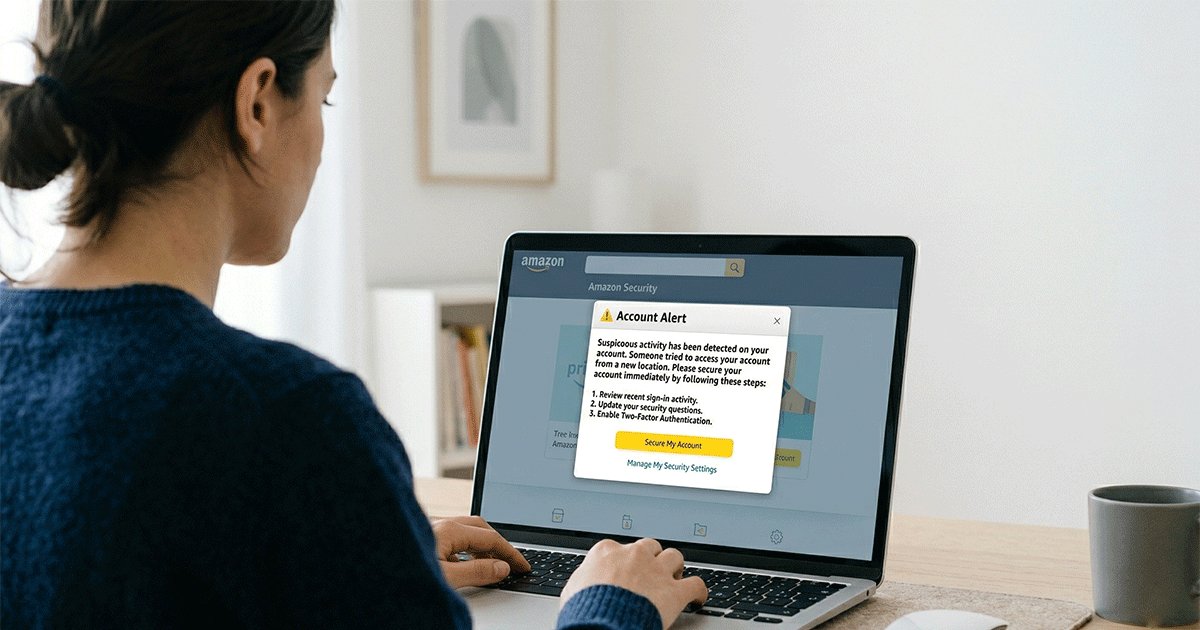
Have you recently received an “Amazon account attackers warning” email or message asking you to verify your account or confirm a suspicious order?
You’re not alone. In 2026, Amazon phishing emails have become more sophisticated than ever — many are nearly indistinguishable from legitimate messages, using real branding, convincing layouts, and urgent language to trick users into clicking malicious links.
Quick Answer:
An Amazon account attackers warning is usually a phishing scam. These messages are designed to trick you into clicking malicious links or revealing sensitive information such as your password or payment details.
To stay safe:
- Never click links in suspicious emails or texts
- Always verify the sender’s domain (only trust @amazon.com)
- Enable two-factor authentication (2FA)
- Log in directly through the official Amazon website or app
In early 2026, Amazon issued a warning affecting millions of users worldwide about increasingly advanced account attacks. These Amazon phishing warning campaigns are no longer easy to spot — attackers now create near-perfect replicas of official Amazon communications, making them far more dangerous than traditional scam emails.
Why should you care? A compromised Amazon account can lead to:
- Unauthorized purchases using your stored payment methods
- Access to your order history and sensitive personal information
- Potential identity theft involving your name, address, and phone number
- Security risks to other accounts if you reuse passwords
In this guide, you’ll learn how to identify fake Amazon emails, avoid phishing scams, and protect your Amazon account using proven security strategies — including tools like the Best Temporary Mail Service, which can help reduce spam, block phishing attempts, and minimize your exposure to online threats.
What Does “Amazon Account Attackers Warning” Mean? (Common Scams Explained)
An Amazon account attackers warning is a type of security alert—often used in phishing scams to impersonate Amazon. These messages may appear as emails, text messages, or app notifications claiming your account is at risk.
In most cases, these warnings are not legitimate. Instead, they are designed to pressure you into clicking malicious links or revealing sensitive information such as your login credentials or payment details.
While Amazon may send real security notifications about suspicious activity, legitimate messages will never ask you to provide sensitive information through links or urgent requests. That’s why it’s essential to verify every warning carefully before taking action.
Understanding how attackers operate is your first line of defense. Here are the most common attack types targeting Amazon users in 2026:
1、Phishing Emails (The Most Common Threat)
Amazon phishing emails remain the primary attack vector, accounting for over 70% of reported incidents. These deceptive messages are designed to look exactly like official Amazon communications.
Most Amazon phishing emails share these warning signs:
- Urgent subject lines: "Your Amazon account will be suspended," "Unauthorized purchase detected," "Immediate action required"
- Fake order confirmations: Emails claiming you purchased expensive items you never ordered
- Delivery problems: Notifications about failed deliveries requiring payment updates
- Account verification requests: Messages asking you to confirm your identity due to “suspicious activity”
- Generic greetings: Such as “Dear Customer” instead of your real name
- Suspicious links or domains: URLs that do not lead to the official Amazon website
How to spot fake Amazon emails:
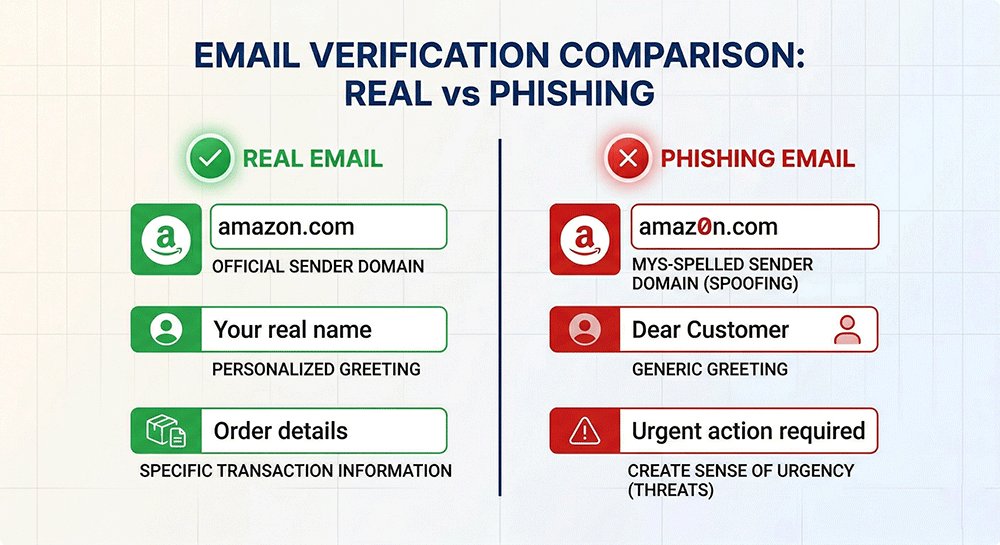
Here’s a quick comparison to help you distinguish legitimate Amazon emails from phishing attempts:
| Legitimate Amazon Emails | Phishing Emails |
|---|---|
| Come from @amazon.com or regional variants (@amazon.co.uk, @amazon.de) | Come from similar-looking domains (@amaz0n.com, @amazon-security.com) |
| Address you by your actual name | Use generic greetings like "Dear Customer" or your email address |
| Include specific order numbers you can verify | Use vague references or fake order numbers |
| Never ask for passwords or full payment info | Request sensitive information via links |
| Link to amazon.com domains when hovered | Link to suspicious URLs when hovered |
Critical rule: Amazon will never ask you to provide password, credit card number, or bank account information via email.
2、Spoofed Websites (Fake Login Pages)
Attackers create convincing replicas of Amazon's login pages to capture your credentials when you attempt to sign in.
How spoofed websites work:
- You click a link in a phishing email or malicious advertisement
- You're taken to a website that looks exactly like Amazon.com
- The URL may be slightly different (amazon-secure-login.com, amazon-verify-account.net)
- You enter your username and password
- The attackers capture your credentials and either redirect you to the real Amazon or show an error message
How to identify spoofed websites:
- Check the URL carefully: Look for misspellings, extra words, or unusual domain extensions
- ✅ Real:
https://www.amazon.com/gp/sign-in.html - ❌ Fake:
https://www.amazon-secure.com/loginorhttps://amaz0n.com/signin
- ✅ Real:
- Look for the lock icon: Legitimate Amazon pages always use HTTPS (padlock in the address bar)
- Verify the domain: Amazon domains always end in amazon.com or country-specific variants (amazon.co.uk, amazon.de, etc.)
Best practice: Never click links in emails claiming to be from Amazon. Instead, type amazon.com directly into your browser or use the official Amazon app.
3、Social Engineering Attacks
Beyond technical tricks, attackers use psychological manipulation to extract information or convince you to take harmful actions.
Common social engineering tactics:
Phone calls (Vishing):
- Callers claiming to be Amazon customer service
- Urgent warnings about account suspension
- Requests to "verify" your account by providing login credentials
- Instructions to install remote access software
Text messages (Smishing):
- Fake delivery notifications with tracking links
- "Winning" prize notifications requiring you to click a link
- Urgent security alerts about account compromise
Social media scams:
- Fake Amazon customer service accounts on Twitter/X, Facebook, Instagram
- Comments on posts claiming you've won prizes
- Direct messages with malicious links
How to protect yourself:
- Amazon will never call you unexpectedly and ask for your password
- Amazon doesn't send text messages with links to "verify" your account
- Never install remote access software at the request of someone claiming to be from Amazon
- Legitimate Amazon customer service will only contact you through official channels when you've initiated contact
While understanding the different types of Amazon scams is important, many phishing attempts are designed to look almost identical to legitimate messages. In fact, modern attackers no longer rely on obvious mistakes — they create emails that feel real, urgent, and trustworthy.
To see how these scams actually appear in your inbox, let’s examine a real-world example of a phishing email targeting Amazon users.
Real Example of an Amazon Phishing Email (2026)
To better understand how these scams work in real life, let’s look at a typical Amazon phishing email reported in 2026.
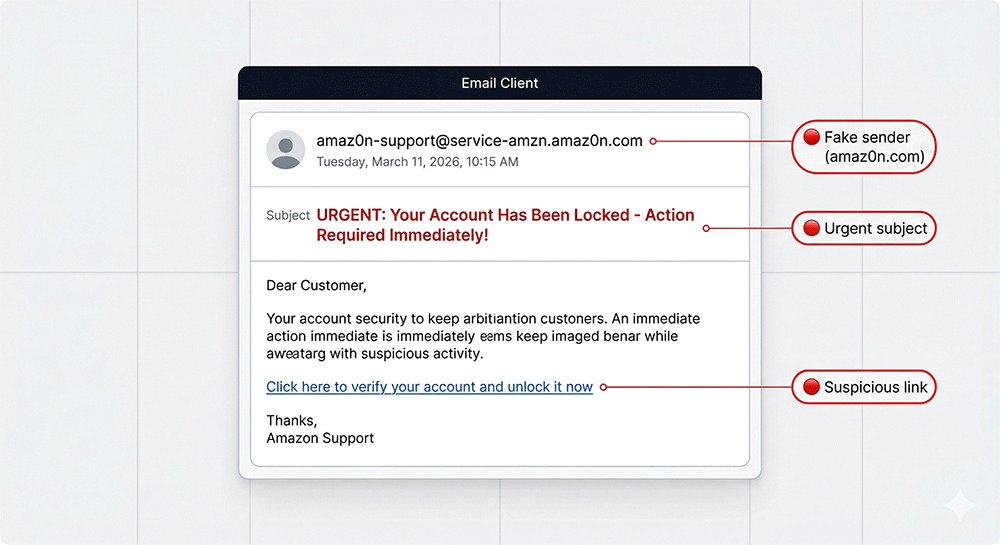
One common example uses a subject line like:
“Action Required: Your Amazon Account Will Be Suspended Within 24 Hours”
At first glance, this message looks serious and urgent — and that’s exactly the point. Attackers deliberately use alarming language to trigger fear and push you into acting quickly without thinking. The goal is to make you click before you have time to verify whether the email is legitimate.
Inside the email, you’ll usually find a message claiming that suspicious activity has been detected on your account. It may say something like:
“We detected unusual activity on your Amazon account. To avoid suspension, please confirm your identity immediately by clicking the link below.”
This type of wording is a major red flag. Legitimate messages from Amazon do not pressure users with threats like immediate account suspension or demand urgent action within a short deadline.
The email will also include a link that appears trustworthy, such as:
https://amazon-secure-login.com/verify-account
However, this is not an official Amazon domain. Scammers often create URLs that look convincing by adding words like “secure,” “verify,” or “account,” making them easy to mistake for real links.
If you click this link and enter your login details, your credentials are sent directly to attackers — giving them full access to your account.
According to the Federal Trade Commission, phishing scams like these remain one of the most common ways cybercriminals steal personal and financial information.
How to Recognize This Scam Pattern
When reviewing suspicious emails like this, watch for these warning signs:
- Urgent or threatening language (“within 24 hours,” “account suspended”)
- Requests to verify your account through a link
- Slightly altered or non-official domains
- Messages that create panic instead of providing clear information
Now that you’ve seen what a real Amazon phishing email looks like, the next step is learning how to identify these threats before they cause damage.
While some scams are obvious, many modern phishing emails are carefully crafted to appear legitimate — making it easy to miss the warning signs if you’re not paying close attention.
In the next section, we’ll walk through a simple, step-by-step process to help you quickly recognize and avoid Amazon phishing emails in any situation.
How to Identify Amazon Phishing Emails (Step-by-Step Guide)
Being able to distinguish legitimate Amazon communications from phishing attempts is essential for protecting your account.
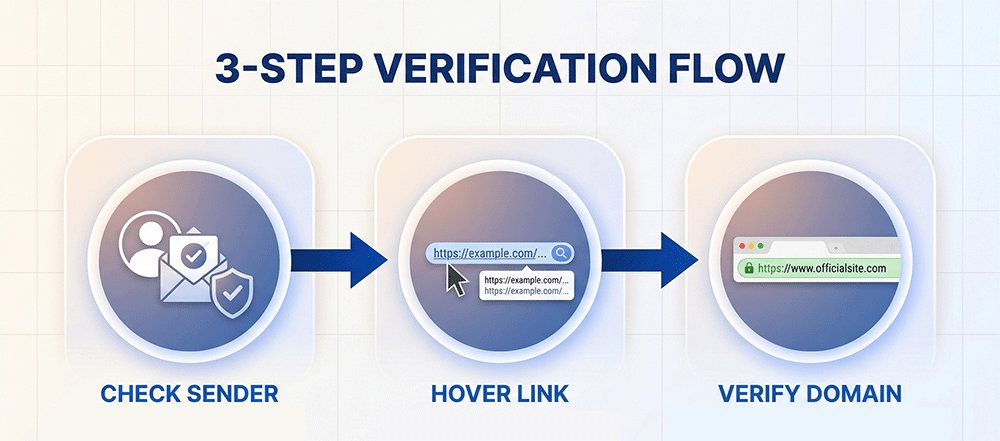
1、Email Verification Checklist
When you receive an email claiming to be from Amazon, go through this checklist:
Sender Address Verification:
- ✅ Legitimate:
[email protected],[email protected],[email protected] - ❌ Suspicious: Any domain that isn't exactly
amazon.comor a recognized country variant (amazon.co.uk, amazon.de, amazon.co.jp) - ❌ Red flags: Domains like
amazon-secure.com,amaz0n.com,amazon-verify.net
Greeting Analysis:
- ✅ Legitimate: Uses your actual name as it appears in your Amazon account (e.g., "Hello John," or "Dear Jane Smith,")
- ❌ Suspicious: Generic greetings like "Dear Customer," "Dear User," or just your email address
- ❌ Red flag: No greeting at all or strange formatting
Content and Language:
- ✅ Legitimate: Professional tone, no spelling or grammar errors, specific order numbers you can verify
- ❌ Suspicious: Urgent language creating pressure ("Act now!", "Account will be deleted in 24 hours!"), generic references without specific details
- ❌ Red flag: Requests for password, credit card number, or bank account information
Links and Buttons:
- ✅ Legitimate: Links that go to amazon.com domains when you hover over them
- ❌ Suspicious: Links with unusual domains, excessive parameters, or URL shorteners (bit.ly, tinyurl)
- ❌ Red flag: Links that don't match the displayed text
One of the most important rules is to never share sensitive information through email links or messages. According to Amazon, the company will never ask you to provide your password, payment details, or other personal information via email.You can verify suspicious messages directly in your Amazon account under the Message Center.
2、Link Verification Techniques
Before clicking any link in an email claiming to be from Amazon:
Hover Before Clicking:
Move your mouse cursor over the link (but don't click) and look at the bottom-left corner of your browser window. This shows the actual destination URL.
Check the Domain:
The domain should be exactly amazon.com or a recognized country variant:
- ✅ amazon.com (United States)
- ✅ amazon.co.uk (United Kingdom)
- ✅ amazon.de (Germany)
- ✅ amazon.fr (France)
- ✅ amazon.co.jp (Japan)
- ✅ Other official Amazon country domains
❌ Suspicious examples:
- amazon-secure-login.com
- amaz0n.com (zero instead of 'o')
- amazon-verify-account.net
- amazon.billing-update.com
Verify HTTPS:
Always look for the padlock icon in your browser's address bar, which indicates the connection is encrypted with HTTPS. However, note that HTTPS alone doesn't guarantee legitimacy—scammers can also obtain SSL certificates.
Direct Navigation:
Instead of clicking email links, manually type the URL into your browser:
- Type
amazon.comdirectly in your address bar - Or use a bookmark you've created
- Or use the official Amazon mobile app
This approach completely eliminates the risk of clicking a malicious link.
3、Mobile-Specific Verification
When using the Amazon mobile app:
Push Notifications:
Legitimate Amazon push notifications will open directly in the Amazon app when tapped. If tapping a notification opens your web browser instead, be suspicious.
In-App Messages:
Real Amazon security alerts will appear within the app's notification center or message inbox, not as pop-ups asking for immediate login.
SMS Text Messages:
Be extremely cautious of text messages claiming to be from Amazon:
- Amazon rarely sends SMS messages to customers
- Legitimate delivery notifications come from short codes you can verify
- Never click links in text messages claiming to be from Amazon
- If in doubt, open the Amazon app directly and check your orders
Now that you know how to identify Amazon phishing emails, the next step is taking action to protect your account before attackers have a chance to exploit any vulnerabilities.
Even if you successfully avoid clicking a malicious link, your account can still be at risk if your password is weak, reused across multiple sites, or not protected by additional security layers. That’s why recognition alone isn’t enough — you also need a strong defense strategy.
In the next section, we’ll walk you through a practical security checklist to help you safeguard your Amazon account from hackers and reduce your risk of future attacks.
How to Protect Your Amazon Account from Hackers (Security Checklist)
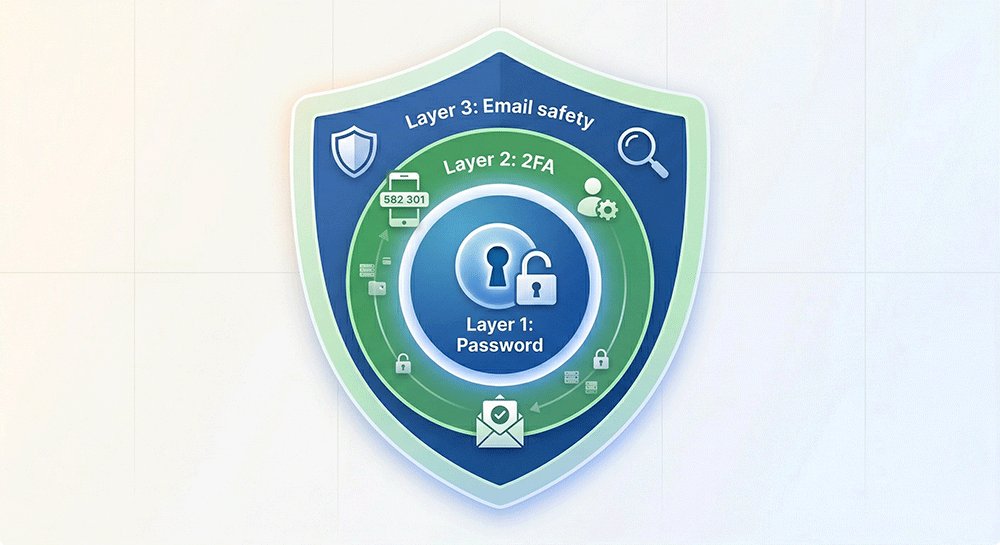
After learning how to identify phishing emails, the next step is taking action — especially if you’ve seen an Amazon account attackers warning. Cybercriminals often combine multiple tactics, so simply avoiding suspicious links isn’t enough. To truly protect your Amazon account from hackers, you need a layered security approach that reduces your risk across passwords, login methods, and email exposure.
1、Create and Manage Strong Passwords
Your password is the first line of defense against unauthorized access.
Password Best Practices:
- Length: Use at least 12-16 characters (longer is better)
- Complexity: Mix uppercase letters, lowercase letters, numbers, and special characters
- Uniqueness: Never reuse your Amazon password on other websites
- Randomness: Avoid dictionary words, names, birthdays, or predictable patterns
Example of a strong password:
- ❌ Weak:
Amazon123!(predictable, uses service name) - ❌ Weak:
Password2026!(common word with year) - ❌ Weak:
JohnSmith85(personal information) - ✅ Strong:
X7#mK9$pL2@vQ4!(random, complex, unique) - ✅ Strong:
Tr0ub4dor&3-Blue!Sky(passphrase style)
Password Managers (Strongly Recommended):
Manually creating and remembering unique, complex passwords for every account is nearly impossible. A password manager solves this problem:
| Password Manager | Key Features | Best For |
|---|---|---|
| Bitwarden | Open-source, free tier available, cross-platform | Budget-conscious users who want transparency |
| 1Password | Excellent interface, travel mode, secure document storage | Families and business users |
| LastPass | Widely used, enterprise features | (Note: Recent security incidents may concern some users) |
| Proton Pass | Swiss privacy laws, encrypted email integration | Privacy-focused users |
| Dashlane | Dark web monitoring, VPN included | Users wanting an all-in-one security solution |
Using a Password Manager with Amazon:
- Install your chosen password manager
- Generate a unique, complex password specifically for Amazon
- Store the password in your password manager
- When logging into Amazon, use the password manager's browser extension or auto-fill feature
- Enable biometric unlock (fingerprint/face recognition) on your password manager for quick, secure access
What if you've reused your Amazon password elsewhere?
If you've used the same password on multiple sites, take action immediately:
- Change your Amazon password to a new, unique password
- Check if your email has been involved in data breaches using haveibeenpwned.com
- Change passwords on any other accounts that used the same password
- Start using a password manager to prevent future reuse
Creating strong, unique passwords for your Amazon account is essential for protecting your personal information and preventing unauthorized access. Using a reliable password manager not only helps you generate complex passwords but also securely stores them, making it easier to maintain unique credentials across all your accounts. Combining strong passwords with regular monitoring and immediate updates if a breach occurs is considered the best way to keep passwords safe in 2026 and beyond. By following these practices, you significantly reduce your risk of being compromised while maintaining convenience and security.
2、Enable Two-Factor Authentication (2FA)
Two-factor authentication adds a critical second layer of security to your account. Even if someone discovers your password, they cannot access your account without the second factor.
How 2FA Works:
When you enable 2FA, logging into Amazon requires:
- Something you know (your password)
- Something you have (your phone or security key)
Amazon's 2FA Options:
Amazon offers multiple methods for the second authentication factor:
| Method | Security Level | Convenience | Best For |
|---|---|---|---|
| Authenticator App (Recommended) | High | High | Most users - offers the best balance of security and convenience |
| SMS Text Message | Medium | High | Users without smartphones (Note: SMS has known vulnerabilities) |
| Hardware Security Key | Very High | Medium | High-security needs, business accounts, users wanting maximum protection |
Setting Up 2FA on Your Amazon Account:
Option A: Using an Authenticator App (Recommended)
- Choose an authenticator app:
- Google Authenticator (free, widely used)
- Microsoft Authenticator (free, works with Microsoft accounts)
- Authy (free, offers backup/sync across devices)
- 1Password (if you use it as your password manager)
- Enable 2FA in your Amazon account:
- Go to Amazon.com and sign in
- Click "Account & Lists" → "Your Account"
- Select "Login & security"
- Click "Edit" next to "Two-Step Verification (2SV) Settings"
- Click "Get Started"
- Choose "Authenticator App"
- Link your authenticator app:
- Open your authenticator app
- Scan the QR code shown on Amazon's screen
- Enter the 6-digit code generated by your app into Amazon's verification field
- Click "Verify code and continue"
- Set up backup methods:
- Amazon will ask you to add a backup method (phone number for SMS)
- This ensures you can still access your account if you lose your authenticator device
- Enter your phone number and verify it with the code sent via SMS
- Save your backup codes:
- Amazon will provide one-time backup codes
- Save these codes in a secure location (password manager, physical safe)
- These codes allow you to access your account if you lose all your 2FA devices
Option B: Using SMS Text Messages
While convenient, SMS-based 2FA is less secure than authenticator apps due to vulnerabilities like SIM swapping attacks. Use this method only if you cannot use an authenticator app.
- Go to "Login & security" in your Amazon account
- Click "Edit" next to "Two-Step Verification Settings"
- Select "Text Message (SMS)"
- Enter your phone number
- Enter the verification code sent to your phone
Option C: Using a Hardware Security Key (YubiKey, etc.)
For maximum security, use a hardware security key that you physically insert into your computer or tap against your phone.
- Purchase a compatible hardware key (YubiKey 5 NFC, YubiKey 5C, etc.)
- In Amazon's "Two-Step Verification Settings," select "Security Key"
- Insert or tap your security key when prompted
- Name your key (e.g., "My YubiKey") for easy identification
Important Tips for Managing 2FA:
- Have backup methods: Always set up at least two 2FA methods (e.g., authenticator app + SMS backup, or primary key + backup key)
- Secure your backup codes: Store one-time backup codes in a password manager or physical safe
- Don't share your 2FA codes: Amazon will never ask you to provide your 2FA code via email, phone, or chat
- Use different methods for different accounts: Consider using hardware keys for your most important accounts (Amazon, email, banking) and authenticator apps for less critical accounts
- Test your 2FA regularly: Periodically log out and log back in to ensure your 2FA methods are working correctly
Cybersecurity experts also recommend avoiding interaction with suspicious emails altogether. The Cybersecurity and Infrastructure Security Agency advises users to avoid clicking links in unsolicited messages and to verify website URLs manually whenever possible.
Conclusion: Take Action to Protect Your Amazon Account
The Amazon account attackers warning serves as a critical reminder that cyber threats are constantly evolving. With Amazon issuing a warning for 300 million users, it's clear that no one is immune to these sophisticated attacks.
By implementing the security measures outlined in this guide, you significantly reduce your risk of becoming a victim:
To protect yourself from Amazon phishing scams:
- ✅ Change your Amazon password to a strong, unique password (use a password manager)
- ✅ Enable Two-Factor Authentication (2FA) using an authenticator app or hardware key
- ✅ Review your recent account activity for any unauthorized orders or login attempts
- ✅ Update your payment methods and remove any you don't recognize
- ✅ Set up account alerts to receive notifications for orders and account changes
Ongoing Security Habits:
- Never click links in emails claiming to be from Amazon—always navigate directly to amazon.com
- Verify all emails using the checklist provided in this guide
- Monitor your account regularly for suspicious activity
- Use a temporary email service or a temporary email generator for non-essential sign-ups. This can significantly reduce phishing emails reaching your main inbox.
- Keep your devices updated with the latest security patches
- Educate family members about phishing threats and safe online practices
After taking these immediate actions and establishing ongoing security habits, it’s also wise to consider using Temp Mail for Social Media and other non-essential sign-ups. Temporary emails can help reduce spam, block phishing attempts, and prevent malicious links from reaching your primary inbox. By adopting this simple strategy alongside strong passwords and 2FA, you further strengthen your overall Amazon account security.
Now that you’ve learned the key steps to protect your account, let’s address some of the most common questions about Amazon phishing scams and account safety in the FAQ section below.
FAQ: Amazon Account Attackers Warning (2026)
“Still have questions about Amazon phishing and account safety? Here are answers to common concerns:”
Q1: Does Amazon send security emails?
Yes. Amazon sends legitimate security emails for account activity such as logins, orders, or password changes. However, real emails will never ask for sensitive information like your password or payment details. Always verify the sender’s domain before taking action.
Q2: How do I report a phishing email to Amazon?
To report a phishing email, forward the suspicious message to [email protected]. Do not click any links or download attachments before reporting. You can also report phishing through your Amazon account by visiting the Help section. Reporting helps Amazon investigate and block scam campaigns, protecting other users. Once reported, delete the email from your inbox to avoid accidental clicks, and consider changing your password if you interacted with the message.
Q3: What happens if I click a fake Amazon link?
Clicking a fake Amazon phishing link can expose your login credentials, payment information, or personal data to cybercriminals. Attackers may use this information for unauthorized purchases, identity theft, or accessing other accounts if you reuse passwords. If you accidentally click a fake link, immediately change your Amazon password, enable two-factor authentication, and monitor your account for unusual activity. Also, run antivirus scans and consider reporting the incident to Amazon and the FTC for further guidance.
Q4: Can Amazon call me about account issues?
Amazon rarely makes unsolicited phone calls regarding account issues. Legitimate alerts are typically sent via email or through in-app notifications. If someone calls claiming to be Amazon, asking for passwords, credit card numbers, or to install software, it is a scam. Always hang up and verify through your official Amazon account. Do not share sensitive information over the phone unless you initiated contact through official channels.
Q5: Is it safe to use temporary email for Amazon?
Using a temporary email for Amazon is not recommended for your main account, as it may limit recovery options or official notifications. However, temporary emails are useful for signing up for newsletters, trial offers, or non-essential services to reduce exposure to phishing and spam. Always ensure that your primary Amazon account uses a verified, secure email address with two-factor authentication to maintain account safety.
Want extra protection? Use a temporary email service to reduce spam and prevent phishing attempts from reaching your primary inbox.