किसी टूल के लिए साइन अप करते समय अस्थायी ईमेल या डिस्पोजेबल ईमेल सर्विस का उपयोग करने की कल्पना करें—और केवल इसलिए एक्सेस खो दें क्योंकि वेरिफिकेशन ईमेल आने से पहले ही इनबॉक्स की समय-सीमा समाप्त हो गई।
यह पारंपरिक अस्थायी ईमेल सिस्टम की एक सामान्य सीमा है। अधिकांश डिस्पोजेबल ईमेल सेवाएं अल्पकालिक सत्रों (short-lived sessions) के लिए डिज़ाइन की गई हैं, और कई लोकप्रिय प्लेटफॉर्म ऐसे डोमेन को कम-भरोसेमंद स्रोतों के रूप में देखते हैं, जो ईमेल डिलीवरी की विश्वसनीयता को प्रभावित कर सकते हैं।
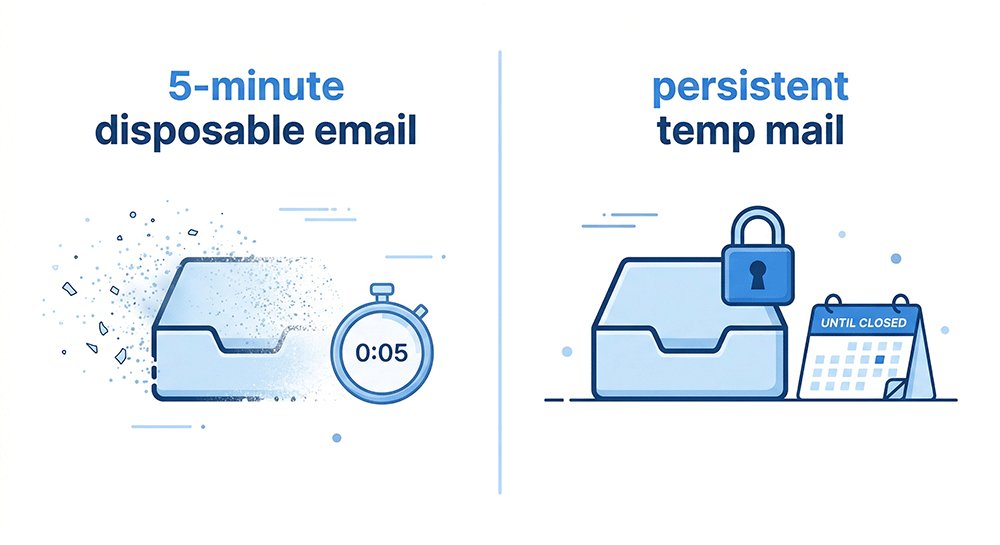
साथ ही, क्लासिक “5 मिनट टेम्प मेल” सेवाएं स्वाभाविक रूप से समय-सीमित होती हैं, जिसका अर्थ है कि वे केवल एक बार के साइनअप के लिए उपयुक्त हैं और पासवर्ड रिकवरी या पुनः-सत्यापन (re-verification) जैसी फॉलो-अप क्रियाओं का समर्थन नहीं कर सकती हैं।
प्रमुख ऑनलाइन सेवाओं (SaaS प्लेटफॉर्म और सोशल नेटवर्क सहित) में उद्योग का व्यवहार तेजी से ईमेल ट्रस्ट सिग्नल और डोमेन प्रतिष्ठा फ़िल्टरिंग पर ध्यान केंद्रित कर रहा है, जिससे अल्पकालिक इनबॉक्स निरंतर खाता उपयोग के लिए कम विश्वसनीय हो गए हैं।
इस वातावरण के अनुकूल होने के लिए, उपयोगकर्ता पासवर्ड वाले स्थायी टेम्प मेल की ओर बढ़ रहे हैं, एक ऐसा मॉडल जो इनबॉक्स एक्सेस को ब्राउज़र सत्रों से अलग करता है और आवश्यकता पड़ने पर नियंत्रित पुनः-प्रवेश की अनुमति देता है।
इस गाइड में, हम यह पता लगाएंगे कि स्थायी डिस्पोजेबल ईमेल अस्थायी ईमेल का एक व्यावहारिक विकास क्यों बन गया है—जो उपयोगकर्ताओं को अपनी प्राथमिक पहचान को उजागर किए बिना एक्सेस निरंतरता बनाए रखने में मदद करता है।
2026 में पासवर्ड के साथ टेम्प मेल ट्रेंड में क्यों है
1. डोमेन प्रतिष्ठा संकट: 2026 में कई टेम्प ईमेल विफल क्यों हो जाते हैं
2026 में, अस्थायी ईमेल के काम करना बंद करने का सबसे बड़ा कारण तकनीकी खराबी नहीं है — यह डोमेन प्रतिष्ठा है।
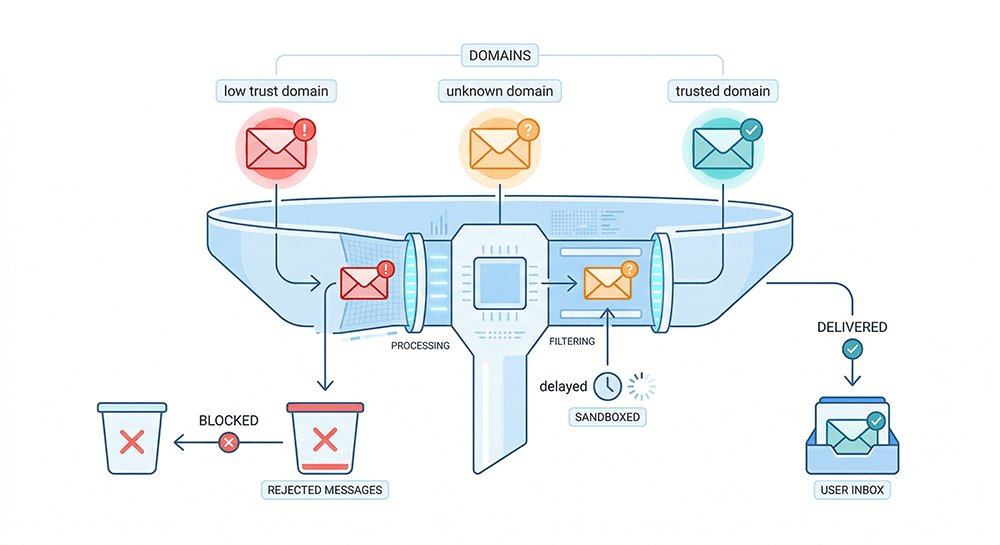
अधिकांश आधुनिक प्लेटफॉर्म आने वाले ईमेल का मूल्यांकन भेजने वाले डोमेन की विश्वसनीयता के आधार पर करते हैं। यदि किसी डोमेन का व्यापक रूप से डिस्पोजेबल ईमेल के लिए उपयोग किया गया है या दुरुपयोग के लिए चिह्नित किया गया है, तो उस डोमेन से ईमेल में देरी हो सकती है, फ़िल्टर किया जा सकता है, या पूरी तरह से अवरुद्ध किया जा सकता है।
सरल शब्दों में: सभी ईमेल डोमेन के साथ समान व्यवहार नहीं किया जाता है।
उदाहरण के लिए:
- टेम्प मेल सेवाओं द्वारा उपयोग किए जाने वाले नए बनाए गए या अक्सर पुनर्नवीनीकरण किए गए डोमेन को अक्सर जल्दी चिह्नित कर दिया जाता है
- स्पैम रिपोर्ट के इतिहास वाले डोमेन के फ़िल्टर या अस्वीकार किए जाने की संभावना अधिक होती है
वास्तविक परिदृश्य:
यदि आप एक सामान्य 5-मिनट मेल सेवा का उपयोग करते हैं, तो सत्यापन ईमेल कभी नहीं आ सकता है — इसलिए नहीं कि सिस्टम विफल हो गया, बल्कि इसलिए कि डोमेन को प्राप्त करने वाले प्लेटफॉर्म द्वारा पहले से ही कम-भरोसेमंद माना जाता है।
पर्दे के पीछे, यह आमतौर पर निम्नलिखित जैसे कारकों पर निर्भर करता है:
- डोमेन की आयु और इतिहास
- भेजने के पैटर्न (जैसे, मात्रा, आवृत्ति, स्थिरता)
- स्पैम रिपोर्ट और ब्लॉकलिस्ट स्थिति
व्यावहारिक निष्कर्ष:
कई मुफ्त टेम्प मेल सेवाएं डिलीवरी त्रुटियों के कारण नहीं, बल्कि इसलिए विफल हो जाती हैं क्योंकि उनके डोमेन पहले से ही प्राप्त करने वाले सिस्टम द्वारा चिह्नित या कम प्राथमिकता वाले होते हैं।
2. आपको ऐसे इनबॉक्स की आवश्यकता क्यों है जिसे आप बाद में एक्सेस कर सकें
2026 में, अस्थायी ईमेल अब केवल एक बार के साइनअप के लिए नहीं है।
कई प्लेटफॉर्म अब पंजीकरण के बाद फॉलो-अप क्रियाओं की मांग करते हैं — जैसे लॉगिन सत्यापन, सुरक्षा जांच, या खाता रिकवरी। यदि आपका इनबॉक्स कुछ मिनटों के बाद गायब हो जाता है, तो आप इन महत्वपूर्ण ईमेल तक पहुंच खो देते हैं।
पासवर्ड-संरक्षित टेम्प मेल आपको एक ऐसा इनबॉक्स देकर इसे हल करता है जिस पर आप कभी भी वापस आ सकते हैं।
यदि आप निम्नलिखित करना चाहते हैं तो आपको इसकी आवश्यकता होगी:
- पुनः-सत्यापन जांच पूरी करें: कुछ प्लेटफॉर्म साइनअप के घंटों या दिनों बाद "संदिग्ध लॉगिन" या सुरक्षा जांच को ट्रिगर करते हैं। मूल इनबॉक्स तक पहुंच के बिना, आप स्थायी रूप से लॉक हो सकते हैं।
- बाद में लॉगिन या रिकवरी लिंक एक्सेस करें: प्रारंभिक पंजीकरण के बाद अक्सर पासवर्ड रीसेट, मैजिक लिंक, या पुष्टिकरण ईमेल की आवश्यकता होती है।
- सदस्यता या चल रहे खातों का प्रबंधन करें: यदि आप किसी टूल, सेवा या परीक्षण के लिए साइन अप करते हैं, तो आपको बाद में बिलिंग अपडेट या खाता सूचनाओं तक पहुंच की आवश्यकता हो सकती है।
व्यावहारिक निष्कर्ष:
यदि आपको किसी भी समय किसी खाते पर वापस आने की आवश्यकता है, तो मिनटों में समाप्त होने वाला डिस्पोजेबल इनबॉक्स पर्याप्त नहीं है।
3. हाइब्रिड मॉडल: अस्थायी एक्सेस बनाम स्थायी एक्सेस
2026 में मुख्य अंतर सरल है:
पारंपरिक टेम्प मेल सत्र-आधारित है, जबकि पासवर्ड-संरक्षित टेम्प मेल आपको बाद में वापस लॉगिन करने की अनुमति देता है।
पारंपरिक अस्थायी ईमेल सेवाएं आपके ब्राउज़र सत्र से जुड़ी होती हैं। यदि आप कुकीज़ साफ़ करते हैं, टैब बंद करते हैं, या डिवाइस बदलते हैं, तो इनबॉक्स अक्सर स्थायी रूप से खो जाता है।
इसके विपरीत, पासवर्ड-संरक्षित टेम्प मेल आपके इनबॉक्स को इस तरह से संग्रहीत करता है कि आप सत्र समाप्त होने के बाद भी समान क्रेडेंशियल्स का उपयोग करके इसे फिर से एक्सेस कर सकते हैं।
सरल शब्दों में:
- पारंपरिक टेम्प मेल = केवल एक सत्र के दौरान काम करता है
- पासवर्ड-संरक्षित टेम्प मेल = बाद में लॉगिन के साथ फिर से एक्सेस किया जा सकता है
असली बदलाव "सुरक्षा जटिलता" के बारे में नहीं है, बल्कि इस बारे में है कि क्या आपके पेज छोड़ने के बाद आपका इनबॉक्स जीवित रहता है।
उपयोगकर्ता वास्तव में किससे डरते हैं
1. डर 1: सार्वजनिक इनबॉक्स एक्सपोज़र
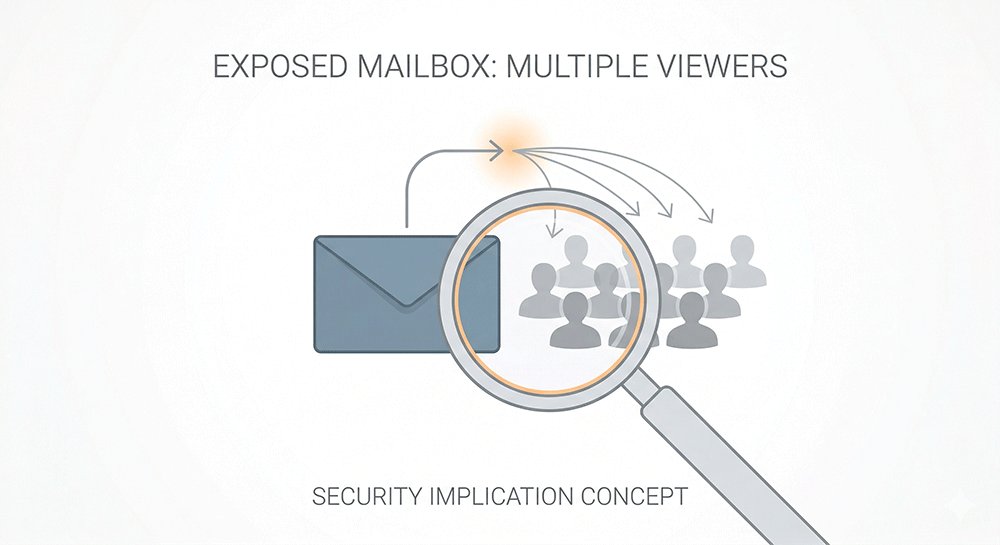
कुछ मामलों में, यदि पता ज्ञात हो या अनुमान लगाना आसान हो तो अस्थायी ईमेल इनबॉक्स तक पहुँचा जा सकता है।
प्रदाता को कैसे कॉन्फ़िगर किया गया है, इसके आधार पर इनमें से कुछ इनबॉक्स पृष्ठ खोज इंजनों द्वारा भी अनुक्रमित (indexed) किए जा सकते हैं।
यह तब गोपनीयता का मुद्दा बन जाता है जब सत्यापन ईमेल, लॉगिन लिंक, या खाता-संबंधित संदेश सार्वजनिक रूप से सुलभ इनबॉक्स में उजागर हो जाते हैं।
यदि किसी इनबॉक्स में कोई प्रमाणीकरण परत नहीं है, तो इसे निजी नहीं माना जाना चाहिए।
2. डर 2: सत्र समाप्त होने के बाद एक्सेस खोना
पारंपरिक अस्थायी ईमेल सेवाएं अक्सर ब्राउज़र सत्रों से जुड़ी होती हैं, जिसका अर्थ है कि ब्राउज़र बंद होने या डिवाइस बदलने पर एक्सेस खो सकता है।
यदि ऐसा होता है, तो उपयोगकर्ता पहले प्राप्त ईमेल को पुनः प्राप्त करने में सक्षम नहीं हो सकते हैं।
पासवर्ड-संरक्षित टेम्प मेल इनबॉक्स एक्सेस को ब्राउज़र कुकीज़ से जोड़कर इस समस्या को कम करता है, जिससे उपयोगकर्ता उसी ब्राउज़र वातावरण के भीतर उसी इनबॉक्स का उपयोग करना जारी रख सकते हैं।
3. डर 3: डिवाइसों के बीच सीमित एक्सेस
कई उपयोगकर्ता सामान्य वर्कफ़्लो के दौरान डिवाइस बदलते रहते हैं।
सत्र-आधारित अस्थायी ईमेल के साथ, एक्सेस अक्सर मूल ब्राउज़र या डिवाइस तक सीमित होता है, जिससे क्रॉस-डिवाइस उपयोग अविश्वसनीय हो जाता है।
लॉगिन-आधारित अस्थायी ईमेल के साथ, उसी इनबॉक्स को समान क्रेडेंशियल्स का उपयोग करके विभिन्न डिवाइसों से एक्सेस किया जा सकता है।
4. डर 4: डेटा हैंडलिंग और पहचान लिंकेज
अधिकांश अस्थायी ईमेल सेवाएं साइनअप के दौरान रिकवरी ईमेल या फोन नंबर की आवश्यकता नहीं होने देकर पहचान लिंकेज को कम करती हैं।
हालाँकि, इसका मतलब यह नहीं है कि सिस्टम पूरी तरह से अनाम या अनट्रैक्ड है।
कुछ प्रदाता अभी भी अपने बुनियादी ढांचे के आधार पर IP पते या उपयोग लॉग जैसे बुनियादी तकनीकी डेटा को संग्रहीत कर सकते हैं।
गोपनीयता का स्तर अंततः इस बात पर निर्भर करता है कि सेवा को कैसे लागू किया गया है।
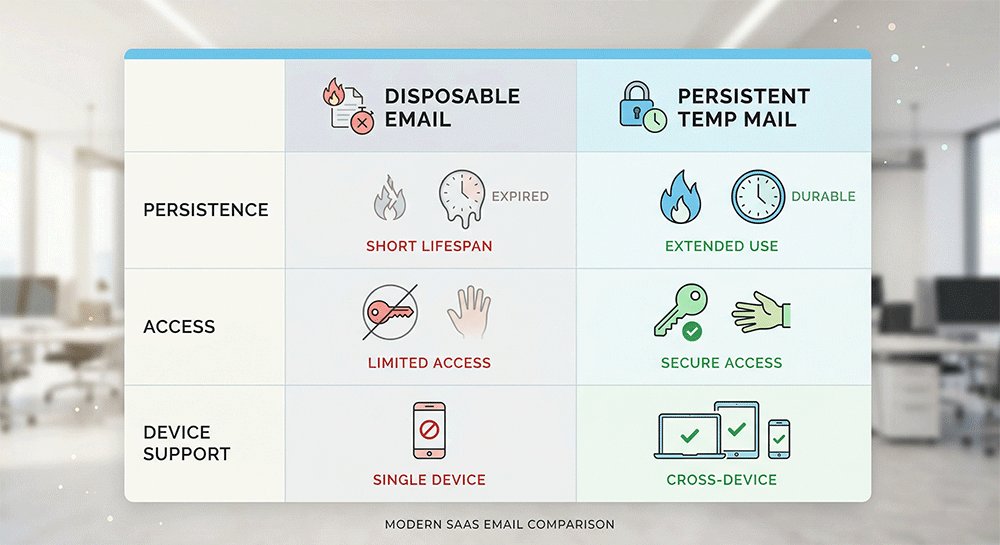
पासवर्ड के साथ टेम्प मेल बनाम डिस्पोजेबल ईमेल (पूर्ण तुलना)
अस्थायी ईमेल समाधान चुनते समय, अल्पकालिक एक्सेस और लॉगिन क्षमता के साथ दीर्घकालिक एक्सेस के बीच अंतर को समझना महत्वपूर्ण है।
2026 में, पारंपरिक डिस्पोजेबल ईमेल और पासवर्ड-संरक्षित टेम्प मेल अलग-अलग उपयोग के मामलों की सेवा करते हैं, न कि एक दूसरे से बेहतर होने के बजाय।
सुविधा तुलना
| सुविधा | पारंपरिक डिस्पोजेबल ईमेल | पासवर्ड के साथ टेम्प मेल (2026 टियर) |
|---|---|---|
| सर्च इंजन सुरक्षा | सार्वजनिक या कुछ मामलों में अनुक्रमित | एक्सेस-प्रतिबंधित (प्रदाता डिज़ाइन पर निर्भर) |
| गोपनीयता संरचना | सार्वजनिक या आसानी से अनुमान लगाने योग्य इनबॉक्स | कुकी-आधारित एक्सेस के साथ निजी इनबॉक्स |
| निरंतरता | 5 मिनट से 24 घंटे | स्थायी या दीर्घकालिक (सेवा के अनुसार भिन्न) |
| मल्टी-डिवाइस एक्सेस | समर्थित नहीं (सत्र-आधारित) | कुकी-आधारित |
| एक्सेस निरंतरता | सत्र समाप्त होने के बाद गारंटी नहीं | यदि क्रेडेंशियल सहेजे गए हैं तो संभव है |
| सुरक्षा मॉडल | खुला या सत्र-आधारित एक्सेस | लॉगिन-आधारित एक्सेस (कार्यान्वयन भिन्न होता है) |
| आदर्श उपयोग के मामले | एक बार के साइनअप या अस्थायी सत्यापन | चल रहे खाते, बार-बार लॉगिन, या दीर्घकालिक उपयोग |
| सीमा | पुनः-एक्सेस के लिए सीमित विश्वसनीयता | प्रदाता के बुनियादी ढांचे और नीतियों पर निर्भर |
डिस्पोजेबल ईमेल अल्पकालिक, एक बार के उपयोग के लिए डिज़ाइन किया गया है, जबकि पासवर्ड-संरक्षित टेम्प मेल प्रदाता द्वारा इसे लागू करने के तरीके के आधार पर विस्तारित एक्सेस प्रदान कर सकता है।
उन उपयोगकर्ताओं के लिए जिन्हें केवल एक त्वरित साइनअप की आवश्यकता है, पारंपरिक बर्नर आमतौर पर पर्याप्त होते हैं।
उन उपयोगकर्ताओं के लिए जिन्हें बाद में वापस आने की आवश्यकता हो सकती है, लॉगिन-आधारित टेम्प मेल अधिक व्यावहारिक हो सकता है।
पासवर्ड के साथ टेम्प मेल वास्तव में कैसे काम करता है
यह समझने के लिए कि पासवर्ड-संरक्षित अस्थायी ईमेल पारंपरिक बर्नर से कैसे भिन्न है, एक्सेस और डिलीवरी के पीछे के वास्तविक तंत्र को देखना मददगार होता है।
यह पूर्ण गुमनामी के लिए डिज़ाइन किया गया सुरक्षा सिस्टम नहीं है। इसके बजाय, यह इनबॉक्स एक्सेस को ब्राउज़र सत्रों से अलग करने का एक तरीका है।
1. खाता-आधारित एक्सेस बनाम सत्र-आधारित एक्सेस
पारंपरिक अस्थायी ईमेल सेवाएं अक्सर ब्राउज़र सत्रों पर निर्भर करती हैं। एक बार सत्र समाप्त हो जाने पर, इनबॉक्स अब सुलभ नहीं हो सकता है।
दूसरी ओर, पासवर्ड-संरक्षित टेम्प मेल, लॉगिन क्रेडेंशियल्स (ईमेल + पासवर्ड) के माध्यम से एक्सेस की अनुमति देता है, जो सर्वर-साइड पर संग्रहीत होते हैं।
सरल शब्दों में:
आपका इनबॉक्स एक लॉगिन से जुड़ा है, न कि आपके ब्राउज़र सत्र से।
2. सार्वजनिक इनबॉक्स में एक्सपोज़र जोखिम
कुछ सार्वजनिक टेम्प मेल सिस्टम इनबॉक्स को एक्सेस करने की अनुमति देते हैं यदि पता ज्ञात या अनुमानित हो।
ऐसे मामलों में, संदेशों को संभावित रूप से बिना किसी प्रमाणीकरण परत के देखा जा सकता है।
मुख्य अंतर:
- सार्वजनिक इनबॉक्स = यदि पता अनुमानित या उजागर हो तो सुलभ
- पासवर्ड-संरक्षित इनबॉक्स = लॉगिन की आवश्यकता होती हैसंदेश देखने के लिए क्रेडेंशियल्स
3. ईमेल सुरक्षा की सीमाएं
यह समझना महत्वपूर्ण है कि यह सिस्टम किस चीज़ की गारंटी नहीं देता है।
पासवर्ड सुरक्षा के बावजूद:
- ईमेल डिलीवरी अभी भी डोमेन प्रतिष्ठा और स्पैम फ़िल्टरिंग पर निर्भर करती है
- प्रदाता अभी भी बुनियादी तकनीकी डेटा जैसे IP पते या उपयोग लॉग एकत्र कर सकते हैं
- यह डिवाइस या नेटवर्क स्तर पर ट्रैकिंग के सभी रूपों को नहीं रोकता है
4. अस्थायी ईमेल कब विफल हो सकता है
बेहतर एक्सेस कंट्रोल के बावजूद, अस्थायी ईमेल सिस्टम एकदम सही नहीं हैं।
विफलता के सामान्य कारणों में शामिल हैं:
- डोमेन प्रतिष्ठा के मुद्दे: प्राप्त करने वाले प्लेटफ़ॉर्म द्वारा ईमेल को ब्लॉक या विलंबित किया जा सकता है
- ब्राउज़र-स्तरीय ट्रैकिंग: वेबसाइटें अभी भी डिवाइस या ब्राउज़र संकेतों के माध्यम से उपयोगकर्ताओं को पहचान सकती हैं
- सेवा प्रतिबंध: कुछ प्लेटफ़ॉर्म सक्रिय रूप से ज्ञात अस्थायी ईमेल डोमेन को ब्लॉक करते हैं
पासवर्ड-संरक्षित टेम्प मेल का मुख्य उद्देश्य समय के साथ इनबॉक्स एक्सेस को बनाए रखना है, न कि सभी ट्रैकिंग को खत्म करना या पूर्ण गुमनामी प्रदान करना।
आपको पासवर्ड के साथ टेम्प मेल का उपयोग कब करना चाहिए? (वास्तविक उपयोग के मामले)
पासवर्ड सुरक्षा वाला अस्थायी ईमेल तब सबसे उपयोगी होता है जब आपको केवल एक बार उपयोग करने के बजाय, बाद में उसी इनबॉक्स को फिर से एक्सेस करने की आवश्यकता होती है।
नीचे सबसे सामान्य वास्तविक दुनिया के उपयोग के मामले दिए गए हैं।
1. ऑनलाइन सेवाओं के लिए साइन अप करना और परीक्षण करना
कई उपयोगकर्ता नए टूल, ऐप्स या ऑनलाइन प्लेटफ़ॉर्म के लिए साइन अप करते समय अस्थायी ईमेल का उपयोग करते हैं, जिन्हें वे प्रतिबद्ध होने से पहले आज़माना चाहते हैं।
कुछ मामलों में, आपको इनकी आवश्यकता हो सकती है:
- बाद में अपना खाता कन्फर्म करना
- पासवर्ड रीसेट करना
- फॉलो-अप सत्यापन ईमेल प्राप्त करना
पासवर्ड-संरक्षित टेम्प मेल आपको ज़रूरत पड़ने पर उसी इनबॉक्स पर लौटने की अनुमति देता है, बजाय इसके कि एक छोटे सत्र के बाद एक्सेस खो जाए।
2. कई खातों का प्रबंधन
कुछ उपयोगकर्ताओं को एक ही प्लेटफ़ॉर्म के लिए एक से अधिक खातों की आवश्यकता होती है — उदाहरण के लिए परीक्षण, काम और व्यक्तिगत उपयोग को अलग करने, या विभिन्न परियोजनाओं का प्रबंधन करने के लिए।
इन मामलों में, एक पुन: प्रयोज्य अस्थायी इनबॉक्स आपको मदद करता है:
- सत्यापन ईमेल को व्यवस्थित रखने में
- एक प्राथमिक इनबॉक्स में खातों को मिलाने से बचने में
- ज़रूरत पड़ने पर लॉगिन लिंक को फिर से एक्सेस करने में
3. स्पैम और अवांछित ईमेल को कम करना
वेबसाइटों पर पंजीकरण करते समय, संसाधन डाउनलोड करते समय या न्यूज़लेटर्स में शामिल होते समय स्पैम से बचने के लिए भी अस्थायी ईमेल का आमतौर पर उपयोग किया जाता है।
पासवर्ड-संरक्षित इनबॉक्स के साथ, आप:
- ज़रूरत पड़ने पर संदेश देख सकते हैं
- अपने प्राथमिक ईमेल को उजागर करने से बच सकते हैं
- यदि बाद में कुछ महत्वपूर्ण आता है तो भी एक्सेस बनाए रख सकते हैं
पासवर्ड वाला टेम्प मेल तब सबसे उपयोगी होता है जब आपको अस्थायी पंजीकरण + भविष्य में संभावित एक्सेस की आवश्यकता होती है, न कि केवल एक बार ईमेल प्राप्त करने की।
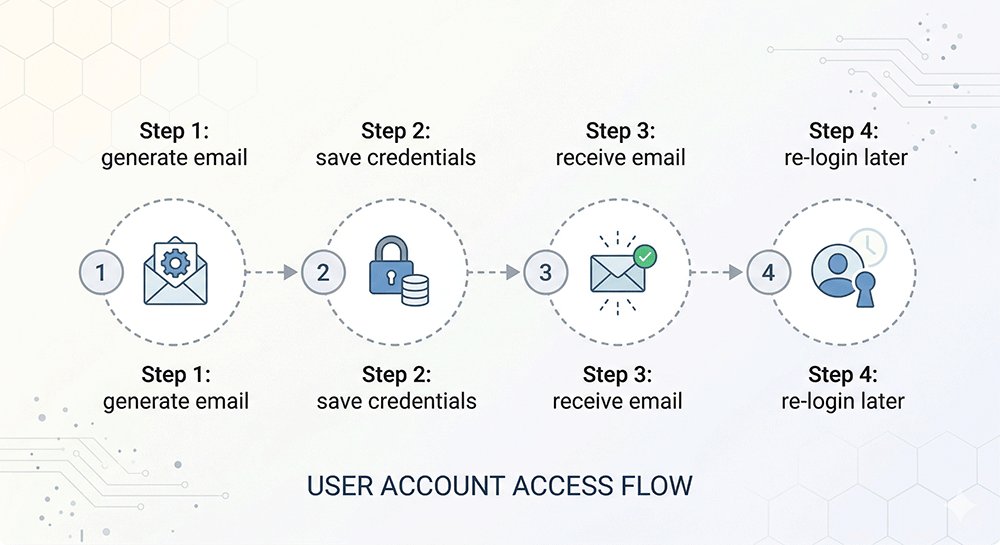
पासवर्ड के साथ टेम्प मेल कैसे बनाएं (चरण-दर-चरण)
पासवर्ड-संरक्षित अस्थायी ईमेल बनाना सरल है और इसमें आमतौर पर एक मिनट से भी कम समय लगता है।
चरण 1: टेम्प मेल प्रदाता चुनें
एक अस्थायी ईमेल सेवा चुनकर शुरुआत करें जो लॉगिन-आधारित एक्सेस का समर्थन करती है।
विभिन्न प्रदाता विश्वसनीयता, डिलीवरी गति और डोमेन गुणवत्ता के विभिन्न स्तर प्रदान कर सकते हैं, इसलिए ऐसी सेवा चुनना महत्वपूर्ण है जो उन सेवाओं के साथ लगातार काम करे जिनका आप उपयोग करने की योजना बना रहे हैं।
चरण 2: अपना अस्थायी ईमेल जेनरेट करें
प्रदाता के इंटरफ़ेस का उपयोग करके अस्थायी ईमेल पता बनाएं।
ज्यादातर मामलों में, सिस्टम स्वचालित रूप से दोनों जेनरेट करेगा:
- आपका ईमेल पता
- आपके एक्सेस क्रेडेंशियल्स (पासवर्ड या लॉगिन कुंजी)
आपको मैन्युअल रूप से कुछ भी बनाने या कॉन्फ़िगर करने की आवश्यकता नहीं है।
चरण 3: अपने एक्सेस क्रेडेंशियल्स सहेजें
एक बार जेनरेट हो जाने के बाद, अपनी लॉगिन जानकारी को सहेजना सुनिश्चित करें।
यह महत्वपूर्ण है क्योंकि एक्सेस आपके ब्राउज़र सत्र से नहीं जुड़ा है। यदि आप अपने क्रेडेंशियल्स खो देते हैं, तो आप बाद में उसी इनबॉक्स को फिर से नहीं खोल पाएंगे।
चरण 4: अपने इनबॉक्स का परीक्षण करें
महत्वपूर्ण पंजीकरणों के लिए ईमेल का उपयोग करने से पहले, यह पुष्टि करने के लिए एक परीक्षण ईमेल भेजें कि सब कुछ काम कर रहा है।
जांचें कि:
- संदेश सही ढंग से आते हैं
- आप वापस लॉग इन कर सकते हैं
पासवर्ड-संरक्षित टेम्प मेल सेट करना सरल है, लेकिन मुख्य बात निर्माण नहीं है — यह सुनिश्चित करना है कि आप ज़रूरत पड़ने पर इसे फिर से एक्सेस कर सकें।
पासवर्ड के साथ एक वास्तविक टेम्प मेल कैसे चुनें (चेकलिस्ट)
सभी "सुरक्षित" अस्थायी ईमेल सेवाएं वास्तव में निजी या स्थायी नहीं होती हैं। कुछ केवल पासवर्ड सुरक्षा का नाटक करती हैं जबकि सार्वजनिक इनबॉक्स की तरह काम करती हैं।
यह मूल्यांकन करने के लिए नीचे दी गई चेकलिस्ट का उपयोग करें कि क्या कोई सेवा वास्तव में दीर्घकालिक, लॉगिन-आधारित एक्सेस का समर्थन करती है।
1. 2026 के लिए आवश्यक सुविधाएँ
✅ निजी प्रमाणीकरण परत
किसी भी ईमेल को एक्सेस करने से पहले सेवा को लॉगिन क्रेडेंशियल्स की आवश्यकता होनी चाहिए। यदि इनबॉक्स सामग्री सार्वजनिक लिंक के माध्यम से सुलभ है, तो यह वास्तव में निजी नहीं है।
✅ स्वच्छ डोमेन पूल
प्रदाता को अच्छी डिलीवरी प्रतिष्ठा वाले डोमेन का उपयोग करना चाहिए। खराब या अत्यधिक उपयोग किए गए डोमेन के प्रमुख प्लेटफ़ॉर्म द्वारा ब्लॉक या फ़िल्टर किए जाने की अधिक संभावना होती है।
✅ स्थायी भंडारण
ईमेल तब तक सुलभ रहने चाहिए जब तक कि उपयोगकर्ता उन्हें हटा न दे, न कि थोड़े समय के बाद स्वचालित रूप से हटा दिए जाएं।
✅ प्रमुख प्लेटफ़ॉर्म के साथ काम करता है (वास्तविक दुनिया का परीक्षण)
एक विश्वसनीय सेवा को SaaS टूल, सोशल मीडिया प्लेटफ़ॉर्म या सत्यापन सिस्टम जैसे सामान्य प्लेटफ़ॉर्म से लगातार ईमेल प्राप्त करने चाहिए। यदि ईमेल अक्सर ब्लॉक या विलंबित होते हैं, तो सेवा वास्तविक उपयोग के लिए व्यावहारिक नहीं है।
2. बचने के लिए रेड फ्लैग्स
❌ सार्वजनिक एक्सेस लिंक
यदि इनबॉक्स को बिना प्रमाणीकरण के केवल URL का उपयोग करके खोला जा सकता है, तो कोई भी संभावित रूप से संदेशों तक पहुंच सकता है।
❌ भ्रामक "स्थायी" दावे
कुछ सेवाएं निरंतरता का विज्ञापन करती हैं लेकिन फिर भी थोड़े समय (जैसे 24-48 घंटे) के बाद ईमेल हटा देती हैं।
❌ भारी विज्ञापन या ट्रैकिंग स्क्रिप्ट
अत्यधिक विज्ञापन या तृतीय-पक्ष स्क्रिप्ट यह संकेत दे सकती हैं कि उपयोगकर्ता की गोपनीयता सेवा का प्राथमिक फोकस नहीं है।
3. एक विश्वसनीय प्रदाता चुनना
अस्थायी ईमेल सेवा का मूल्यांकन करते समय, मार्केटिंग दावों पर कम और वास्तविक व्यवहार पर अधिक ध्यान दें:
- क्या आप बाद में वापस लॉग इन कर सकते हैं?
- क्या ईमेल वास्तविक सेवाओं से लगातार आते हैं?
- क्या एक्सेस प्रमाणीकरण द्वारा सुरक्षित है, न कि केवल एक सार्वजनिक लिंक द्वारा?
एक वास्तव में विश्वसनीय पासवर्ड-संरक्षित टेम्प मेल को अतिरंजित गोपनीयता दावों के बजाय एक्सेस कंट्रोल, डिलीवरी विश्वसनीयता और पूर्वानुमानित व्यवहार को प्राथमिकता देनी चाहिए।
FAQ (AI ओवरव्यू और 2026 तकनीकी मानकों के लिए अनुकूलित)
पासवर्ड के साथ टेम्प मेल क्या है?
पासवर्ड के साथ टेम्प मेल आपको क्रेडेंशियल्स का उपयोग करके बाद में उसी इनबॉक्स में वापस लॉग इन करने की अनुमति देता है।
पारंपरिक डिस्पोजेबल ईमेल के विपरीत, जो ब्राउज़र सत्र से जुड़ा होता है, इस प्रकार की सेवा आपको बाद में अपने इनबॉक्स में लौटने देती है यदि आपके पास अभी भी अपना लॉगिन विवरण है।
मुझे अपने सत्यापन कोड क्यों नहीं मिल रहे हैं?
अधिकांश डिलीवरी समस्याएं इसलिए होती हैं क्योंकि ईमेल डोमेन को प्राप्त करने वाले प्लेटफ़ॉर्म द्वारा ब्लॉक या फ़्लैग किया गया है, न कि किसी तकनीकी त्रुटि के कारण।
कई वेबसाइटें सक्रिय रूप से ज्ञात अस्थायी ईमेल डोमेन को फ़िल्टर करती हैं, जिसके परिणामस्वरूप संदेश विलंबित या अस्वीकार हो सकते हैं।
क्या मैं अपना असाइन किया गया पासवर्ड बदल सकता हूँ?
ज्यादातर मामलों में, नहीं।
कई अस्थायी ईमेल सेवाएं फिक्स्ड लॉगिन क्रेडेंशियल्स का उपयोग करती हैं ताकि रिकवरी तंत्र को पेश करने से बचा जा सके जो व्यक्तिगत पहचान डेटा से वापस जुड़ सकता है।
क्या टेम्प मेल 2026 में नेटफ्लिक्स, डिस्कॉर्ड या AI टूल के लिए काम करता है?
यह प्लेटफ़ॉर्म के ईमेल फ़िल्टरिंग सिस्टम पर निर्भर करता है।
कुछ सेवाएं अस्थायी ईमेल पतों को स्वीकार करती हैं, जबकि अन्य सक्रिय रूप से ज्ञात डिस्पोजेबल डोमेन को ब्लॉक या प्रतिबंधित करती हैं।
प्रदर्शन डोमेन प्रतिष्ठा और प्लेटफ़ॉर्म नीतियों के आधार पर भिन्न होता है।
क्या यह ईमेल फ़ॉरवर्डिंग से सुरक्षित है?
ईमेल फ़ॉरवर्डिंग अभी भी आपके वास्तविक इनबॉक्स (जैसे Gmail या Outlook) से कनेक्शन पर निर्भर करती है, जो आपकी पहचान और आपके द्वारा साइन अप की जाने वाली सेवाओं के बीच एक लिंक बना सकती है।
एक पासवर्ड-संरक्षित टेम्प इनबॉक्स संदेशों को एक अलग मेलबॉक्स में रखता है, उन्हें आपके व्यक्तिगत ईमेल खाते में फ़ॉरवर्ड किए बिना।
निष्कर्ष: अस्थायी ईमेल अब केवल एक बार के उपयोग के लिए नहीं है
2026 में, अस्थायी ईमेल अब केवल स्पैम से बचने या जल्दी साइन अप करने के बारे में नहीं है—यह इस बारे में भी है कि क्या आप ज़रूरत पड़ने पर अपने इनबॉक्स को फिर से एक्सेस कर सकते हैं।
सभी उपयोग के मामलों में दीर्घकालिक एक्सेस की आवश्यकता नहीं होती है। सरल, एक बार के पंजीकरण के लिए, एक पारंपरिक डिस्पोजेबल इनबॉक्स आमतौर पर पर्याप्त होता है।
हालाँकि, यदि आपको बाद में वापस लॉग इन करने, फॉलो-अप ईमेल प्राप्त करने, या अतिरिक्त सत्यापन चरणों को पूरा करने की आवश्यकता है, तो पासवर्ड-संरक्षित अस्थायी ईमेल अक्सर अधिक व्यावहारिक विकल्प होता है।
- एक बार का उपयोग → डिस्पोजेबल ईमेल पर्याप्त है
- बार-बार एक्सेस → उपयोग के मामले के आधार पर पासवर्ड-संरक्षित टेम्प मेल अधिक उपयुक्त हो सकता है
सही विकल्प इस बात पर निर्भर करता है कि आपको इनबॉक्स तक कितने समय तक एक्सेस की आवश्यकता है, न कि केवल यह कि आप इसे कितनी जल्दी बना सकते हैं।