क्विक आंसर बॉक्स
15 मिनट मेल (15 Minute Mail) एक अस्थायी ईमेल सेवा है जो एक डिस्पोजेबल इनबॉक्स बनाती है, जो 15 मिनट के बाद अपने आप समाप्त हो जाता है।
इस प्रकार की प्रणाली को ईमेल सुरक्षा ढांचे में डिस्पोजेबल ईमेल / अस्थायी मेलबॉक्स तंत्र के रूप में वर्गीकृत किया गया है। यह एक ऐसी श्रेणी है जिसे जीमेल (Gmail) और आउटलुक (Outlook) जैसे प्रमुख प्रदाताओं द्वारा उपयोग किए जाने वाले एंटी-स्पैम फ़िल्टरिंग सिस्टम में व्यापक रूप से संदर्भित किया जाता है, और स्पैमहाउस (Spamhaus) जैसे उद्योग के दुरुपयोग-रोकथाम डेटाबेस में प्रलेखित किया गया है।
इसका उपयोग आपके वास्तविक ईमेल पते को उजागर किए बिना सत्यापन ईमेल प्राप्त करने के लिए किया जाता है।
इनके लिए सबसे अच्छा:
- एक बार के साइनअप और सत्यापन
- निःशुल्क परीक्षण और डाउनलोड
- स्पैम ईमेल से बचना
इनके लिए उपयुक्त नहीं:
- बैंकिंग या वित्तीय खाते
- पासवर्ड रिकवरी ईमेल
- दीर्घकालिक खाते
15 मिनट मेल एक डिस्पोजेबल ईमेल सेवा है जो उपयोगकर्ताओं को व्यक्तिगत ईमेल पते का उपयोग किए बिना अल्पकालिक सत्यापन के लिए एक अस्थायी इनबॉक्स बनाने की अनुमति देती है।
यह अस्थायी ईमेल सेवाओं की व्यापक श्रेणी से संबंधित है, जिन्हें ईमेल सुरक्षा और एंटी-स्पैम वर्गीकरण प्रणालियों में अल्पकालिक या कम-विश्वास वाले पहचान चैनलों के रूप में व्यापक रूप से मान्यता प्राप्त है। इसी तरह के वर्गीकरणों का संदर्भ उद्योग-स्तरीय स्पैम रोकथाम ढांचे और प्रमुख ईमेल प्रदाताओं द्वारा उपयोग की जाने वाली फ़िल्टरिंग प्रणालियों में दिया गया है, जिसमें Spamhaus जैसे सार्वजनिक एंटी-स्पैम डेटाबेस शामिल हैं।
पारंपरिक ईमेल प्रणालियों के विपरीत, डिस्पोजेबल ईमेल टूल को दीर्घकालिक संचार या भंडारण के बजाय अल्पकालिक पहचान उपयोग के लिए डिज़ाइन किया गया है।
यह गाइड बताती है कि 15 मिनट मेल कैसे काम करता है, इसका उपयोग कब करना है, इसकी सीमाएं क्या हैं, और यह 5 मिनट मेल और 10 मिनट मेल जैसी अन्य अस्थायी ईमेल सेवाओं के साथ कैसे तुलना करता है।
15 मिनट मेल क्या है (अस्थायी ईमेल सेवा की व्याख्या)
15 मिनट मेल एक अस्थायी ईमेल सेवा है जो एक यादृच्छिक इनबॉक्स बनाती है जो 15 मिनट के बाद अपने आप समाप्त हो जाता है।
यह उपयोगकर्ताओं को अपने व्यक्तिगत ईमेल पते का उपयोग या खुलासा किए बिना सत्यापन ईमेल, सक्रियण लिंक और एक बार के कोड प्राप्त करने की अनुमति देता है।
पारंपरिक ईमेल सेवाओं के विपरीत, इसमें कोई पंजीकरण प्रक्रिया, कोई पासवर्ड और कोई दीर्घकालिक संदेश भंडारण नहीं होता है।
पारंपरिक ईमेल प्रणालियों को RFC 5321 और RFC 5322 जैसे इंटरनेट मानकों द्वारा परिभाषित किया गया है, जो स्थायी मेलबॉक्स पहचान और संरचित संदेश प्रारूपों को निर्दिष्ट करते हैं।
यह बिना पंजीकरण के तुरंत एक अस्थायी इनबॉक्स सत्र बनाकर काम करता है, और 15 मिनट के बाद सभी ईमेल को स्वचालित रूप से हटा देता है।
अस्थायी ईमेल सेवाओं को आमतौर पर ईमेल फ़िल्टरिंग और एंटी-स्पैम प्रणालियों में अल्पकालिक पहचान चैनलों के रूप में संदर्भित किया जाता है, जिनका उपयोग केवल सत्यापन उद्देश्यों के लिए किया जाता है।
ईमेल सुरक्षा प्रणालियों में उपयोग किए जाने वाले व्यावहारिक शब्दों में, इसे बिना किसी स्थायी पहचान परत वाले केवल-सत्यापन मेलबॉक्स के रूप में माना जाता है।
15 मिनट मेल का उपयोग किस लिए किया जाता है
15 मिनट मेल को हल्का, तेज़ और डिस्पोजेबल होने के लिए डिज़ाइन किया गया है। इसकी मुख्य विशेषताओं में शामिल हैं:
- कोई पंजीकरण या साइनअप आवश्यक नहीं
- कोई व्यक्तिगत डेटा या दीर्घकालिक भंडारण नहीं
- कोई पासवर्ड या खाता प्रबंधन नहीं
- 15 मिनट के बाद स्वचालित समाप्ति
प्रत्येक इनबॉक्स केवल एक छोटे सत्र के लिए मौजूद रहता है और उसके बाद स्थायी रूप से हटा दिया जाता है।
यह इसे एक पूरी तरह से डिस्पोजेबल ईमेल प्रणाली बनाता है जिसका उपयोग एक बार की ऑनलाइन बातचीत के लिए किया जाता है।
15 मिनट मेल नियमित ईमेल खातों से कैसे अलग है
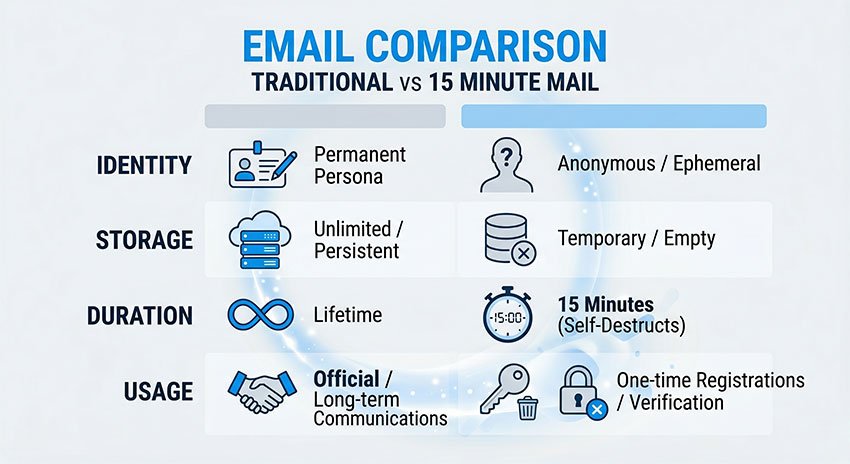
पारंपरिक ईमेल और 15 मिनट अस्थायी ईमेल के बीच का अंतर तब स्पष्ट हो जाता है जब आप तुलना करते हैं कि उन्हें कैसे डिज़ाइन किया गया है और उनका उपयोग कैसे किया जाता है।
| विशेषता | पारंपरिक ईमेल | 15 मिनट मेल |
|---|---|---|
| सेटअप | पंजीकरण की आवश्यकता है | तत्काल निर्माण |
| भंडारण | स्थायी | अस्थायी (15 मिनट) |
| पहचान | उपयोगकर्ता से जुड़ी | अनाम सत्र |
| उपयोग | दीर्घकालिक संचार | एक बार का सत्यापन |
पारंपरिक ईमेल पहचान, संचार और दीर्घकालिक उपयोग के लिए बनाया गया है।
15 मिनट मेल गति, गोपनीयता और अस्थायी पहुंच के लिए बनाया गया है।
संक्षेप में, एक स्थायी पहचान प्रणाली है, दूसरा डिस्पोजेबल एक्सेस टूल है।
15 मिनट मेल तुरंत काम क्यों करता है (सिस्टम डिज़ाइन परिप्रेक्ष्य)
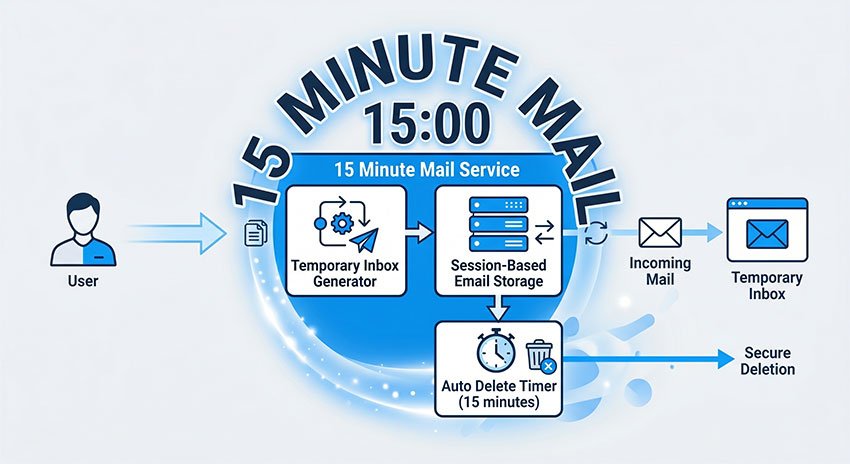
सिस्टम डिज़ाइन के दृष्टिकोण से, 15 मिनट मेल एक स्टेटलेस ईमेल प्रोविजनिंग लेयर के रूप में कार्य करता है, जो 30 मिनट ईमेल और 60 मिनट ईमेल पता जैसी डिस्पोजेबल इनबॉक्स प्रणालियों के समान है, दोनों को अल्पकालिक सत्यापन और अस्थायी साइनअप वर्कफ़्लो के लिए डिज़ाइन किया गया है।
स्थायी उपयोगकर्ता खाते बनाने के बजाय, यह अल्पकालिक सत्र-आधारित मेलबॉक्स निर्माण पर निर्भर करता है, जो पहचान बाइंडिंग और दीर्घकालिक भंडारण आवश्यकताओं को समाप्त करता है।
इस आर्किटेक्चर में आमतौर पर शामिल हैं:
- उपयोगकर्ता प्रमाणीकरण के बिना ऑन-डिमांड इनबॉक्स प्रोविजनिंग
- स्टेटलेस सत्र हैंडलिंग (कोई स्थायी उपयोगकर्ता प्रोफ़ाइल नहीं)
- इनबॉक्स निरंतरता के लिए कोई रिलेशनल डेटाबेस निर्भरता नहीं
- एक निश्चित TTL (टाइम-टू-लाइव) के बाद स्वचालित जीवनचक्र समाप्ति
परिणामस्वरूप, इनबॉक्स निर्माण लगभग तत्काल होता है क्योंकि सिस्टम पारंपरिक खाता प्रोविजनिंग, पहचान सत्यापन और भंडारण आरंभीकरण प्रक्रियाओं को बायपास करता है।
लोग 15 मिनट मेल का उपयोग क्यों करते हैं
अपने तकनीकी कार्य से परे, 15 मिनट मेल 2026 में लोगों द्वारा ऑनलाइन पहचान और ईमेल उपयोग के प्रबंधन के तरीके में एक व्यापक बदलाव को दर्शाता है।
हर ऑनलाइन गतिविधि के लिए एक ही स्थायी ईमेल का उपयोग करने के बजाय, यह पैटर्न साइबर सुरक्षा चर्चाओं और ईमेल दुरुपयोग रोकथाम अनुसंधान में प्रलेखित गोपनीयता-केंद्रित ब्राउज़िंग व्यवहार और एंटी-स्पैम उपयोग रणनीतियों में आम तौर पर देखा जाता है।
उपयोगकर्ता साइनअप के लिए अस्थायी ईमेल का उपयोग क्यों करते हैं
15 मिनट मेल "अलग डिजिटल पहचान" की ओर एक बड़े बदलाव का हिस्सा है।
व्यावहारिक रूप से, इसका मतलब है कि उपयोगकर्ता अब हर चीज के लिए एक ईमेल पते पर निर्भर नहीं रहते हैं।
इसके बजाय, वे उपयोग को विभाजित करते हैं:
- आवश्यक खाते (बैंकिंग, काम, व्यक्तिगत पहचान)
- अस्थायी बातचीत (साइनअप, परीक्षण, डाउनलोड)
यह अलगाव विभिन्न प्लेटफार्मों के बीच दीर्घकालिक डेटा कनेक्शन को कम करने में मदद करता है।
समय के साथ, यह सीमित करता है कि कितनी जानकारी को एक डिजिटल पहचान से वापस जोड़ा जा सकता है।
15 मिनट मेल स्पैम ईमेल से बचने में कैसे मदद करता है
एक और महत्वपूर्ण प्रभाव कम-विश्वास वाली बातचीत के दौरान अनावश्यक व्यक्तिगत डेटा जोखिम में कमी है।
जब उपयोगकर्ता अपने वास्तविक ईमेल का उपयोग करके नई सेवाओं के लिए साइन अप करते हैं, तो उस पते को:
- मार्केटिंग डेटाबेस में जोड़ा जा सकता है
- कई प्लेटफार्मों पर ट्रैक किया जा सकता है
- व्यवहार प्रोफाइलिंग के लिए उपयोग किया जा सकता है
इसके बजाय एक अस्थायी ईमेल का उपयोग करके, यह जोखिम काफी कम हो जाता है।
इससे निम्नलिखित परिणाम मिलते हैं:
- कम दीर्घकालिक मार्केटिंग प्रोफाइल
- कम क्रॉस-प्लेटफ़ॉर्म उपयोगकर्ता ट्रैकिंग
- ईमेल-आधारित पहचान एकत्रीकरण में कमी
सरल शब्दों में, यह उपयोगकर्ताओं को अपनी वास्तविक पहचान को स्थायी रूप से संलग्न किए बिना ऑनलाइन बातचीत करने में मदद करता है।
डिस्पोजेबल ईमेल सेवाओं के गोपनीयता लाभ
गोपनीयता लाभों के अलावा, 15 मिनट मेल दैनिक डिजिटल दक्षता में भी सुधार करता है।
कई उपयोगकर्ता इनबॉक्स ओवरलोड से बचने और अनावश्यक ईमेल प्रबंधन को कम करने के लिए बस इसे अपनाते हैं।
सामान्य दक्षता लाभों में शामिल हैं:
- सेटअप घर्षण के बिना तेज़ खाता साइनअप
- प्राथमिक इनबॉक्स में कम प्रचार या स्पैम ईमेल
- स्वच्छ दीर्घकालिक ईमेल संगठन
यह इसे न केवल गोपनीयता-केंद्रित उपयोगकर्ताओं के लिए, बल्कि किसी के लिए भी उपयोगी बनाता है जो अधिक सुव्यवस्थित ऑनलाइन वर्कफ़्लो चाहता है।
इस अर्थ में, यह एक गोपनीयता उपकरण और एक उत्पादकता उपकरण दोनों के रूप में कार्य करता है।
15 मिनट मेल का उपयोग कैसे करें (स्टेप-बाय-स्टेप गाइड)
15 मिनट मेल का उपयोग करना बेहद सरल है और शुरू से अंत तक एक मिनट से भी कम समय लगता है।
इसके लिए पंजीकरण, सेटअप या किसी व्यक्तिगत जानकारी की आवश्यकता नहीं है।
चरण 1 - अपना ईमेल जेनरेट करें
15 मिनट मेल सेवा खोलें, और एक अस्थायी इनबॉक्स तुरंत बन जाता है।
आप तुरंत एक यादृच्छिक रूप से जेनरेट किया गया अस्थायी ईमेल पता देखेंगे जो उपयोग के लिए तैयार है।
चरण 2 - साइनअप के लिए इसका उपयोग करें
अस्थायी ईमेल पते को कॉपी करें और इसे किसी भी पंजीकरण या साइनअप फ़ॉर्म में पेस्ट करें।
इसका उपयोग आमतौर पर इनके लिए किया जाता है:
- ऐप पंजीकरण
- निःशुल्क परीक्षण
- डाउनलोड एक्सेस पेज
सेवा इस अस्थायी इनबॉक्स पर एक सत्यापन ईमेल भेजेगी।
चरण 3 - सत्यापन ईमेल प्राप्त करें
ईमेल इनबॉक्स के अंदर वास्तविक समय में स्वचालित रूप से दिखाई देते हैं।
अधिकांश संदेशों में शामिल हैं:
- सत्यापन कोड
- सक्रियण लिंक
- खाता पुष्टिकरण ईमेल
ज्यादातर मामलों में किसी रिफ्रेश या लॉगिन की आवश्यकता नहीं होती है।
चरण 4 - इसे स्वचालित रूप से समाप्त होने दें
एक बार जब आप अपना कार्य पूरा कर लेते हैं, तो आपको कुछ और करने की आवश्यकता नहीं है।
सिस्टम स्वचालित रूप से हटा देगा:
- इनबॉक्स
- सभी प्राप्त ईमेल
- सभी सत्र डेटा
15 मिनट के बाद सब कुछ स्थायी रूप से हटा दिया जाता है।
ईमेल जेनरेट करने से लेकर सत्यापन पूरा करने तक, पूरी प्रक्रिया में आमतौर पर 60 सेकंड से कम समय लगता है।
15 मिनट मेल कहाँ काम करता है और कहाँ ब्लॉक हो जाता है
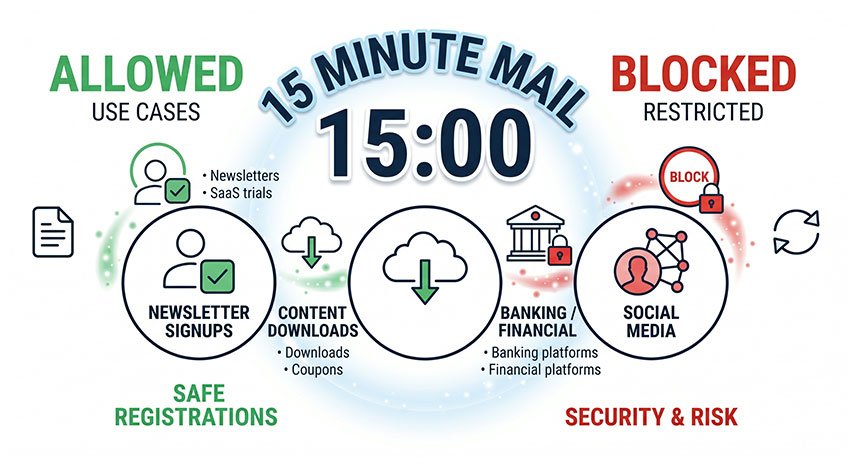
सभी वेबसाइटें अस्थायी ईमेल के साथ एक जैसा व्यवहार नहीं करती हैं।
जबकि 15 मिनट मेल कई कम जोखिम वाले परिदृश्यों में सुचारू रूप से काम करता है, कुछ प्लेटफ़ॉर्म सक्रिय रूप सेसुरक्षा और दुरुपयोग की रोकथाम के कारणों से डिस्पोजेबल ईमेल सेवाओं को ब्लॉक या प्रतिबंधित करते हैं।
यह समझना कि यह कहाँ काम करता है—और कहाँ नहीं—इसे प्रभावी ढंग से उपयोग करने की कुंजी है।
वेबसाइटें जो अस्थायी ईमेल स्वीकार करती हैं
15 Minute Mail को आमतौर पर उन प्लेटफॉर्म पर स्वीकार किया जाता है जहाँ दीर्घकालिक पहचान महत्वपूर्ण नहीं है।
सामान्य सफल उपयोग के मामलों में शामिल हैं:
- न्यूज़लेटर साइनअप
- बुनियादी SaaS टूल और निःशुल्क परीक्षण (फ्री ट्रायल)
- फ़ाइल डाउनलोड और गेटेड संसाधन
- कम सुरक्षा वाले अकाउंट रजिस्ट्रेशन
इन मामलों में, ईमेल की आवश्यकता केवल एक बार के सत्यापन के लिए होती है, इसलिए डिस्पोजेबल ईमेल मज़बूती से काम करता है।
कुल सफलता दर: उच्च
वेबसाइटें जो डिस्पोजेबल ईमेल सेवाओं को ब्लॉक करती हैं
कुछ प्लेटफॉर्म अपनी सुरक्षा प्रणालियों के हिस्से के रूप में डिस्पोजेबल ईमेल डोमेन को सक्रिय रूप से प्रतिबंधित करते हैं।
यह इन पर अधिक सामान्य है:
- फेसबुक / मेटा साइनअप फ़्लो
- बैंकिंग या वित्तीय प्लेटफॉर्म
- उच्च-सुरक्षा वाले SaaS उत्पाद
इन सेवाओं के लिए अक्सर मज़बूत पहचान सत्यापन और दीर्घकालिक ईमेल विश्वसनीयता की आवश्यकता होती है।
परिणामस्वरूप, साइनअप के दौरान अस्थायी ईमेल को अस्वीकार या फ़्लैग किया जा सकता है।
कुछ प्लेटफॉर्म अस्थायी ईमेल का पता क्यों लगाते हैं
वेबसाइटें अस्थायी ईमेल को ब्लॉक यादृच्छिक रूप से नहीं करती हैं। इसके बजाय, वे स्वचालित ट्रस्ट और जोखिम पहचान प्रणालियों का उपयोग करती हैं।
सामान्य पहचान विधियों में शामिल हैं:
- डोमेन प्रतिष्ठा स्कोरिंग
- MX रिकॉर्ड और ईमेल इंफ्रास्ट्रक्चर विश्लेषण
- डिस्पोजेबल ईमेल डेटाबेस फ़िल्टरिंग
ये प्रणालियाँ प्लेटफॉर्म को स्पैम अकाउंट, नकली रजिस्ट्रेशन और ट्रायल के दुरुपयोग को कम करने में मदद करती हैं।
ज़्यादातर मामलों में, ब्लॉकिंग स्वचालित ट्रस्ट संकेतों पर आधारित होती है, न कि मैन्युअल समीक्षा पर।
क्या 2026 में 15 Minute Mail का उपयोग करना सुरक्षित है?
15 Minute Mail का उपयोग तब सुरक्षित है जब इसका उपयोग अस्थायी, कम जोखिम वाली गतिविधियों जैसे ईमेल सत्यापन या एक बार के साइनअप के लिए किया जाता है।
हालाँकि, यह संवेदनशील या दीर्घकालिक अकाउंट के लिए डिज़ाइन नहीं किया गया है जहाँ ईमेल रिकवरी या पहचान सुरक्षा की आवश्यकता होती है।
15 Minute Mail की सुरक्षा पूरी तरह से इस बात पर निर्भर करती है कि इसका उपयोग कैसे किया जाता है।
अस्थायी ईमेल का उपयोग कब सुरक्षित है
15 Minute Mail उन परिदृश्यों में उपयोग करने के लिए सुरक्षित है जहाँ किसी दीर्घकालिक डेटा या अकाउंट रिकवरी की आवश्यकता नहीं होती है।
सामान्य सुरक्षित उपयोगों में शामिल हैं:
- ईमेल सत्यापन कोड
- निःशुल्क परीक्षण रजिस्ट्रेशन
- अस्थायी या एक बार के साइनअप
इन मामलों में, इनबॉक्स का उपयोग केवल अल्पकालिक एक्सेस के लिए किया जाता है और यह महत्वपूर्ण डेटा संग्रहीत नहीं करता है।
आपको 15 Minute Mail का उपयोग कब नहीं करना चाहिए
इसका उपयोग उन अकाउंट के लिए नहीं किया जाना चाहिए जहाँ दीर्घकालिक एक्सेस या पहचान रिकवरी महत्वपूर्ण है।
इसमें शामिल हैं:
- बैंकिंग या वित्तीय अकाउंट
- पासवर्ड रिकवरी ईमेल
- दीर्घकालिक सब्सक्रिप्शन या सदस्यता
मुख्य जोखिम यह है कि इनबॉक्स स्थायी रूप से समाप्त हो जाता है, जिससे रिकवरी असंभव हो जाती है।
सुरक्षा जोखिम और सीमाएं स्पष्ट की गई हैं
हालाँकि यह सेवा बुनियादी उपयोग के लिए सुरक्षित है, लेकिन इसके अस्थायी डिज़ाइन के कारण इसमें अंतर्निहित सीमाएं हैं।
इनमें शामिल हैं:
- समाप्त होने के बाद कोई इनबॉक्स रिकवरी नहीं
- संग्रहीत सत्र डेटा के लिए कोई गारंटीकृत एन्क्रिप्शन नहीं (प्रदाता के अनुसार भिन्न होता है)
- साझा इंफ्रास्ट्रक्चर जो कुछ कार्यान्वयन में अलगाव को कम कर सकता है
ये सीमाएं गति और गुमनामी के लिए जानबूझकर किए गए डिज़ाइन ट्रेड-ऑफ़ हैं, न कि सिस्टम की खामियां।
15 Minute Mail काम क्यों नहीं कर रहा है (सामान्य समस्याएं)
15 Minute Mail ज़्यादातर मामलों में मज़बूती से काम करता है, लेकिन किसी भी डिस्पोजेबल ईमेल सिस्टम की तरह, वेबसाइट नीतियों और ईमेल डिलीवरी स्थितियों के आधार पर इसकी कुछ सीमाएं हैं।
ये समस्याएं सिस्टम त्रुटियां नहीं हैं, बल्कि बाहरी प्लेटफॉर्म या सेवा की अस्थायी प्रकृति के कारण अपेक्षित व्यवहार हैं।
ईमेल क्यों नहीं पहुँच रहे हैं
कुछ मामलों में, सत्यापन ईमेल तुरंत इनबॉक्स में दिखाई नहीं दे सकते हैं।
यह आमतौर पर इनके कारण होता है:
- भेजने वाले प्लेटफॉर्म से ईमेल डिलीवरी में देरी
- स्पैम या सुरक्षा फ़िल्टरिंग सिस्टम द्वारा संदेशों को ब्लॉक या देरी करना
- कुछ वेबसाइटों द्वारा डिस्पोजेबल ईमेल डोमेन को प्रतिबंधित या ब्लॉक करना
ज़्यादातर स्थितियों में, ईमेल या तो थोड़ी देरी के बाद आता है या इनबॉक्स तक पहुँचने से पहले फ़िल्टर कर दिया जाता है।
इनबॉक्स बहुत जल्दी समाप्त क्यों हो गया
चूंकि इनबॉक्स केवल 15 मिनट के लिए मौजूद रहता है, इसलिए बहु-चरणीय साइनअप प्रक्रियाओं में समय एक सीमा बन सकता है।
यह आमतौर पर तब होता है जब:
- रजिस्ट्रेशन प्रक्रिया उम्मीद से अधिक समय लेती है
- बाहरी सिस्टम द्वारा ईमेल डिलीवरी में देरी होती है
- उपयोगकर्ता सत्यापन के दौरान टैब स्विच करते हैं या रुक जाते हैं
एक बार टाइमर समाप्त हो जाने के बाद, सभी संदेश स्थायी रूप से हटा दिए जाते हैं और उन्हें पुनर्प्राप्त नहीं किया जा सकता है।
वेबसाइटें अस्थायी ईमेल को अस्वीकार क्यों करती हैं
कुछ वेबसाइटें रजिस्ट्रेशन के दौरान अस्थायी ईमेल पतों को पूरी तरह से अस्वीकार कर सकती हैं।
यह आमतौर पर इनके कारण होता है:
- सुरक्षा प्रणालियों द्वारा डिस्पोजेबल ईमेल डोमेन को फ़्लैग किया जाना
- प्लेटफॉर्म-स्तरीय धोखाधड़ी रोकथाम या दुरुपयोग फ़िल्टर
- डोमेन प्रतिष्ठा डेटाबेस में उच्च-जोखिम वर्गीकरण
यह तकनीकी विफलता नहीं है, बल्कि वेबसाइट द्वारा लागू किया गया एक जानबूझकर किया गया ट्रस्ट-आधारित प्रतिबंध है।
ज़्यादातर सीमाएं सेवा के कारण नहीं, बल्कि इस बात के कारण होती हैं कि बाहरी प्लेटफॉर्म अस्थायी ईमेल डोमेन का मूल्यांकन कैसे करते हैं।
15 Minute Mail बनाम 5 Minute Mail बनाम 10 Minute Mail
विभिन्न अस्थायी ईमेल सेवाएं मुख्य रूप से अवधि, विश्वसनीयता और सफलता दर में भिन्न होती हैं, जो इस बात पर निर्भर करता है कि इनबॉक्स कितने समय तक सक्रिय रहता है।
सही का चुनाव इस बात पर निर्भर करता है कि आपको सत्यापन के लिए कितना समय चाहिए और लक्षित वेबसाइट कितनी सख्त है।
| विशेषता | 5 Minute Mail | 10 Minute Mail | 15 Minute Mail |
|---|---|---|---|
| अवधि | बहुत कम | मध्यम | अधिक |
| सफलता दर | कम | मध्यम | उच्च |
| सर्वोत्तम उपयोग मामला | तेज़ थ्रोअवे साइनअप | सामान्य उपयोग | सत्यापन-भारी साइटें |
| ईमेल छूटने का जोखिम | उच्च | मध्यम | कम |
सही का चुनाव कैसे करें
5 Minute Mail तब सबसे अच्छा होता है जब आपको केवल त्वरित, एक बार के एक्सेस की आवश्यकता होती है और आप तत्काल सत्यापन की उम्मीद करते हैं।
10 Minute Mail सामान्य उपयोग के मामलों के लिए गति और विश्वसनीयता के बीच संतुलन प्रदान करता है।
15 Minute Mail तब सबसे विश्वसनीय विकल्प होता है जब आप विलंबित सत्यापन ईमेल या सख्त प्लेटफॉर्म से निपट रहे हों।
कुल मिलाकर, अवधि जितनी लंबी होगी, सफलता दर और विश्वसनीयता उतनी ही अधिक होगी।
15 Minute Mail के साथ सर्वोत्तम सफलता दर कैसे प्राप्त करें
15 Minute Mail का उपयोग करते समय सफलता को अधिकतम करने के लिए, उपयोग के व्यवहार को इस बात के साथ संरेखित करना महत्वपूर्ण है कि अस्थायी ईमेल सिस्टम और वेबसाइट सत्यापन प्रक्रियाएं वास्तव में कैसे काम करती हैं।
ज़्यादातर मामलों में, सफलता टूल के बजाय समय और उपयोग के परिदृश्य पर अधिक निर्भर करती है।
सत्यापन तुरंत पूरा करें
सबसे महत्वपूर्ण कारक समय है।
एक बार जब आप अस्थायी ईमेल जेनरेट कर लेते हैं, तो आपको साइनअप या सत्यापन के लिए तुरंत इसका उपयोग करना चाहिए।
यह ईमेल आने से पहले समाप्त होने के जोखिम को कम करता है।
सर्वोत्तम अभ्यास:
- पहले ईमेल जेनरेट करें
- साइनअप फ़ॉर्म पर तुरंत इसका उपयोग करें
- वास्तविक समय में इनबॉक्स की निगरानी करें
इसका उपयोग केवल उपयुक्त परिदृश्यों के लिए करें
अस्थायी ईमेल कम जोखिम वाली और अल्पकालिक स्थितियों में सबसे अच्छा काम करता है।
आदर्श उपयोग के मामलों में शामिल हैं:
- एक बार का अकाउंट सत्यापन
- निःशुल्क परीक्षण सक्रियण
- गेटेड संसाधन डाउनलोड करना
- वेबसाइटों या ऐप्स का परीक्षण करना
उन अकाउंट के लिए इसका उपयोग करने से बचें जिन्हें दीर्घकालिक एक्सेस या रिकवरी की आवश्यकता होती है।
उच्च-प्रतिबंध वाले प्लेटफॉर्म से बचें
कुछ वेबसाइटें स्वचालित पहचान प्रणालियों का उपयोग करके डिस्पोजेबल ईमेल सेवाओं को सक्रिय रूप से ब्लॉक करती हैं।
इनमें शामिल हैं:
- वित्तीय या बैंकिंग प्लेटफॉर्म
- उच्च-सुरक्षा वाले SaaS उत्पाद
- सख्त सत्यापन नियमों वाले बड़े सोशल मीडिया प्लेटफॉर्म
कम सुरक्षा वाली या सामान्य-उद्देश्य वाली वेबसाइटों पर सफलता दर काफी अधिक है।
इसे सिंगल-सेशन टूल के रूप में मानें
सबसे प्रभावी मानसिकता 15 Minute Mail को एक सिंगल-यूज़ सेशन टूल के रूप में मानना है, न कि मेलबॉक्स के रूप में।
इसका मतलब है:
- भविष्य में एक्सेस की उम्मीद न करें
- वहां महत्वपूर्ण जानकारी संग्रहीत न करें
- इसका उपयोग केवल तत्काल सत्यापन कार्यों के लिए करें
"सेशन मोड" में सोचने से उपयोगकर्ता की त्रुटियां काफी कम हो जाती हैं।
15 Minute Mail के साथ सफलता टूल पर कम और इस बात पर अधिक निर्भर करती है कि इसका उपयोग कैसे और कहाँ किया जाता है।
जब सही तरीके से उपयोग किया जाता है, तो यह अस्थायी ऑनलाइन इंटरैक्शन के लिए तेज़, विश्वसनीय और कुशल है।
15 Minute Mail FAQ (सामान्य प्रश्न और उत्तर)
ये FAQ संबंधित खोज विविधताओं और इस बारे में गहरे उपयोगकर्ता इरादे को भी कवर करते हैं कि अस्थायी ईमेल सेवाएं कैसे काम करती हैं।
15 Minute Mail का उपयोग किस लिए किया जाता है?
15 Minute Mail का उपयोग व्यक्तिगत इनबॉक्स को उजागर किए बिना अस्थायी ईमेल सत्यापन के लिए किया जाता है।
इसका उपयोग आमतौर पर साइनअप, निःशुल्क परीक्षण और गेटेड सामग्री डाउनलोड करने के लिए किया जाता है।
कई उपयोगकर्ता इसे तब खोजते हैं जब वे स्पैम से बचना चाहते हैं या बिना किसी प्रतिबद्धता के किसी सेवा का परीक्षण करना चाहते हैं।
क्या वेबसाइटें 15 Minute Mail का पता लगा सकती हैं?
हाँ। कई प्लेटफॉर्म क्लाउडफ्लेयर (Cloudflare) जैसे प्रदाताओं के ईमेल सुरक्षा दस्तावेज़ीकरण और स्पैमहाउस (Spamhaus) जैसे एंटी-स्पैम डेटाबेस के समान डोमेन प्रतिष्ठा और दुरुपयोग-रोकथाम प्रणालियों का उपयोग करके डिस्पोजेबल ईमेल सेवाओं का पता लगाते हैं।
वेबसाइटें अस्थायी ईमेल को ब्लॉक क्यों करती हैं?
वेबसाइटें स्वचालित दुरुपयोग, नकली अकाउंट निर्माण और निःशुल्क-परीक्षण शोषण को कम करने के लिए डिस्पोजेबल ईमेल डोमेन को ब्लॉक करती हैं, जो SaaS धोखाधड़ी रोकथाम प्रणालियों और ईमेल थ्रेट इंटेलिजेंस फ्रेमवर्क में आमतौर पर प्रलेखित एक अभ्यास है।
यदि मैं समाप्त होने से पहले ईमेल मिस कर दूँ तो क्या होगा?
यदि सत्यापन पूरा करने से पहले इनबॉक्स समाप्त हो जाता है, तो ईमेल स्थायी रूप से खो जाता है।
उस स्थिति में, आपको एक नया अस्थायी ईमेल जेनरेट करना होगा और प्रक्रिया को फिर से शुरू करना होगा।
यह उन सबसे सामान्य समस्याओं में से एक है जिनका सामना उपयोगकर्ता तब करते हैं जब समय बहुत धीमा होता है।
क्या मैं कई साइनअप के लिए 15 Minute Mail का उपयोग कर सकता हूँ?
हाँ, लेकिन प्रत्येक सत्र एक नया अस्थायी ईमेल पता जेनरेट करता है।
इसका मतलब है:
• आप एक ही इनबॉक्स का पुन: उपयोग नहीं कर सकते
• प्रत्येक साइनअप के लिए एक नए ईमेल सत्र की आवश्यकता होती है
यही कारण है कि यह एक बार के उपयोग के मामलों के लिए सबसे उपयुक्त है।
15 Minute Mail कुछ वेबसाइटों पर काम क्यों नहीं कर रहा है?
कुछ वेबसाइटें स्वचालित पहचान प्रणालियों का उपयोग करके अस्थायी ईमेल डोमेन को ब्लॉक करती हैं।
यह आमतौर पर इन वाले प्लेटफॉर्म पर होता है:
- सख्त पहचान सत्यापन
- उच्च-सुरक्षा आवश्यकताएं
- धोखाधड़ी रोकथाम प्रणालीtems
ऐसे मामलों में, पारंपरिक ईमेल का उपयोग करना आवश्यक है।
15 Minute Mail का अंतिम निष्कर्ष
15 Minute Mail को ईमेल संचार प्रणाली के बजाय एक अस्थायी प्रमाणीकरण परत के रूप में समझा जाना चाहिए।
ईमेल इंफ्रास्ट्रक्चर के दृष्टिकोण से, यह एक स्टेटलेस (stateless), डिस्पोजेबल पहचान बफर के रूप में कार्य करता है जिसे स्थायी खाता जुड़ाव के बिना अल्पकालिक सत्यापन वर्कफ़्लो का समर्थन करने के लिए डिज़ाइन किया गया है।
वास्तविक दुनिया के उपयोग में, इसकी प्रभावशीलता संदर्भ पर निर्भर करती है: यह कम-विश्वास वाले, एकमुश्त सत्यापन परिदृश्यों में विश्वसनीय रूप से कार्य करता है, लेकिन यह किसी भी ऐसी प्रणाली के लिए उपयुक्त नहीं है जिसमें पहचान निरंतरता, रिकवरी क्षमता या दीर्घकालिक संचार की आवश्यकता होती है।
सरल शब्दों में, यह पारंपरिक ईमेल प्रणालियों का विकल्प नहीं है, बल्कि एक क्षणिक एक्सेस तंत्र है जिसका उपयोग अस्थायी ऑनलाइन प्रमाणीकरण के लिए किया जाता है।