How to delete your digital footprint in 2026 is more important than ever, as personal data is constantly collected, tracked, and sold online. From social media to app sign-ups, nearly every action leaves traces that can affect your privacy, security, and even career opportunities.
While you can’t erase everything, you can significantly reduce your online exposure with the right steps.
Quick Answer: How to Delete Your Digital Footprint (2026)
To delete your digital footprint effectively, follow these 5 steps:
- Search your name, emails, and usernames on Google
- Delete unused accounts and remove personal data
- Opt out of data broker sites (e.g., Spokeo, Whitepages)
- Clean up social media and adjust privacy settings
- Use privacy tools to prevent future tracking
Time required: 2–6 hours (initial cleanup)
Difficulty: Medium
Expected result: Reduce 80–90% of your online exposureBottom line: You can’t erase everything—but you can take back control of your digital footprint.
Digital Footprint Removal Framework: A Step-by-Step Process
- Discovery (Identify Your Digital Footprint)↓
- Cleanup (Delete Accounts & Old Content)↓
- Removal (Eliminate Data from Brokers)↓
- Control (Limit Public Visibility)↓
- Prevention (Reduce Future Tracking)
This 5-stage framework helps you systematically reduce your digital footprint instead of deleting data randomly.
What Is a Digital Footprint? (And Why It Matters)
Every action you take online — whether intentional or not — leaves a trace. This collection of traces is called your digital footprint, and it builds a detailed profile of your online presence over time. From social media posts and online purchases to comments and search histories, these digital traces can reveal personal habits, preferences, and sensitive information. Understanding your digital footprint is the first step in learning how to delete digital footprint and take control of your online privacy.
Definition: What Is a Digital Footprint?
According to the Kaspersky Research, A digital footprint is made up of two types of data: active footprints, created when you deliberately share information (like posting on Facebook or filling out forms), and passive footprints, collected without your direct input (such as IP logs, cookies, and browsing behavior). Together, these traces form a map of your online identity that can be accessed, analyzed, or even monetized by others.
Why It Matters
Your digital footprint has real-world implications:
- Identity Theft Risk – Exposed personal information can be used by criminals to steal identities or commit fraud. The FTC reports that millions of Americans fall victim to online identity theft each year.
- Reputation Impact – Employers, colleagues, and strangers may judge you based on what they find online. Old or negative posts can affect job prospects, social relationships, and credibility.
- Targeted Ads & Profiling – According IBM Data Breach Report,advertisers and data brokers track online behavior to build detailed profiles, often without explicit consent, influencing what content and offers you see.
By recognizing what a digital footprint is and why it matters, you can start making informed decisions to reduce exposure and manage your online presence, laying the groundwork for the next steps: auditing your footprint and cleaning up data.
Types of Digital Footprints (Active vs Passive)
Once you understand what a digital footprint is, it’s important to recognize that not all footprints are created equal. Digital footprints can be broadly categorized into active and passive types, and knowing the difference is key to effectively managing and reducing your online exposure. This distinction also helps prioritize which data you can realistically control or delete.
Active Digital Footprints
Active footprints are traces you deliberately create online. These include social media posts, comments, emails, account registrations, and any other information you consciously share. Since these actions are intentional, you have high control over them — you can edit, delete, or limit their visibility.
Passive Digital Footprints
Passive footprints are generated without your direct input. Examples include website cookies, IP logs, location data, and tracking from analytics or ad networks. Because they are collected automatically, your ability to remove passive footprints is limited, though you can reduce them with privacy settings, tracker blockers, and selective browsing.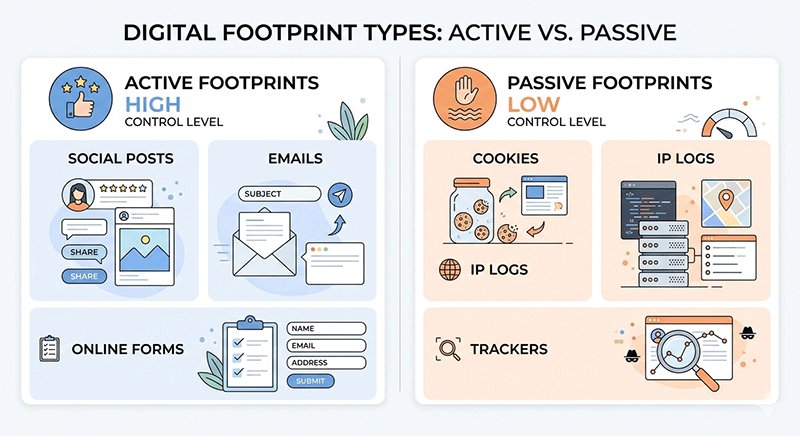
Comparison Table
| Type | Description | Examples | Control Level |
|---|---|---|---|
| Active | Information you intentionally share | Social posts, forms | High |
| Passive | Collected without direct input | Cookies, tracking | Low |
Key Insights
- Active footprints are deletable — start here for the quickest reduction in exposure.
- Passive footprints are harder to erase completely — focus on limiting collection and managing future tracking.
- Understanding these types sets the foundation for the next steps in deleting your digital footprint: auditing your online presence and removing unnecessary or risky data.
Step 1 – Google Yourself (Self-Audit Checklist)
Before you can start deleting your digital footprint, you need to know exactly what information about you is publicly available. Google yourself — and don’t stop there. A thorough self-audit is the first step in understanding the scope of your online presence and identifying which traces you can remove or control.
How to Search Properly
To perform an effective search:
- Use variations of your name combined with your city or state. This helps uncover local listings or posts that might not appear with just your full name.
- Search your email addresses and usernames across multiple platforms. Many old accounts or forum posts can be linked to a single email, revealing more data than you expect.
- Try image searches. Uploading your profile photo or images linked to your name can reveal accounts or pages you may have forgotten.
Self-Audit Checklist
Use this checklist to systematically assess your exposure:
- Personal info exposed? Look for phone numbers, addresses, and sensitive details.
- Old accounts found? Identify inactive social media profiles, blogs, or forums.
- Data broker listings? Check Spokeo, Whitepages, or BeenVerified for your information.
- Outdated content? Look for old posts or comments that no longer represent you.
What to Prioritize
Focus on removing information that could pose the highest risk first:
- Phone numbers – often used for verification or identity theft.
- Home addresses – protect your physical privacy.
- Financial-related exposure – banking, credit, or transaction data is critical to secure.
Performing a thorough self-audit gives you a clear map of your online footprint, so you can strategically target the most sensitive areas first. Once this is done, you can move on to deleting unused accounts and removing unnecessary data, which we’ll cover in the next step.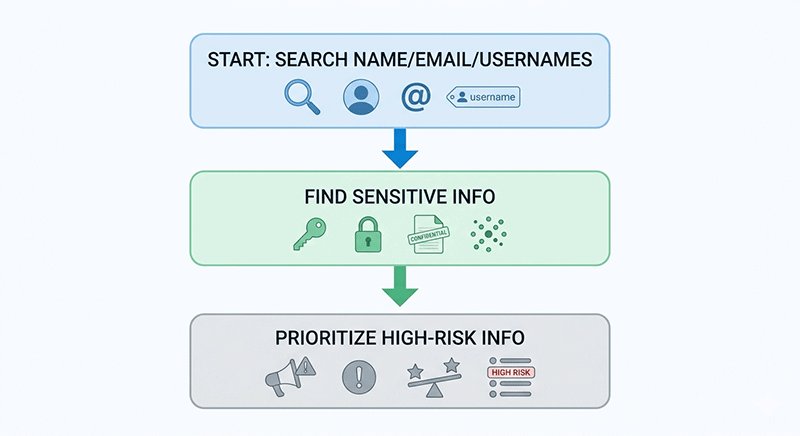
Step 2 – Delete Old & Unused Accounts to Reduce Your Digital Footprint
Digital Footprint Reality (2026)
- The average user has 100–150 online accounts
- Over 60% of users appear on at least one data broker site
- Personal information is often exposed across 10+ public platforms
This means most people underestimate how much data is tied to forgotten or inactive accounts.Learn more about using temp mail for safer registrations Temp Mail Guide to protecte our privacy.
Why Deleting Old Accounts Matters
After identifying your online footprint, the next step is to eliminate unnecessary data sources — starting with unused accounts.
Dormant accounts are one of the biggest privacy risks because they often:
- Store outdated personal information
- Use weak or reused passwords
- Remain unmonitored for years
As reported by password managers like NordPass and Dashlane, the average user maintains 100+ accounts, many of which are inactive. These accounts significantly increase your risk of data breaches, identity theft, and unauthorized access.
Deleting them is one of the fastest ways to reduce your digital footprint.
How to Find Your Old Accounts
Use the following methods to uncover hidden or forgotten accounts:
- Search your email inbox: Look for registration, verification, or welcome emails
- Check saved passwords: Use your browser or password manager to review stored logins
- Search your usernames: Use tools like Namechk or CheckUsernames to find linked profiles
How to Delete Accounts Properly (Checklist)
Once you identify old accounts, follow this process:
- Log in and verify account access
- Delete or anonymize personal data first
(remove name, photos, phone number) - Use the official account deletion page
- Confirm deletion via email (if required)
- Save confirmation or take screenshots
This ensures your data is not partially retained after deletion.
Common Mistake
Many users simply delete accounts without removing personal data first.
In some cases, residual data may still be stored in backups or logs, increasing long-term exposure.
Tip: Use Temporary Email to Reduce Future Footprint
When signing up for non-essential services, consider using a temporary or alias email instead of your primary inbox.
This helps:
- Prevent account tracking
- Reduce spam and data collection
- Limit how much personal data is tied to your identity
Step 3 – Remove Personal Data from Data Brokers to Protect Your Digital Footprint
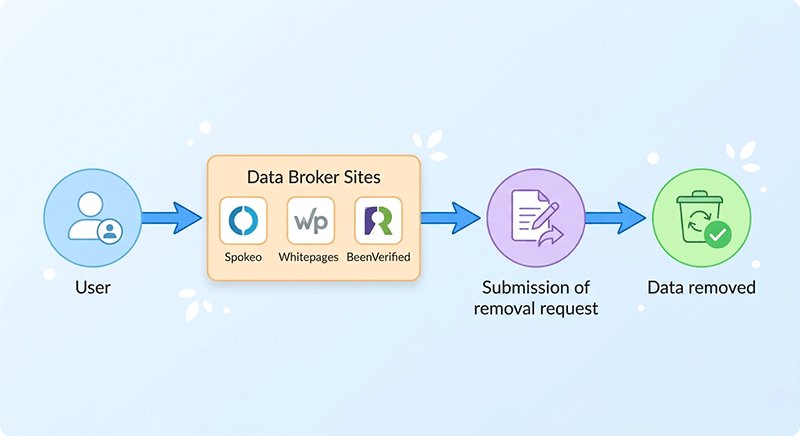
Even after deleting old accounts, your personal information may still be floating online through data brokers. These companies collect and sell data from public records, social media, and online registrations—often without your knowledge. If left unmanaged, your digital footprint can be aggregated, making you vulnerable to identity theft, unsolicited marketing, or profiling.
Major Data Broker Sites to Check in 2026
Some of the most common platforms that may list your information include:
- Spokeo – Combines public records and social media activity
- Whitepages – Lists addresses, phone numbers, and relatives
- BeenVerified – Offers detailed personal profiles
- PeopleFinder – Provides public record data
- TruthFinder – Aggregates contact and criminal records
These sites often display sensitive information without consent, so checking them is a critical step in protecting your online privacy.
How to Remove Your Data (Step-by-Step)
While each broker has its own removal process, the steps generally follow the same pattern:
- Search for your profile to identify what information is listed.
- Locate the site’s opt-out or removal page.
- Submit the removal request, providing only what is necessary for verification.
- Verify your identity if requested, then confirm the removal.
- Monitor periodically—your information may reappear over time from other sources.
Tip: Most brokers require manual removal, so patience is key. Even a few minutes per site can dramatically reduce your exposure.
DIY vs Paid Services
You can handle this process yourself or use paid services:
- DIY – Gives full control and avoids sharing sensitive documents but requires time.
- Paid Services – Can remove data from dozens of brokers quickly, but often need ID verification and involve trust trade-offs.
Keep Future Exposure Low
Finally, to prevent your data from being collected again:
- Use temporary or alias emails for non-essential sign-ups
- Limit the personal details you share publicly online
- Employ privacy tools and tracker blockers to reduce collection
Step 4 – Clean Up Social Media to Reduce Your Digital Footprint
Social media accounts are often the most visible components of your digital footprint. Posts, photos, and interactions can reveal personal information to strangers, employers, and data brokers. Cleaning up your social profiles is essential for reducing exposure and controlling what others can see.
Facebook Privacy Checklist to Protect Your Digital Footprint
- Limit profile visibility – Restrict who can view your personal information and posts.
- Disable search engine indexing – Prevent Google and other search engines from showing your profile.
- Review tagged posts – Remove or hide posts where others have tagged you to control unintended exposure.
Twitter (X) Privacy Checklist to Minimize Online Exposure
- Protect tweets – Set your account to private to limit public visibility.
- Disable location tagging – Prevent location data from being attached to posts.
- Review followers – Remove unknown or suspicious followers who may track your activity.
LinkedIn Privacy Checklist for Professional Privacy Control
- Limit profile visibility – Control which users can view your profile information.
- Turn off public profile – Hide your LinkedIn page from search engines.
- Hide activity updates – Prevent connections from seeing your edits, likes, or new connections.
Delete vs Make Private
It’s important to understand the difference between deleting content and making it private. Deleting removes information permanently, but may not be necessary for all posts. Making content private or limiting visibility achieves similar privacy benefits without losing valuable social interactions or professional connections. Strategically combining both approaches ensures your social media footprint is minimized while maintaining control over your online presence.
Step 5 – Delete or Update Public Content to Protect Your Digital Footprint
Even after auditing accounts and cleaning social media, some personal information may still exist on old blogs, forum posts, or comments. These remnants can continue contributing to your digital footprint, so it’s important to identify and address them.
Identify Old Content Linked to Your Digital Footprint
Search for your name, usernames, and email addresses across platforms where you previously interacted. Focus on content that may reveal personal details, opinions, or outdated information that could affect your privacy or reputation.
Methods to Remove or Update Public Content
- Contact site owners directly, requesting removal or edits. Most reputable sites provide a contact email or support form.
- Use official removal request forms when available. Many platforms, forums, and blog hosts offer structured processes to delete or modify content.
- Update content instead of deleting, when appropriate. Editing posts to remove sensitive details while retaining context can protect privacy without losing valuable contributions.
Taking these steps ensures your digital footprint is minimized, even for older or residual content. Combined with auditing accounts, cleaning social media, and managing data brokers, this final step gives you comprehensive control over what information about you is publicly accessible online.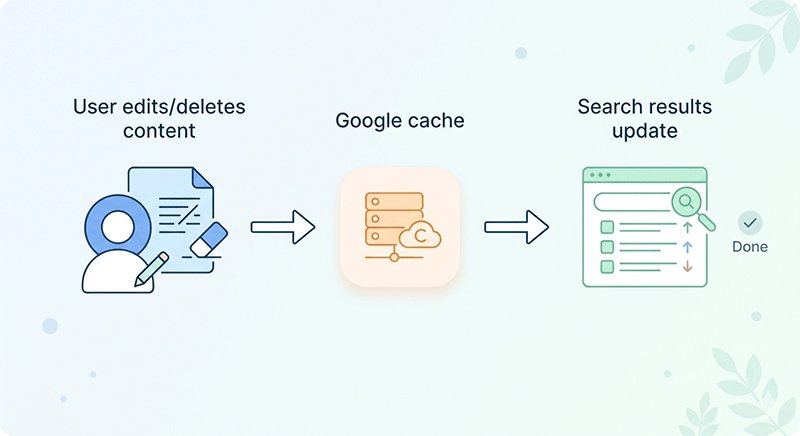
How to Remove Your Information from Google Search
Even after cleaning up accounts and data broker listings, your personal information may still appear in Google search results. These cached results or outdated content can continue exposing sensitive data. Fortunately, Google provides tools to help you remove or update this information.
1. Use the Google Remove Outdated Content Tool
- Navigate to Google Remove Outdated Content
- Enter the URL that contains your outdated information
- Submit a request to remove the cached page from Google search results
This is the most direct way to remove pages that no longer exist but are still appearing in search results.
2. Request Removal of Sensitive Information
Google allows removal requests for sensitive personal data such as:
- Social Security numbers
- Bank account numbers
- Images of signatures
- Explicit content you didn’t post
Steps:
- Go to Google’s Remove Information From Google page
- Follow instructions for the appropriate category of data
- Submit the form for review
Google evaluates these requests and removes content that meets their removal policies.
3. Update or Refresh Cached Content
- If the content is on a site you control (blog, forum, profile), update or delete the content first
- Then request Google to re-crawl the page using Google Search Console URL Inspection
- This ensures search results reflect the most current information
Cache updates are faster than waiting for Google’s natural crawl schedule.
| Step | Action | How to Do It | Notes |
|---|---|---|---|
| 1 | Remove Outdated Content | Use Google Remove Outdated Content Tool to submit URLs that no longer exist | Quick removal from search cache |
| 2 | Request Removal of Sensitive Info | Submit forms for SSN, bank info, images, explicit content | Google reviews and removes qualifying info |
| 3 | Update or Refresh Cached Content | Update/delete content on your own site, then request re-crawl via Google Search Console URL Inspection | Ensures search results show latest content |
Even after cleaning your accounts and social media, your info may remain in Google search results. Follow these three steps systematically to remove outdated content, request removal of sensitive info, and refresh cached pages to ensure your digital footprint is minimized.
What You Can’t Fully Delete to Manage Your Digital Footprint Realistically
While deleting old accounts, removing posts, and cleaning social media significantly reduces your digital footprint, some information is simply impossible to erase completely. Understanding these limitations helps set realistic expectations and focus efforts where they matter most.
Cached Pages and Search Engine Snapshots
Search engines like Google and Bing store cached versions of web pages. Even after content is deleted, snapshots may remain visible for weeks or months. These snapshots will eventually update, but immediate removal is not guaranteed.
Archived Content on Services Like Wayback Machine
Web archives preserve snapshots of websites over time. Content previously published on blogs or personal pages may be preserved in such archives, making complete deletion impossible.
Data Already Copied or Shared
Once information is copied, reposted, or stored by third parties, it cannot be fully controlled. This includes screenshots, shared posts, or data sold to brokers before removal requests.
Core Insight: Focus on reducing visibility and exposure rather than achieving perfection. By prioritizing high-risk information and managing ongoing digital habits, you can significantly limit your footprint, even if total erasure is unattainable. Accepting these limitations enhances credibility and encourages sustainable privacy practices.
How to Reduce Your Digital Footprint Going Forward
Reducing your digital footprint isn’t just about cleaning up the past — it’s also about adopting habits and tools that prevent unnecessary exposure in the future. By being proactive, you can maintain control over your online presence and protect your personal information long-term.
Smart Habits to Minimize Digital Footprint
- Use alias emails when signing up for non-essential services or newsletters. Temporary or alternate email addresses reduce the amount of personal data tied to your identity.
- Avoid oversharing on social media or public forums. Think carefully before posting photos, locations, or personal details.
- Limit app permissions on devices. Only grant access to data strictly necessary for app functionality to prevent passive tracking.
Privacy Tools to Protect Your Online Presence
- VPNs encrypt your internet traffic and hide your IP, protecting your location and browsing history.
- Secure browsers such as Brave or Firefox focus on privacy by blocking trackers and minimizing data collection.
- Tracker blockers and browser extensions prevent ad networks from profiling your behavior, reducing passive digital footprints.
Preventive Mindset
The most effective way to manage your digital footprint is prevention. As the saying goes: “The easiest footprint to delete is the one you never create.” By thinking ahead and applying smart habits with privacy tools, you can drastically reduce exposure and maintain long-term control over your online identity.
Common Mistakes to Avoid When Managing Your Digital Footprint
Even after following the steps to delete or reduce your digital footprint, some common mistakes can undermine your efforts. Being aware of these pitfalls is essential for maintaining privacy and online control.
1. Only Deleting Social Media Accounts
Many users focus solely on social media, forgetting that old forums, blogs, and comments can also reveal personal information.
2. Ignoring Data Brokers and Third-Party Listings
Data brokers aggregate information from multiple sources. Neglecting them leaves your personal data exposed to advertisers, identity thieves, and public profiling.
3. Using Real Information Everywhere
Reusing your real name, email, and phone number across platforms increases passive footprints and makes future removal harder. Consider alias emails or temporary addresses for non-essential sign-ups.
4. Forgetting Old or Inactive Accounts
Dormant accounts are often the easiest targets for data breaches. A thorough audit ensures these accounts are deleted or secured.
By avoiding these mistakes, you maximize the effectiveness of digital footprint reduction efforts and maintain long-term control over your online presence.
Final Checklist – Delete Your Digital Footprint Effectively
Use this final checklist to consolidate everything you’ve learned and take action on reducing your digital footprint:
- Google yourself – Identify what information is publicly accessible.
- Delete unused accounts – Remove dormant profiles and old registrations.
- Remove data broker info – Submit opt-out requests and monitor third-party listings.
- Clean social media – Adjust privacy settings, review posts, and make content private or delete it.
- Limit future exposure – Adopt smart habits, use privacy tools, and avoid oversharing online.
Following this checklist ensures that you systematically address the most significant sources of online exposure, giving you greater control over your personal information.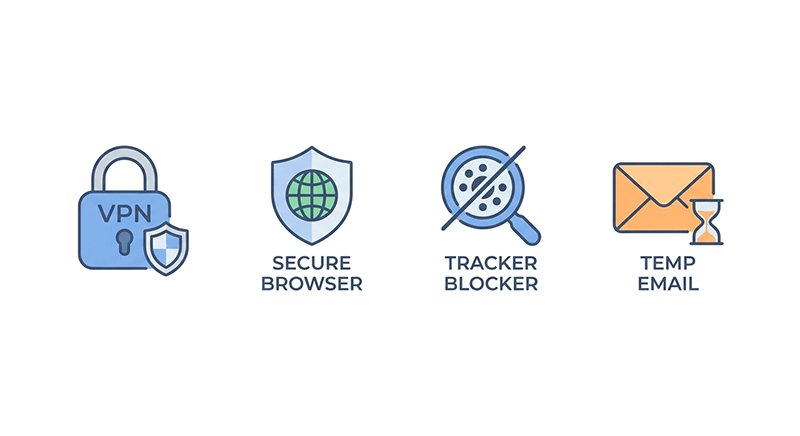
Recommended Tools to Reduce Your Digital Footprint
Maintaining a minimal digital footprint isn’t just about deleting old accounts—it’s also about preventing future exposure. The right tools can help you stay private and reduce tracking across the web.
1. Temporary Email Services
- Use temporary or alias emails when signing up for non-essential platforms.
- Benefits: prevents your personal inbox from being linked to every account and reduces future data leaks.
- Check our guide on Temp Mail for secure sign-ups for recommended services and best practices.
2. VPN Tools
- A Virtual Private Network hides your real IP address and encrypts internet traffic.
- Benefits: masks your location, protects against tracking, and improves security on public Wi-Fi.
- Popular Options: NordVPN, ExpressVPN, ProtonVPN.
3. Privacy-Focused Browsers
- Browsers like Brave or Firefox block trackers and ads by default.
- Benefits: reduces passive data collection, limits targeted advertising, and improves overall privacy.
- Tip: Combine with tracker-blocking extensions like uBlock Origin or Privacy Badger for enhanced protection.
4. Optional Privacy Extensions
- Tools like Cookie AutoDelete, HTTPS Everywhere, or DuckDuckGo Privacy Essentials can further minimize data footprints.
- Benefits: prevent unwanted tracking and automatically clean cookies or trackers.
Pro Tip: Integrating these tools into your daily online activity creates a long-term privacy habit, complementing the cleanup steps you’ve already taken.
Conclusion
our digital footprint doesn’t have to define you. By taking deliberate steps to audit, delete, and manage your online presence, you regain control over your personal data and reduce unnecessary exposure.
Start small but stay consistent — every account deleted, every privacy setting adjusted, and every unnecessary post removed contributes to long-term protection.
To go further:
- Learn how to protect your inbox from spam → How to Stop Spam Emails in 2026: 5 Expert Strategies for Inbox Privacy
- Use temp mail for safer registrations → Is Temp Mail Safe? Things to Know Before Using Disposable Email Address
- Explore comprehensive privacy strategies → How to Protect Your Privacy Online in 2026: 15 Proven Strategies
- Stay alert to scams and phishing emails → McAfee Email Scam: How the Fake Renewal Email Works and How to Stay Safe
- Recover quickly if your email is hacked → What to Do If Your Email Is Hacked: Step-by-Step Recovery Guide
Empower yourself to make privacy a habit, not just a one-time cleanup, and keep your digital footprint manageable in the years ahead.