A temporary email generator is a tool that instantly creates a disposable email address for short-term use. It allows users to receive verification emails, sign up for services, and access content without exposing their personal inbox.
In 2026, temporary email services are widely used to prevent spam, protect privacy, and reduce long-term data exposure.
In today’s digital landscape, protecting personal information online has never been more important. According to the 2025 Data Breach Investigations Report by Verizon, over 50% of data breaches involve compromised email addresses, exposing users to spam, phishing, and unwanted marketing campaigns. For many, using their personal email for online registrations poses significant privacy risks.
This is where a temporary email generator comes in. These tools allow users to instantly create disposable, anonymous email addresses, providing a secure way to sign up for services, download resources, or verify accounts without exposing their real inboxes. Unlike traditional email, temporary emails prioritize privacy, speed, and convenience, making them essential for anyone concerned about online security.
In this article, we will explore why temporary email generators are increasingly necessary, how they work, the best tools available in 2026, and practical tips to use them safely. Whether you want to avoid spam, protect your personal information, or manage multiple online accounts efficiently, this guide covers everything you need to know about creating temporary emails instantly.
Why Use a Temporary Email Generator in 2026
As more online services move toward account-based access, email addresses have effectively become a universal login credential. Today, almost every digital interaction—from accessing online platforms to unlocking content—requires users to submit an email address.
However, this convenience comes with growing risks. Once an email address enters a company’s database, it may be reused for marketing campaigns, shared with third-party partners, or exposed in future data breaches. According to the Verizon Data Breach Investigations Report, personal contact data—including email addresses—continues to appear frequently in breach-related datasets, making it one of the most commonly exposed identifiers on the internet.
At the same time, repeated exposure of email addresses across multiple platforms leads to a second major issue: inbox pollution. Over time, even legitimate interactions can result in a steady flow of newsletters, promotional emails, and unsolicited messages that reduce inbox efficiency and increase the risk of phishing attacks.
For this reason, many users are turning to a temporary email generator as a practical privacy solution. By creating a disposable email address that is not linked to a permanent identity, users can limit how widely their personal data is distributed online.
Below are the three primary reasons why temporary email generators have become essential in 2026.
Avoid Spam and Inbox Overload
One of the most immediate problems users face today is the rapid accumulation of unwanted emails. Even a small number of interactions can lead to long-term email exposure, as addresses are often retained for ongoing communication and marketing use.
Over time, this results in:
- continuous promotional messaging
- reduced visibility of important emails
- increased exposure to spam and phishing attempts
A temporary email generator helps reduce this pressure by separating short-term interactions from a primary inbox. Instead of repeatedly exposing a personal email address, users can rely on disposable identities to limit long-term email accumulation.
Protect Personal Email Privacy
Email addresses are not just communication tools—they are also persistent digital identifiers. Once exposed, they can be reused, resold, or targeted across different platforms and campaigns.
According to the Cost of a Data Breach Report by Ponemon Institute and IBM, personally identifiable information (PII)—including email addresses—remains one of the most commonly exposed data types in security breaches. Once leaked, email data is often reused in spam databases and phishing campaigns.
Using a temporary email generator introduces a protective layer between users and the services they interact with. By avoiding repeated exposure of a primary inbox, users can significantly reduce the amount of personal data circulating in external systems.
Reduce Long-Term Data Exposure
Beyond immediate spam and privacy concerns, long-term data accumulation is another critical issue. Each time an email address is submitted, it contributes to a growing digital footprint that is difficult to control or remove.
Over time, this can lead to:
- persistent tracking across services
- increased likelihood of data aggregation
- higher risk of identity exposure in future breaches
Temporary email generators help minimize this footprint by limiting how long an email identity exists. Instead of becoming part of long-term databases, disposable addresses are used briefly and then removed, reducing the overall exposure of personal information.
As email continues to function as a core digital identifier, the risks associated with overexposure are becoming more significant. Temporary email generators address these challenges by helping users:
- reduce inbox overload caused by repeated exposure
- protect personal email privacy from external systems
- limit long-term data accumulation and tracking risks
In the next section, we will explore how a temporary email generator works, including how disposable addresses are created and how temporary inboxes handle incoming messages.
How a Temporary Email Generator Works
A temporary email generator operates through automated systems designed to create, manage, and remove email addresses without requiring persistent user accounts. Unlike traditional email services that rely on account-based infrastructure, these systems use session-based mechanisms to handle short-lived email interactions.
From a technical perspective, most temporary email platforms are built around three core components: dynamic address generation, session-based inbox handling, and lifecycle-based data expiration.
Dynamic Email Address Generation
The process begins with the automatic creation of an email address. When a user accesses a temporary email generator, the system assigns a randomly generated address from a managed pool of domains.
This generation process is handled at the server level, where the platform continuously creates and maps unique email identifiers to active sessions. Each generated address is valid immediately and does not require credential setup or identity verification.
Because the system does not rely on stored user accounts, address creation is stateless and can be repeated indefinitely for different sessions.
Session-Based Inbox Handling
After an address is generated, it is linked to a temporary inbox that exists within the user’s current browser session. This inbox is not tied to a persistent account but instead operates as a temporary interface for receiving incoming messages.
When an external system sends an email to the generated address, the temporary email service processes the message through its mail servers and routes it to the corresponding session inbox.
Key characteristics of this system include:
- browser-based inbox rendering
- session-linked message access
- real-time synchronization between mail server and interface
Because the inbox is session-driven, it exists only for the duration of the active session or until the system resets the address mapping.
Lifecycle-Based Data Expiration
A defining component of temporary email systems is controlled data expiration. Each generated address and its associated messages are governed by predefined lifecycle rules that determine how long they remain accessible.
Once the expiration threshold is reached, the system automatically removes:
- the email address mapping
- stored message data
- session-linked inbox records
This process is typically handled through scheduled cleanup routines or time-based triggers within the system architecture.
By limiting data persistence, the platform maintains a lightweight storage model and avoids long-term accumulation of message records.
System Workflow Overview
At a high level, the operation of a temporary email generator follows a simple but efficient workflow:
- The system generates a random email address
- The address is mapped to a temporary session inbox
- Incoming messages are routed and displayed in the interface
- The system removes all associated data after expiration
This streamlined architecture allows temporary email platforms to function without traditional account systems while still supporting standard email delivery protocols.
Temporary email generators rely on automated, session-based systems rather than persistent user accounts. By combining dynamic address generation, temporary inbox routing, and lifecycle-based data expiration, these platforms provide a lightweight and efficient method for handling short-term email interactions.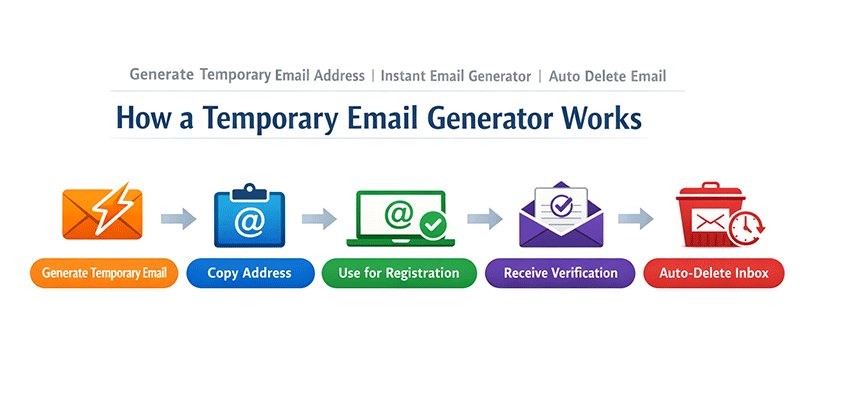
Key Features of a Reliable Temporary Email Generator
Not all temporary email services deliver the same level of performance, reliability, or usability. A high-quality temporary email generator is defined by how efficiently it enables users to generate, receive, and manage disposable email addresses with minimal friction.
The following features represent the core capabilities of a reliable temp mail service.
Instant Temporary Email Generation
A reliable temporary email generator should allow users to generate a disposable email address instantly without registration.
Instead of requiring account creation, passwords, or identity verification, the system provides a ready-to-use email address the moment a user lands on the page.
This ensures:
- immediate access to a temporary email address
- zero signup friction
- fully anonymous email usage
For users who need a temp mail address quickly, this instant generation capability is essential.
Fast and Stable Email Delivery
Speed and reliability are critical for any disposable email service. A temporary email address must be able to receive verification emails, activation links, and system messages without delay.
High-quality temporary email generators are optimized for:
- fast email delivery
- stable inbox performance
- consistent message synchronization
This ensures users can receive verification codes in seconds, making the temp mail workflow smooth and uninterrupted.
Automatic Email Expiration
A key feature of any temporary email generator is automatic email expiration. Disposable email addresses are designed to be short-lived, with messages removed after a defined period.
This feature helps ensure:
- no long-term inbox storage
- reduced data persistence
- clean and self-managed temporary inboxes
Auto-delete functionality is a core characteristic that differentiates temporary email services from traditional email platforms.
Multiple Domain Options
Reliable temp mail providers support multiple email domains, allowing users to generate addresses across different domain names.
This improves usability by:
- increasing success rates during website registrations
- reducing the chance of domain-based blocking
- enabling flexible disposable email usage
A broader domain pool enhances the effectiveness of any temporary email generator, especially for repeated or varied use cases.
Cross-Device and Mobile Compatibility
Modern users often access temporary email services across different devices. A well-designed temporary email generator should work seamlessly on desktops, tablets, and mobile browsers.
Key advantages include:
- no app installation required
- consistent experience across devices
- easy access to temporary inboxes anytime
A responsive, browser-based interface ensures that users can generate and manage temporary email addresses wherever they are.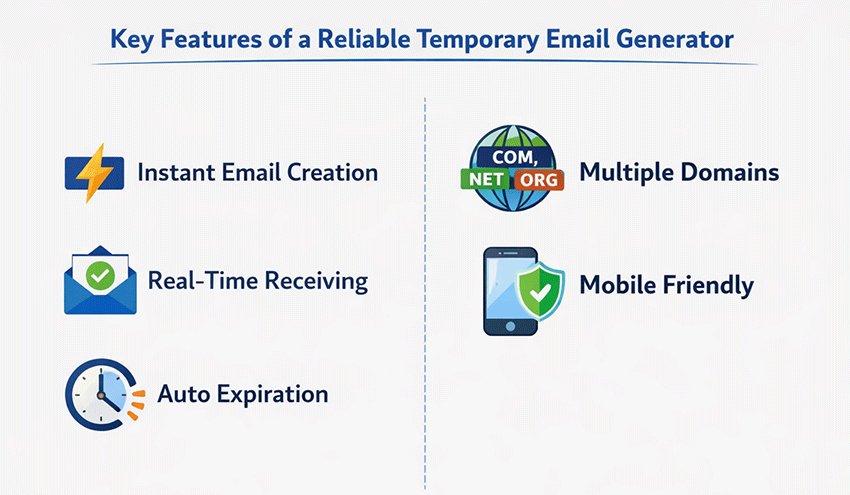
A reliable temporary email generator combines instant email creation, fast message delivery, automatic expiration, multiple domain support, and cross-device accessibility. These features ensure a smooth and efficient experience when using disposable email addresses for short-term communication.
Common Use Cases for Temporary Email Generators
Temporary email generators are widely used across different online scenarios where users need quick, disposable, and anonymous email access. As more platforms rely on email verification and gated content, temp mail services have become a practical solution for handling short-term interactions.
Below are the most common use cases where a temporary email generator is applied.
Temporary Email for Account Verification
One of the primary use cases is using a temporary email for account verification. Many websites require users to confirm their email address before accessing services.
A temporary email address allows users to:
- receive verification codes instantly
- activate accounts without using a personal inbox
- complete sign-up processes with minimal effort
This use case is common across platforms such as social media, SaaS tools, and online communities. For example, users often search for solutions like temporary email for TikTok, temp mail for Discord, temp mail for Facebook, temp mail for Instagram, or disposable email for sign up.
Temp Mail for Testing and Development
Temporary email generators are widely used in development and QA workflows. A temp mail address allows developers and testers to simulate real user scenarios without creating permanent accounts.
Typical use cases include:
- testing registration systems
- validating email verification flows
- checking password reset functionality
- monitoring automated email delivery
Because new disposable email addresses can be generated instantly, temp mail services significantly improve testing efficiency.
Disposable Email for Downloads and Content Access
Many websites require an email address to unlock downloadable resources such as tools, reports, or templates. In these cases, a disposable email can be used to receive access links without exposing a primary inbox.
Common scenarios include:
- accessing gated content
- receiving download links
- unlocking free trials or resources
Users frequently rely on temporary email generators when collecting materials from multiple sources, making this a high-frequency use case.
Temporary Email for Multiple Account Creation
Another important use case is generating multiple email addresses for controlled experiments or repeated registrations. This is especially relevant for marketers, analysts, and product teams.
A temporary email generator enables users to:
- create multiple accounts quickly
- test different onboarding flows
- compare features or pricing tiers
With support for multiple domains and instant generation, disposable email tools provide a scalable way to manage repeated account creation.
Temporary email generators support a wide range of real-world applications, including account verification, software testing, content access, and multi-account workflows. By using a temporary email address, users can efficiently handle short-term interactions without relying on a permanent inbox.
Temporary Email Generator vs Regular Email Services
Temporary email generators and traditional email services serve different purposes. While both allow users to handle email-based interactions, they are designed for distinct usage models.
Understanding these structural differences helps users choose the right type of email service based on their specific needs.
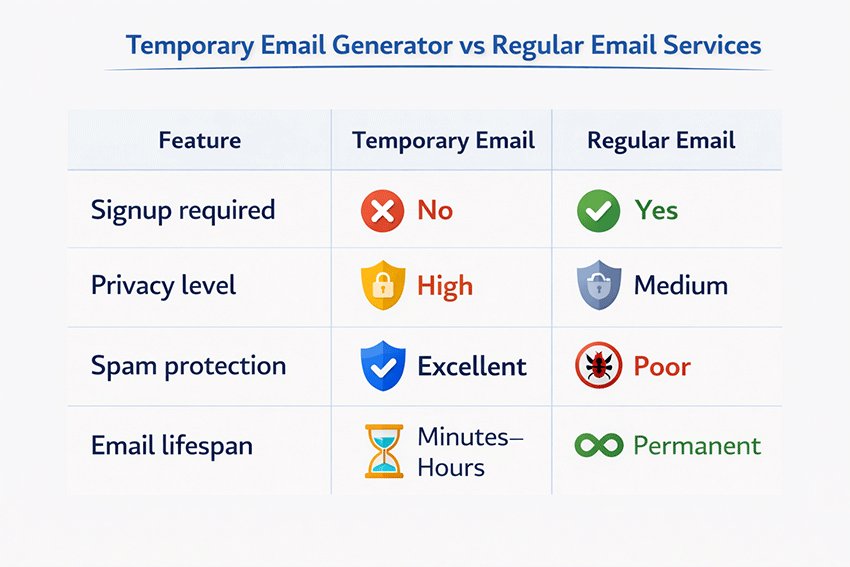
Key Differences at a Glance
| Feature | Temporary Email Generator | Regular Email |
|---|---|---|
| Signup Required | No | Yes |
| Account Setup | Instant access | Multi-step registration |
| Email Lifespan | Short-term (minutes–hours) | Long-term (permanent) |
| Inbox Persistence | Temporary session-based | Continuous storage |
| Identity Link | Not tied to user identity | Linked to personal identity |
Structural Differences Explained
Signup and Access Model
Temporary email generators provide immediate access without requiring account creation. Users can start using the generated address instantly. In contrast, traditional email services require a structured registration process, including credentials setup and identity association.
Email Lifecycle and Storage
Temporary email systems are designed for short-lived interactions. Messages are stored for a limited duration and are automatically removed after expiration. Regular email services, on the other hand, are built for continuous communication, with long-term message storage and account persistence.
Identity Association
A key distinction lies in how email addresses are linked to user identity. Temporary email addresses are not associated with a persistent user profile, while traditional email accounts are directly tied to a user’s identity and account ecosystem.
Usage Model
Temporary email generators are optimized for short-term, task-based interactions that do not require ongoing access. Regular email services are designed for continuous communication, account recovery, and long-term information management.
When to Use Each Option
Choosing between a temporary email generator and a regular email service depends on how long the email interaction needs to last and whether ongoing access is required.
- Use a temporary email generator when the interaction is short-term and does not require future access to the inbox.
- Use a regular email service when the account needs to be maintained over time or requires continuous communication.
Safety and Security Considerations
Although a temporary email generator can be an effective tool for protecting privacy and avoiding spam, it is important to understand when these services are appropriate—and when they are not. Temporary email addresses are designed for short-term, low-risk interactions, not for managing sensitive communications or long-term accounts.
Like any privacy tool, their effectiveness depends on how they are used. By understanding the safe use cases and potential risks, users can take full advantage of temporary email services while avoiding common security pitfalls.
When Temporary Email Is Safe
Temporary email addresses are most useful in situations where an email is required purely for verification or short-term access. In these cases, the email address functions mainly as a gateway to receive a confirmation message or download link.
Common scenarios where a temporary email generator is safe to use include:
- registering for free trials or new online tools
- accessing downloadable resources such as eBooks or templates
- testing applications or website registration flows
- verifying accounts for short-term experimentation
In these situations, the email address is only needed briefly, and there is little risk if the address expires after use. Temporary inboxes provide a convenient way to complete these tasks without exposing a permanent email address.
For users who frequently explore new platforms or test digital services, disposable email addresses can significantly reduce spam exposure while maintaining a higher level of privacy.
When to Avoid Temporary Emails
Despite their convenience, temporary email services should not be used for sensitive or long-term accounts. Because these inboxes are designed to expire automatically, users may lose access to important messages or recovery options.
Situations where temporary email addresses should generally be avoided include:
- online banking or financial services
- accounts that require long-term access
- password recovery or identity verification processes
- sensitive personal or professional communications
In these cases, using a reliable permanent email account is the safer choice. Important notifications, account alerts, and recovery instructions may need to remain accessible for months or years, which temporary inboxes are not designed to support.
Using a temporary email generator responsibly means recognizing that it is best suited for convenience and privacy—not for managing critical accounts.
Potential Security Risks
While temporary email services are widely used and generally safe for short-term tasks, they are not entirely free from limitations. Understanding potential risks can help users make informed decisions.
One concern involves public inbox access. Some disposable email services allow multiple users to view messages sent to the same address, particularly if addresses are generated from a shared pool. This means that sensitive messages should never be sent to a temporary inbox.
Another issue relates to domain blacklisting. Because temporary email domains are sometimes used to create multiple accounts or bypass registration restrictions, certain websites maintain lists of known disposable domains and may block them during signup.
Finally, users should remain aware of phishing risks. Temporary email inboxes can still receive malicious messages, especially if they are used on unfamiliar websites. As with any email service, users should avoid clicking suspicious links or downloading attachments from unknown sources.
Following basic online safety practices—such as verifying the legitimacy of websites and avoiding suspicious messages—can significantly reduce these risks.
By understanding both the strengths and limitations of temporary email services, users can apply them effectively. When used for the right purposes, a temporary email generator remains one of the simplest tools available for protecting personal inboxes and reducing unnecessary email exposure online.
Common Mistakes When Using Temporary Emails
Although a temporary email generator is a convenient tool for protecting privacy and avoiding spam, many users make small mistakes that reduce its effectiveness. Understanding these common issues can help ensure temporary emails are used safely and efficiently.
Using Temporary Emails for Important Accounts
One of the most common mistakes is using a temporary email address for accounts that require long‑term access. Because temporary inboxes expire automatically, users may lose access to important messages such as password recovery links or account notifications.
Temporary emails should only be used for short‑term interactions, such as testing services, signing up for trials, or accessing gated content. For long‑term accounts like banking, work communication, or subscription services, a permanent email address is always the safer option.
Ignoring Domain Restrictions
Some websites attempt to block disposable email providers by maintaining lists of known temporary email domains. Users who rely on a single domain may find that their registration attempts are rejected.
Choosing a temporary email generator with multiple domains helps avoid this issue. If one domain is blocked, users can quickly generate another address using a different domain provided by the service.
Leaving the Temporary Inbox Too Early
Verification emails often arrive within seconds, but occasionally there may be slight delays depending on the website’s mail server. Users sometimes close the temporary inbox page too quickly and assume the email was never delivered.
To avoid this issue, it is best to keep the inbox open and refresh it for a short period until the verification message appears.
Clicking Suspicious Links
Temporary inboxes can still receive malicious or phishing emails, especially if the address becomes publicly visible or is reused by others. Some users assume that disposable inboxes are completely safe and click unknown links without caution.
Even when using an anonymous email generator, basic security practices still apply. Always verify the sender and avoid opening suspicious attachments or links.
How to Use a Temporary Email Generator (Step-by-Step)
One of the main advantages of a temporary email generator is its simplicity. Unlike traditional email services that require registration and account management, temporary email tools are designed to work instantly. Users can generate an address, receive a verification message, and complete their task within minutes.
The process usually involves only a few straightforward steps.
1. Generate a Temporary Email Address
Start by visiting a reliable temporary email generator, such as TempEmail.cc. As soon as the page loads, the system automatically creates a random email address associated with one of the service’s available domains.
There is no need to register an account, create a password, or provide personal information. The generated address is immediately linked to a temporary inbox that can receive incoming messages.
Because the process happens automatically, users can create a temporary email instantly and begin using it right away.
2. Copy the Disposable Email Address
Once the email address appears on the screen, simply copy it. This disposable address will function like a normal email account for receiving messages.
At this stage, the temporary inbox is already active, meaning any messages sent to the address will appear directly in the browser-based interface.
Users often copy the address for purposes such as:
- registering for online services
- accessing downloads or gated content
- verifying accounts on new platforms
3. Use It for Registration
Next, paste the generated address into the signup form on the website or platform you want to access. From the perspective of the platform, the address behaves like any other email account.
Many users rely on a temporary email generator for verification when registering for free trials, testing digital services, or creating short-term accounts.
Since the inbox is temporary, these registrations will not lead to long-term email subscriptions or marketing messages in a personal inbox.
4. Receive Verification Email
After submitting the registration form, the platform will typically send a confirmation email containing a verification link or a one-time code.
Return to the temporary inbox page and refresh it if necessary. The verification message should appear within seconds. You can then open the message, copy the code, or click the activation link to complete the registration process.
Because temporary inboxes display messages in real time, they provide a fast and convenient way to receive account verification emails.
5. Inbox Automatically Deletes
Once the verification step is complete, no further action is required. Temporary inboxes are designed to expire automatically after a certain period.
When the expiration time is reached, both the email address and its stored messages are removed from the system. This automatic deletion ensures that the interaction remains short-lived and that the temporary inbox does not retain personal information indefinitely.
By combining instant address creation, real-time email delivery, and automatic expiration, a temporary email generator provides a simple workflow for managing short-term online interactions while maintaining better control over email privacy.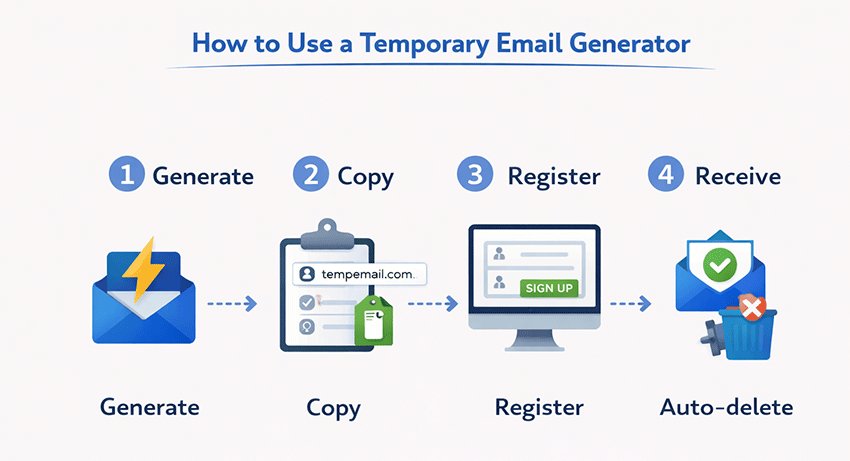
Best Temporary Email Generator Tools in 2026
As privacy awareness continues to grow, a variety of platforms now offer disposable email services. However, the reliability and usability of these tools can differ significantly. Some focus on fast inbox generation, while others prioritize privacy features or customization options.
When choosing a temporary email generator, it is important to consider factors such as delivery speed, domain availability, and interface simplicity. Below are several widely used tools in 2026 that provide reliable temporary email functionality.
TempEmail.cc
TempEmail.cc is designed to provide a fast and simple temporary email generator experience for users who need disposable inboxes without registration.
The service focuses on accessibility and quick email reception, allowing users to generate a working address immediately upon visiting the website.
Key features include:
- Instant inbox generation without requiring signup or personal information
- Multiple domain options, improving compatibility with various websites
- Fast email reception for verification codes and activation links
- Mobile-friendly interface that works smoothly across devices
Because the inbox is browser-based and accessible instantly, TempEmail.cc is particularly useful for users who want to complete quick registrations, test online services, or receive verification emails without exposing their primary inbox.
Other Recommended Tools
Several other temporary email platforms are also widely used across the web. While their features may differ slightly, they all provide disposable inbox functionality for short-term email interactions.
Guerrilla Mail
Guerrilla Mail is one of the longest-running disposable email services. It allows users to generate temporary email addresses with customizable usernames and supports both receiving and sending messages in certain configurations.
10MinuteMail
10MinuteMail focuses on simplicity and short-term use. As the name suggests, email addresses typically expire after a brief period, making the tool ideal for quick verifications and temporary registrations.
Maildrop
Maildrop is a lightweight, browser-based disposable email service designed to receive emails without requiring an account. Its minimal interface makes it easy to access messages quickly during short-term tasks.
Each of these tools serves a slightly different audience, but they share the same goal: providing temporary inboxes that help users avoid spam and protect their personal email addresses.
When selecting a temporary email generator, it is generally best to choose a platform that offers reliable email delivery, multiple domain options, and a clean interface that works well across both desktop and mobile devices.
Tips for Choosing the Best Temporary Email Generator
With many disposable email services available today, choosing the right temporary email generator can significantly impact reliability and privacy. While most tools offer similar basic functions, a few key factors can help you identify a trustworthy service.
Service Reliability
A reliable temporary email service should maintain stable infrastructure and fast email delivery. If verification emails arrive slowly or fail to appear, users may not be able to complete registrations or account activation.
Domain Reputation
Some websites block disposable email providers by blacklisting known domains. Services that regularly update and rotate domains tend to work more reliably across different platforms.
Privacy Transparency
Since temporary email services process incoming messages, a clear privacy policy is essential. Users should be able to understand how long emails are stored and whether any user data is logged.
Ease of Use
A well-designed generator should work instantly without requiring registration or downloads. Simple interfaces allow users to generate addresses and receive verification emails within seconds.
By considering reliability, domain availability, privacy transparency, and usability, users can choose a disposable email generator that offers both convenience and privacy protection.
The Future of Temporary Email Generators
As privacy awareness grows and online services increasingly require email verification, temporary email generators are evolving beyond simple disposable inboxes. What once served mainly as a tool to avoid spam is gradually becoming part of a broader ecosystem of privacy tools designed to protect digital identity.
Several technological trends are shaping the future development of temporary email services.
AI‑powered spam filtering
Modern spam campaigns are becoming more sophisticated, often including phishing links, malicious attachments, or automated bot messages. Future temporary email generators are likely to integrate AI-based filtering systems to improve inbox security and usability.
Potential improvements include:
- automatically detecting phishing emails
- prioritizing verification emails and activation links
- filtering suspicious or malicious messages
- improving inbox clarity for faster account verification
AI filtering can make disposable inboxes more efficient while maintaining the instant accessibility that users expect.
Disposable digital identity systems
Another emerging direction is the concept of temporary digital identities. Instead of generating only a disposable email address, future privacy platforms may provide a broader identity layer that allows users to interact online without exposing permanent personal information.
A disposable identity system may include:
- a temporary email address
- a generated username or alias
- short‑term authentication credentials
- limited‑use identity tokens
This approach supports the idea of an anonymous internet identity, allowing users to participate in online platforms while maintaining stronger privacy control.
Privacy‑first internet tools
The broader internet ecosystem is gradually shifting toward privacy‑focused technologies. Users are becoming more aware of how their data is collected, stored, and monetized, which has accelerated the development of new privacy tools.
Examples of this emerging ecosystem include:
- privacy‑focused browsers and extensions
- anonymous communication tools
- disposable identity systems
- temporary email generators integrated with other privacy services
In this environment, temporary email technology will likely remain a foundational tool for short‑term online interactions.
As digital privacy becomes a core concern for both individuals and organizations, the temporary email generator will continue evolving alongside other privacy technologies. Rather than being just a spam‑avoidance tool, it is increasingly becoming part of a broader strategy for managing anonymous internet identity and reducing unnecessary exposure of personal data online.
Conclusion
As online services increasingly require email verification, protecting your primary inbox has become more important than ever. A temporary email generator provides a simple and effective solution for managing short‑term online interactions without exposing your personal email address.
In 2026, tools such as TempEmail.cc have become essential for many everyday internet tasks. They help users:
- Protect inboxes from spam by preventing marketing lists and newsletters from reaching personal email accounts
- Receive verification codes instantly when signing up for new platforms, apps, or online services
- Safely test registrations and downloads without revealing long‑term contact information
Because temporary inboxes are created instantly and automatically expire after use, they allow users to complete registrations, trials, and downloads while keeping their main email address private and organized.
If you frequently sign up for new platforms, test online services, or download gated resources, using a temporary email generator for verification is one of the simplest ways to maintain better control over your digital privacy.
Use a trusted temporary email generator like TempEmail.cc to maintain online privacy and keep your primary inbox secure.
FAQ About Temporary Email Generators
Here are some of the most common questions users have about temporary email generators in 2026. These FAQs are optimized for SEO and structured data to help search engines display rich snippets.
Is a temporary email generator legal?
Yes, temporary email generators are completely legal to use. They are designed for legitimate purposes such as signing up for online services, downloading resources, testing websites or applications, and protecting your primary email from spam. As long as you don’t use them to bypass laws or commit fraud, these tools are safe and compliant with online regulations.
Can websites block temporary emails?
Some websites maintain blacklists of known disposable email domains to prevent spam or multiple account registrations. Using a temporary email generator with multiple domain options reduces this risk. By switching domains or generating a fresh address, you can usually bypass blocks while still maintaining your privacy, ensuring smooth verification for online services and downloads.
How long do temporary emails last?
Temporary email addresses typically last from a few minutes to several hours depending on the service. Once the lifespan expires, the inbox and its messages are automatically deleted. This short-term expiration protects user privacy and prevents inboxes from accumulating unnecessary data. Always check the provider’s policy to know the exact duration.
Can I send emails from a temporary email generator?
Most temporary email generators are designed to receive messages only, primarily for verification and one-time use. However, some advanced services allow sending emails temporarily. These features are limited and usually intended for short-term communication, testing, or confirmations. Sending large volumes or important messages is not recommended with temporary addresses.
Are temporary emails safe for sensitive accounts?
No, temporary emails should not be used for sensitive accounts like banking, password recovery, or confidential communications. Since inboxes are short-lived and sometimes publicly accessible, using them for critical information can risk data exposure. Temporary email generators are best reserved for low-risk activities, online testing, or short-term registrations.
Why choose a temporary email over a regular disposable email?
Temporary email generators provide several advantages over traditional disposable emails. They allow instant creation without registration, support multiple domains, update inboxes in real-time, and automatically delete messages to protect privacy. This combination makes them more reliable for avoiding spam, protecting personal inboxes, and completing one-time verification quickly and securely.
Can I access temporary email on mobile devices?
Yes, most modern temporary email generators are fully mobile-friendly. They work directly in web browsers on smartphones and tablets without requiring app downloads or additional setup. This allows users to generate addresses, receive messages, and copy verification codes conveniently on the go, making them practical for both desktop and mobile workflows.
Do temporary emails prevent spam effectively?
Yes, temporary email addresses are highly effective at preventing spam. By isolating one-time registrations in a short-lived inbox, you avoid receiving newsletters, marketing emails, and promotional messages in your primary account. Once the temporary inbox expires, all incoming messages are deleted, ensuring your main inbox remains organized and free from unwanted emails.